State Management in Flutter with Riverpod 3
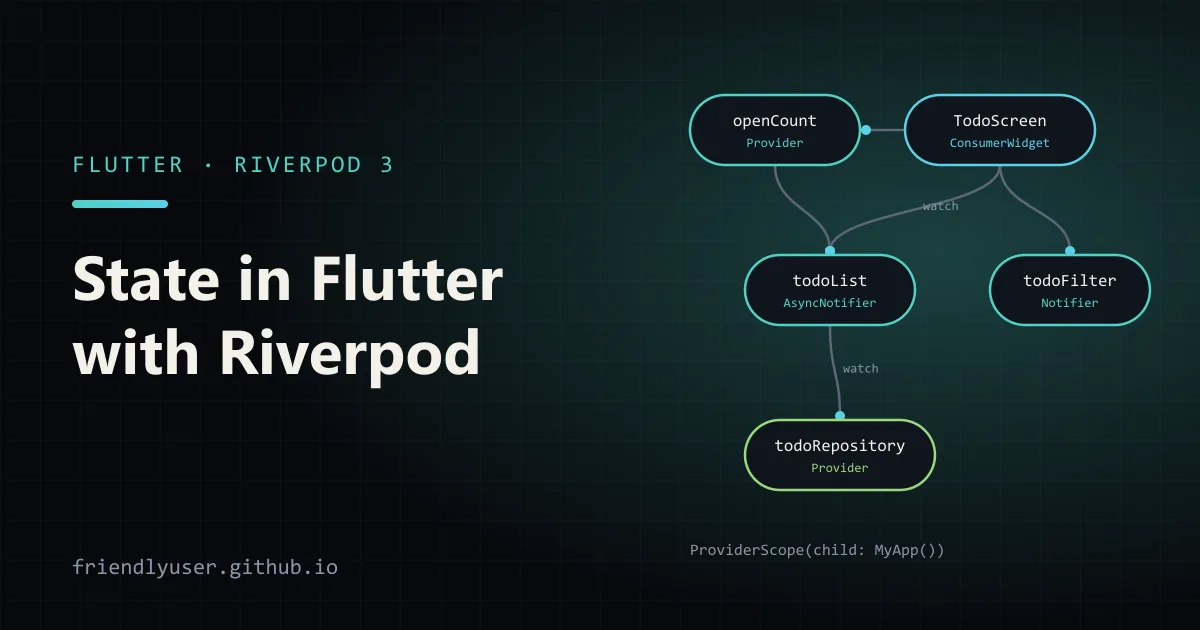
Riverpod is a state management and dependency injection library for Flutter. You declare providers, global objects that describe how to create a piece of state, and widgets watch them. When a provider’s state changes, the widgets and other providers that depend on it rebuild. Because providers are declared outside the widget tree and resolved by a ProviderScope, you can read them from anywhere, swap them out in tests, and never get a “provider not found” error at runtime.
This post builds a small todo app with plain providers, a Notifier and an AsyncNotifier, then tests it. It was written against flutter_riverpod 3.3. Riverpod 3.0 (September 2025) changed a few APIs, which I point out where they matter.
flutter create riverpod_todocd riverpod_todoflutter pub add flutter_riverpod:^3.3.0Then wrap the app in a ProviderScope, which holds the state of every provider:
void main() { runApp(const ProviderScope(child: MaterialApp(home: TodoScreen())));}Providers
Section titled “Providers”A provider is declared once, as a top-level final, and describes how to build a value. The simplest kind, Provider, holds a value that never changes by itself. It’s the usual way to expose a service such as a repository:
final todoRepositoryProvider = Provider<TodoRepository>((ref) => TodoRepository());The ref parameter lets a provider read other providers. Providers are lazy: nothing is created until something reads it, and each provider is created once per ProviderScope.
The other types you’ll use most:
NotifierProviderwith aNotifierclass: synchronous state plus methods that change it.AsyncNotifierProviderwith anAsyncNotifier: state that loads asynchronously, plus methods.FutureProviderandStreamProvider: read-only async values, such as a one-off fetch or a stream of updates.
In Riverpod 3, the older StateProvider, StateNotifierProvider and ChangeNotifierProvider moved to package:flutter_riverpod/legacy.dart. They still work, but new code should use Notifier and AsyncNotifier.
The app
Section titled “The app”Here is the whole app in one lib/main.dart. The sections after it explain each piece.
import 'package:flutter/material.dart';import 'package:flutter_riverpod/flutter_riverpod.dart';
// ---- Model and repository ----
class Todo {  const Todo({required this.id, required this.title, this.done = false});
  final int id;  final String title;  final bool done;
  Todo copyWith({bool? done}) => Todo(id: id, title: title, done: done ?? this.done);}
class TodoRepository {  TodoRepository([List<Todo> seed = const [    Todo(id: 1, title: 'Read the Riverpod docs'),    Todo(id: 2, title: 'Pin the package version'),  ]]) : _todos = [...seed];
  final List<Todo> _todos;
  Future<List<Todo>> fetchAll() async {    await Future<void>.delayed(const Duration(milliseconds: 300)); // pretend network    return List.unmodifiable(_todos);  }
  Future<void> add(String title) async {    _todos.add(Todo(id: _todos.length + 1, title: title));  }
  Future<void> toggle(int id) async {    final i = _todos.indexWhere((t) => t.id == id);    _todos[i] = _todos[i].copyWith(done: !_todos[i].done);  }}
// ---- Providers ----
final todoRepositoryProvider = Provider<TodoRepository>((ref) => TodoRepository());
class TodoList extends AsyncNotifier<List<Todo>> {  @override  Future<List<Todo>> build() {    return ref.watch(todoRepositoryProvider).fetchAll();  }
  Future<void> add(String title) async {    final repo = ref.read(todoRepositoryProvider);    final next = await AsyncValue.guard(() async {      await repo.add(title);      return repo.fetchAll();    });    if (!ref.mounted) return;    state = next;  }
  Future<void> toggle(int id) async {    final repo = ref.read(todoRepositoryProvider);    final next = await AsyncValue.guard(() async {      await repo.toggle(id);      return repo.fetchAll();    });    if (!ref.mounted) return;    state = next;  }}
final todoListProvider = AsyncNotifierProvider<TodoList, List<Todo>>(TodoList.new);
enum TodoFilter { all, open, done }
class TodoFilterNotifier extends Notifier<TodoFilter> {  @override  TodoFilter build() => TodoFilter.all;
  void change(TodoFilter filter) => state = filter;}
final todoFilterProvider = NotifierProvider<TodoFilterNotifier, TodoFilter>(TodoFilterNotifier.new);
final openCountProvider = Provider<int>((ref) {  final todos = ref.watch(todoListProvider).value ?? const <Todo>[];  return todos.where((t) => !t.done).length;});
// ---- UI ----
void main() {  runApp(const ProviderScope(child: MaterialApp(home: TodoScreen())));}
class TodoScreen extends ConsumerWidget {  const TodoScreen({super.key});
  @override  Widget build(BuildContext context, WidgetRef ref) {    final todos = ref.watch(todoListProvider);    final filter = ref.watch(todoFilterProvider);    final openCount = ref.watch(openCountProvider);
    return Scaffold(      appBar: AppBar(title: Text('Todos ($openCount open)')),      body: Column(        children: [          Padding(            padding: const EdgeInsets.all(8),            child: SegmentedButton<TodoFilter>(              segments: const [                ButtonSegment(value: TodoFilter.all, label: Text('All')),                ButtonSegment(value: TodoFilter.open, label: Text('Open')),                ButtonSegment(value: TodoFilter.done, label: Text('Done')),              ],              selected: {filter},              onSelectionChanged: (selection) =>                  ref.read(todoFilterProvider.notifier).change(selection.first),            ),          ),          Expanded(            child: switch (todos) {              AsyncData(:final value) => ListView(                  children: [                    for (final todo in value)                      if (filter == TodoFilter.all || (filter == TodoFilter.done) == todo.done)                        CheckboxListTile(                          value: todo.done,                          title: Text(todo.title),                          onChanged: (_) => ref.read(todoListProvider.notifier).toggle(todo.id),                        ),                  ],                ),              AsyncError(:final error) => Center(child: Text('Could not load todos: $error')),              _ => const Center(child: CircularProgressIndicator()),            },          ),        ],      ),      floatingActionButton: FloatingActionButton(        onPressed: () => ref.read(todoListProvider.notifier).add('New todo'),        child: const Icon(Icons.add),      ),    );  }}
Run it with flutter run. The list shows a spinner for 300 ms, then the two todos. Ticking a box updates the list and the open count in the app bar, and the filter buttons narrow the list.
Reading providers in widgets
Section titled “Reading providers in widgets”ConsumerWidget is a StatelessWidget whose build method also receives a WidgetRef. There are matching ConsumerStatefulWidget and ConsumerState classes for widgets that need initState or controllers, and a Consumer widget for rebuilding just part of a tree.
The two ways to read a provider are not interchangeable:
ref.watch(provider)returns the current value and subscribes, so the widget rebuilds when the value changes. Use it inbuild, and in providers to depend on other providers.ref.read(provider)returns the current value once without subscribing. Use it in callbacks such asonPressedandonChanged, where you want to act on the state, not rebuild from it.
The common mistake is calling ref.read in build to avoid rebuilds. The widget then shows stale data. If a widget rebuilds too often, watch a narrower value with select: ref.watch(todoListProvider.select((s) => s.value?.length)) rebuilds only when the count changes.
To call methods on a notifier, read its .notifier: ref.read(todoFilterProvider.notifier).change(...). For side effects such as showing a snackbar when a provider fails, use ref.listen in build; it calls your callback on changes without rebuilding.
Notifier: synchronous state with methods
Section titled “Notifier: synchronous state with methods”TodoFilterNotifier is the minimal Notifier:
build()returns the initial state. It runs when the provider is first read, and again if a provider it watches changes.stateis the current value. Assigning to it notifies every listener.- Public methods are the only way the UI changes the state.
Riverpod 3 compares the old and new state with == and skips notifying listeners if they’re equal. That’s one more reason to treat state as immutable: if you mutate a list in place and assign the same list back, nothing rebuilds.
AsyncNotifier: state that loads
Section titled “AsyncNotifier: state that loads”TodoList.build() returns a Future, so the provider’s state is an AsyncValue<List<Todo>>. It’s a sealed class with three cases, AsyncData, AsyncError and AsyncLoading, and the widget handles them with a Dart switch expression. .when(data:, error:, loading:) does the same if you prefer callbacks.
The mutation methods follow a pattern worth copying:
ref.readthe repository. Inside notifier methods, useread;watchbelongs inbuild.- Wrap the async work in
AsyncValue.guard, which turns a thrown exception into anAsyncErrorinstead of an unhandled error. - Check
ref.mountedbefore assigning. It’s new in Riverpod 3. If the provider was disposed while theawaitwas running, touchingstatethrows, so return early.
Because build uses ref.watch(todoRepositoryProvider), swapping the repository (as the test below does) rebuilds the list automatically. You can force a reload from the UI with ref.invalidate(todoListProvider), or ref.refresh(...) to invalidate and read the new value in one call.
Two Riverpod 3 behaviours to know about for async providers:
AsyncValue.valueis nullable. It returnsnullwhile loading without previous data and on errors. Riverpod 2 had a separatevalueOrNullfor that; it was removed in 3.0.openCountProvideruses.value ?? const [].- Failed providers retry automatically after a delay. That helps with flaky networks, but it means an error state isn’t necessarily final. You can configure or disable it with the
retryparameter onProviderScopeor on a provider.
Testing with ProviderContainer
Section titled “Testing with ProviderContainer”Providers can be tested without widgets. ProviderContainer is the non-Flutter equivalent of ProviderScope, and Riverpod 3 adds ProviderContainer.test(), which disposes the container automatically at the end of the test. overrides swaps any provider for a test double:
import 'package:flutter_riverpod/flutter_riverpod.dart';import 'package:flutter_test/flutter_test.dart';import 'package:riverpod_todo/main.dart';
void main() {  test('adding a todo updates the list and the open count', () async {    final container = ProviderContainer.test(      overrides: [        todoRepositoryProvider.overrideWithValue(TodoRepository(const [])),      ],    );
    expect(await container.read(todoListProvider.future), isEmpty);
    await container.read(todoListProvider.notifier).add('Buy milk');
    final todos = container.read(todoListProvider).value!;    expect(todos.map((t) => t.title), ['Buy milk']);    expect(container.read(openCountProvider), 1);  });
  test('filter starts at all and can be changed', () {    final container = ProviderContainer.test();
    expect(container.read(todoFilterProvider), TodoFilter.all);    container.read(todoFilterProvider.notifier).change(TodoFilter.done);    expect(container.read(todoFilterProvider), TodoFilter.done);  });}
Run with flutter test. .future on an async provider gives you a Future that completes with the loaded data, which is the easy way to wait for build() in a test.
For widget tests, wrap the widget in ProviderScope(overrides: [...], child: ...) and use the usual pumpWidget and tester.pump() calls.
Code generation is optional
Section titled “Code generation is optional”Riverpod also has an annotation-based syntax. You write a function or class with @riverpod, and riverpod_generator creates the provider declaration:
import 'package:riverpod_annotation/riverpod_annotation.dart';
part 'counter.g.dart';
@riverpodclass Counter extends _$Counter {  @override  int build() => 0;
  void increment() => state++;}
@riverpodFuture<List<Todo>> todos(Ref ref) {  return ref.watch(todoRepositoryProvider).fetchAll();}
This generates counterProvider and todosProvider. Set it up with flutter pub add riverpod_annotation dev:riverpod_generator dev:build_runner and run dart run build_runner watch -d.
The generated version picks the right provider type from the signature, makes parameters (Riverpod’s “families”) as easy as adding function arguments, and makes providers auto-dispose by default; use @Riverpod(keepAlive: true) to keep one alive. The cost is a build step and .g.dart files. Both styles create the same kind of providers and can be mixed in one app, so starting without code generation, as this post does, doesn’t lock you out of it later.
Gotchas
Section titled “Gotchas”- Keep
ref.watchout of callbacks andref.readout ofbuild. Most Riverpod bugs come down to one of the two. - Don’t put
BuildContext-dependent things in providers. Navigation, dialogs and theme lookups belong in widgets. Trigger them withref.listen. - Non-auto-dispose providers live as long as the
ProviderScope. That’s what you want for app-wide state, but for screen-specific state, auto-dispose providers free their memory when the last listener goes away. - Mutable state doesn’t notify. Build new lists and objects (
[...state, item],copyWith) instead of changing them in place. - Version pinning matters. Riverpod 2 tutorials are still everywhere, and some of their APIs (
valueOrNull,StateProviderfrom the main import, typedRefsubclasses likeTodosRef) don’t compile on 3.x. Check which major version an example targets before copying it.
Further reading
Section titled “Further reading”© 2026 David Li · Home · Blog · RSS ·Classic site · Built with Astro, Starlight and three.js · Logos:Font Awesome Free (CC BY 4.0)