State in Jetpack Compose: remember, State Hoisting and ViewModel
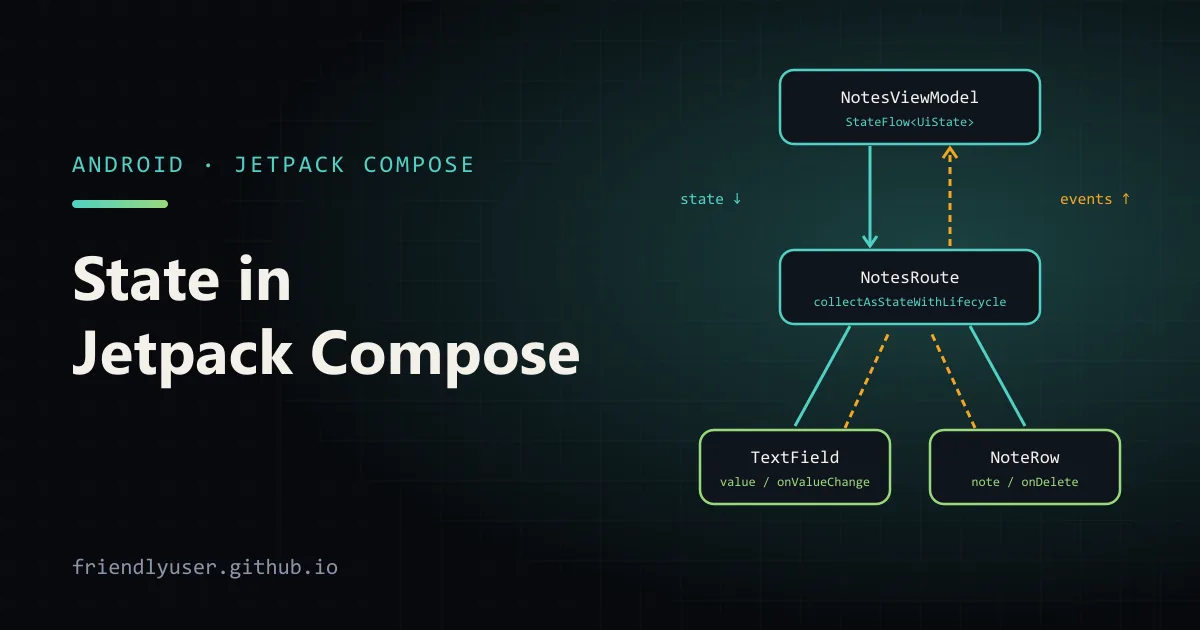
In Jetpack Compose, the UI is a function of state: when a State object that a composable reads changes, Compose calls that composable again (it recomposes) and the screen updates. There is no setText() and no view to keep in sync. Most Compose bugs and most Compose design questions come down to where a piece of state lives and who is allowed to change it.
This post goes from local state with remember to a screen backed by a ViewModel, and explains state hoisting along the way. The examples use the Compose BOM 2026.01.00 and AndroidX Lifecycle 2.10.0.
In a project created from Android Studio’s Empty Activity template, these are the dependencies the examples need:
dependencies {    implementation(platform("androidx.compose:compose-bom:2026.01.00"))    implementation("androidx.compose.material3:material3")    implementation("androidx.compose.ui:ui-tooling-preview")    debugImplementation("androidx.compose.ui:ui-tooling")
    implementation("androidx.activity:activity-compose:1.12.2")    implementation("androidx.lifecycle:lifecycle-viewmodel-compose:2.10.0")    implementation("androidx.lifecycle:lifecycle-runtime-compose:2.10.0")}
lifecycle-viewmodel-compose provides the viewModel() function and lifecycle-runtime-compose provides collectAsStateWithLifecycle(). Neither is part of the Compose BOM, so they carry their own version.
remember: state that survives recomposition
Section titled “remember: state that survives recomposition”A composable function runs many times. A plain local variable is recreated on every run, so this counter would never change:
@Composablefun BrokenCounter() { var count = 0 // reset on every recomposition Button(onClick = { count++ }) { Text("Clicked $count times") }}Two things are missing. The value has to be held in a State object, so Compose knows to recompose when it changes. And it has to be remembered, so the same object comes back on the next run instead of a new one:
import androidx.compose.material3.Buttonimport androidx.compose.material3.Textimport androidx.compose.runtime.*
@Composablefun ClickCounter() {    var count by remember { mutableIntStateOf(0) }    Button(onClick = { count++ }) { Text("Clicked $count times") }}
mutableIntStateOf is the primitive-specialised version of mutableStateOf, which avoids boxing the Int. The by delegate needs the getValue and setValue imports from androidx.compose.runtime; the wildcard import covers them. Without by, you’d write val count = remember { mutableIntStateOf(0) } and use count.intValue.
remember keeps a value only as long as the composable stays in the composition. Rotate the device and the activity is recreated, the composition starts from scratch, and the counter goes back to zero.
rememberSaveable: state that survives recreation
Section titled “rememberSaveable: state that survives recreation”rememberSaveable stores the value in the saved instance state Bundle, so it survives configuration changes such as rotation, and the system killing the app’s process in the background:
import androidx.compose.runtime.saveable.rememberSaveable
@Composablefun DraftNote() {    var draft by rememberSaveable { mutableStateOf("") }    OutlinedTextField(value = draft, onValueChange = { draft = it }, label = { Text("Note") })}
The value must be something a Bundle can hold: primitives, String, Parcelable and so on. For other types, pass a custom Saver. Use rememberSaveable for small UI state the user would be annoyed to lose, such as text being typed, the selected tab or a scroll position. Large data and anything loaded from disk or the network belongs in a ViewModel or a repository.
You can also give remember keys: remember(userId) { ... } throws away the remembered value and recomputes it whenever userId changes.
Stateful and stateless composables
Section titled “Stateful and stateless composables”ClickCounter above is stateful: it owns its count. That’s convenient, but the caller can’t read the count, reset it, or start it at 5, and you can’t preview it in a particular state.
A stateless composable takes the state as a parameter and reports changes through a callback:
@Composablefun Counter(count: Int, onIncrement: () -> Unit, modifier: Modifier = Modifier) { Button(onClick = onIncrement, modifier = modifier) { Text("Clicked $count times") }}It renders whatever it’s given and does nothing else. The same pattern is everywhere in Material components: OutlinedTextField(value, onValueChange), Checkbox(checked, onCheckedChange), Switch(checked, onCheckedChange).
State hoisting
Section titled “State hoisting”Hoisting means moving state up from a composable to its caller, leaving the composable stateless. The usual shape is a pair of parameters, the current value and an onValueChange: (T) -> Unit callback:
@Composablefun CounterScreen() { var count by rememberSaveable { mutableIntStateOf(0) } Column { Counter(count = count, onIncrement = { count++ }) TextButton(onClick = { count = 0 }) { Text("Reset") } }}Now CounterScreen owns the state, and both the counter and the reset button work with it. That’s the rule for where state should live: hoist it to the lowest common ancestor of every composable that reads or changes it. Not lower, because then siblings can’t share it. Not higher, because then unrelated parts of the screen recompose when it changes, and the code is harder to follow.
What hoisting gets you:
- One source of truth. The count exists in one place, so two parts of the UI can’t disagree about it.
- Reuse.
Counterworks anywhere, with state from anywhere. - Previews and tests. A stateless composable can be rendered in any state by passing values.
Moving screen state into a ViewModel
Section titled “Moving screen state into a ViewModel”For anything beyond a few local values, the state of a screen belongs in a ViewModel. It survives configuration changes, owns a coroutine scope for loading data, and keeps business logic out of composables.
Here is a small notes screen with a search box. First the state, as one immutable class, and the ViewModel that owns it:
import androidx.lifecycle.ViewModelimport androidx.lifecycle.viewModelScopeimport kotlinx.coroutines.delayimport kotlinx.coroutines.flow.MutableStateFlowimport kotlinx.coroutines.flow.StateFlowimport kotlinx.coroutines.flow.asStateFlowimport kotlinx.coroutines.flow.updateimport kotlinx.coroutines.launch
data class Note(val id: Int, val title: String)
data class NotesUiState(    val query: String = "",    val notes: List<Note> = emptyList(),    val isLoading: Boolean = true,) {    val visibleNotes: List<Note>        get() = if (query.isBlank()) notes                else notes.filter { it.title.contains(query, ignoreCase = true) }}
class NotesViewModel : ViewModel() {    private val _uiState = MutableStateFlow(NotesUiState())    val uiState: StateFlow<NotesUiState> = _uiState.asStateFlow()
    init {        viewModelScope.launch {            delay(500) // stand-in for a repository call            val loaded = listOf(Note(1, "Buy milk"), Note(2, "Call the dentist"), Note(3, "Book flights"))            _uiState.update { it.copy(notes = loaded, isLoading = false) }        }    }
    fun onQueryChange(query: String) {        _uiState.update { it.copy(query = query) }    }
    fun onDelete(id: Int) {        _uiState.update { state -> state.copy(notes = state.notes.filterNot { it.id == id }) }    }}
The ViewModel exposes a read-only StateFlow and keeps the MutableStateFlow private. The UI can’t change the state directly; it can only call the ViewModel’s functions. update { } applies the change atomically, which matters once several coroutines modify the same state.
Then the UI, split into a thin stateful entry point and a stateless screen:
import androidx.compose.foundation.layout.*import androidx.compose.foundation.lazy.LazyColumnimport androidx.compose.foundation.lazy.itemsimport androidx.compose.material3.*import androidx.compose.runtime.*import androidx.compose.ui.Alignmentimport androidx.compose.ui.Modifierimport androidx.compose.ui.tooling.preview.Previewimport androidx.compose.ui.unit.dpimport androidx.lifecycle.compose.collectAsStateWithLifecycleimport androidx.lifecycle.viewmodel.compose.viewModel
@Composablefun NotesRoute(modifier: Modifier = Modifier, viewModel: NotesViewModel = viewModel()) {    val uiState by viewModel.uiState.collectAsStateWithLifecycle()    NotesScreen(        state = uiState,        onQueryChange = viewModel::onQueryChange,        onDelete = viewModel::onDelete,        modifier = modifier,    )}
@Composablefun NotesScreen(    state: NotesUiState,    onQueryChange: (String) -> Unit,    onDelete: (Int) -> Unit,    modifier: Modifier = Modifier,) {    Column(modifier.padding(16.dp)) {        OutlinedTextField(            value = state.query,            onValueChange = onQueryChange,            label = { Text("Search") },            singleLine = true,            modifier = Modifier.fillMaxWidth(),        )        Spacer(Modifier.height(12.dp))        if (state.isLoading) {            CircularProgressIndicator()        } else {            LazyColumn {                items(state.visibleNotes, key = { it.id }) { note ->                    NoteRow(note = note, onDelete = { onDelete(note.id) })                }            }        }    }}
@Composablefun NoteRow(note: Note, onDelete: () -> Unit) {    Row(        modifier = Modifier.fillMaxWidth().padding(vertical = 8.dp),        verticalAlignment = Alignment.CenterVertically,    ) {        Text(note.title, modifier = Modifier.weight(1f))        TextButton(onClick = onDelete) { Text("Delete") }    }}
@Preview(showBackground = true)@Composablefun NotesScreenPreview() {    NotesScreen(        state = NotesUiState(notes = listOf(Note(1, "Buy milk"), Note(2, "Call the dentist")), isLoading = false),        onQueryChange = {},        onDelete = {},    )}
And the activity:
import android.os.Bundleimport androidx.activity.ComponentActivityimport androidx.activity.compose.setContentimport androidx.compose.foundation.layout.paddingimport androidx.compose.material3.MaterialThemeimport androidx.compose.material3.Scaffoldimport androidx.compose.ui.Modifier
class MainActivity : ComponentActivity() {    override fun onCreate(savedInstanceState: Bundle?) {        super.onCreate(savedInstanceState)        setContent {            MaterialTheme {                Scaffold { innerPadding ->                    NotesRoute(modifier = Modifier.padding(innerPadding))                }            }        }    }}
Only NotesRoute knows a ViewModel exists. NotesScreen and NoteRow are stateless, which is why the preview can show a loaded list without running any coroutine.
Why collectAsStateWithLifecycle
Section titled “Why collectAsStateWithLifecycle”collectAsStateWithLifecycle() turns the StateFlow into Compose State, so the screen recomposes when the ViewModel emits a new value. Unlike the plain collectAsState(), it stops collecting when the lifecycle drops below STARTED, for example when the app goes to the background, and resumes when it comes back. For a StateFlow held by a ViewModel that saves little, but if the flow is backed by a database query or location updates, it stops that work while nobody can see the screen.
Unidirectional data flow
Section titled “Unidirectional data flow”The ViewModel example follows a pattern called unidirectional data flow (UDF):
- State flows down. The ViewModel exposes
NotesUiState,NotesRoutecollects it and passes it down as plain parameters. - Events flow up. The text field and the delete button don’t change anything themselves. They call lambdas that end up as ViewModel function calls.
- The ViewModel is the only place state changes. It applies the event, emits a new state, and Compose recomposes what read the changed values.
Debugging gets easier this way: when the screen shows something wrong, there is exactly one place where that state could have been set. And because every event goes through a named function (onQueryChange, onDelete), the ViewModel can be unit-tested without any UI.
Which tool for which state
Section titled “Which tool for which state”| State | Where it lives |
|---|---|
| Purely visual, can be lost (an expanded/collapsed flag, an animation) | remember in the composable that uses it |
| UI state the user expects to survive rotation (text being typed, selected tab) | rememberSaveable, hoisted as needed |
| Screen data and business logic (loaded items, a search query that drives filtering) | A ViewModel, exposed as StateFlow |
| Screen state that must survive process death | ViewModel with SavedStateHandle |
For the last row, a ViewModel’s constructor can take a SavedStateHandle. savedStateHandle.getStateFlow("query", "") gives a StateFlow that is restored after process death, and setting savedStateHandle["query"] = value writes it.
Gotchas
Section titled “Gotchas”- Mutating instead of replacing. Compose notices that a
Statechanged when it’s assigned a new value. Adding an item to aMutableListheld inmutableStateOfchanges nothing Compose can see. Use immutable lists and copies (as inupdate { it.copy(...) }), ormutableStateListOf()for a list that Compose observes. - Passing the ViewModel down the tree. Child composables that take a
NotesViewModelcan’t be previewed or reused. Pass state and lambdas instead, and keepviewModel()at the screen level. - Expensive work during composition.
visibleNotesfilters the list every time it’s read. That’s fine for a few hundred notes. For costly derived values, compute them in the ViewModel, or wrap them inremember(key) { }orderivedStateOfin the composable. - Side effects in the body. Starting a network call or logging an analytics event directly in a composable body runs it on every recomposition. Use
LaunchedEffect(key)or move it to the ViewModel.
Further reading
Section titled “Further reading”© 2026 David Li · Home · Blog · RSS ·Classic site · Built with Astro, Starlight and three.js · Logos:Font Awesome Free (CC BY 4.0)