Meridian: an offline tasks, habits and focus app for Android and the web
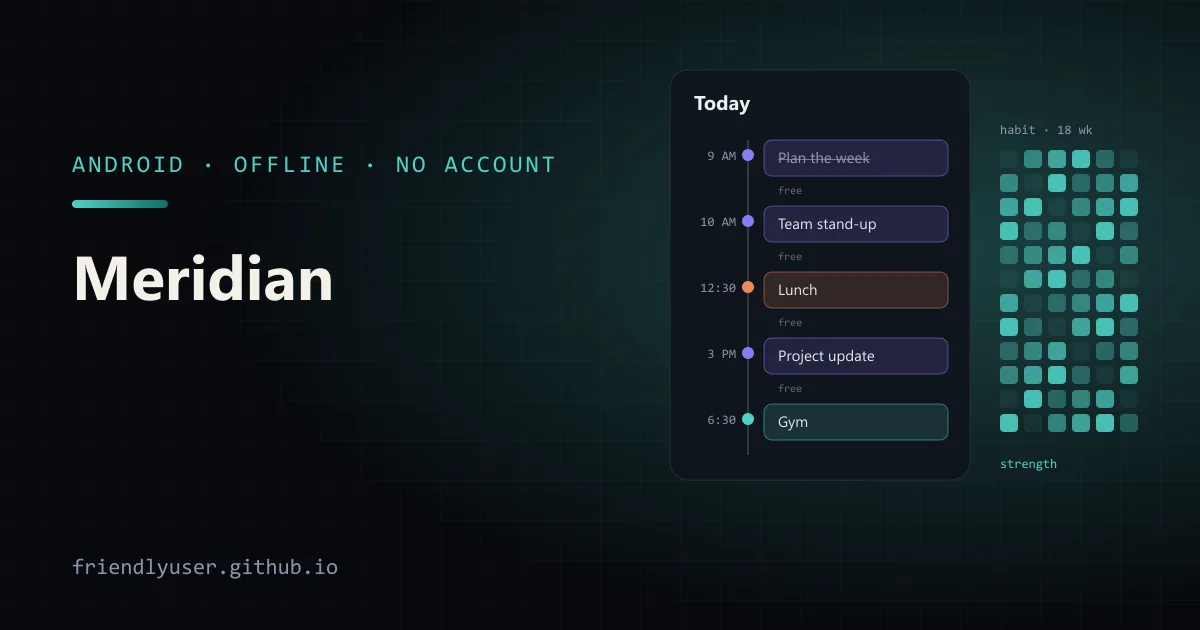
Meridian is a task list, day planner, calendar, notes app, habit tracker and focus timer in one app. Everything stays on the device: there is no account, no server and no network request. The same build runs as a web page and as an Android app. It is on Google Play as Meridian: Tasks, Habits, Focus.
- Google Play: Meridian: Tasks, Habits, Focus
- In the browser: friendlyuser.github.io/meridian
- Source: github.com/FriendlyUser/meridian
The commits are co-authored with Claude (Fable 5.2), the same way Afterlight was built. This post covers what is in the app and how the more interesting parts work, using the code in the repository.
What is in it
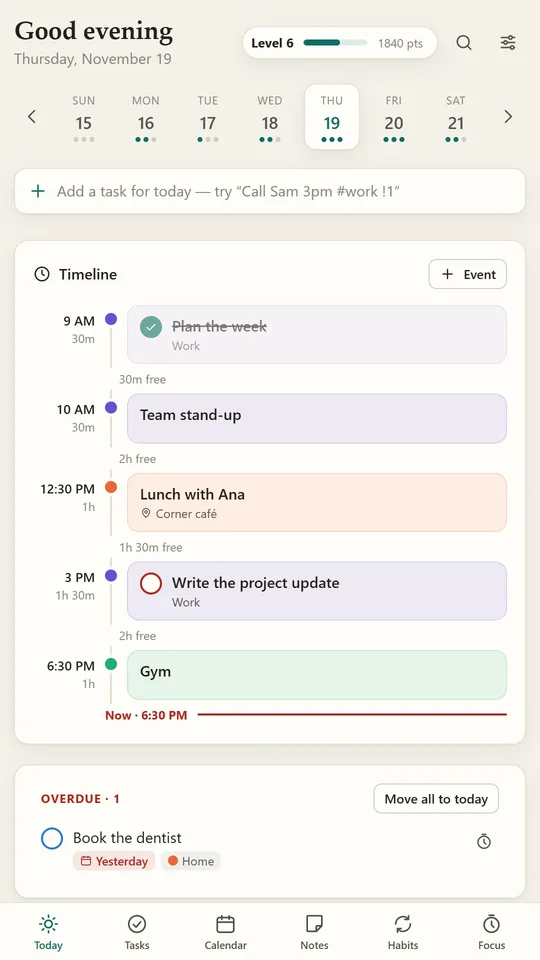
Section titled “What is in it”The feature set came from looking at what the Google Play productivity charts offer and keeping the ideas that work without a backend. The README credits each screen to the app whose idea it borrows:
| Screen | What it does | Idea borrowed from |
|---|---|---|
| Today | The day as a timeline of events and timed tasks, with the free time between them, overdue items and suggestions | Structured, Microsoft To Do’s My Day |
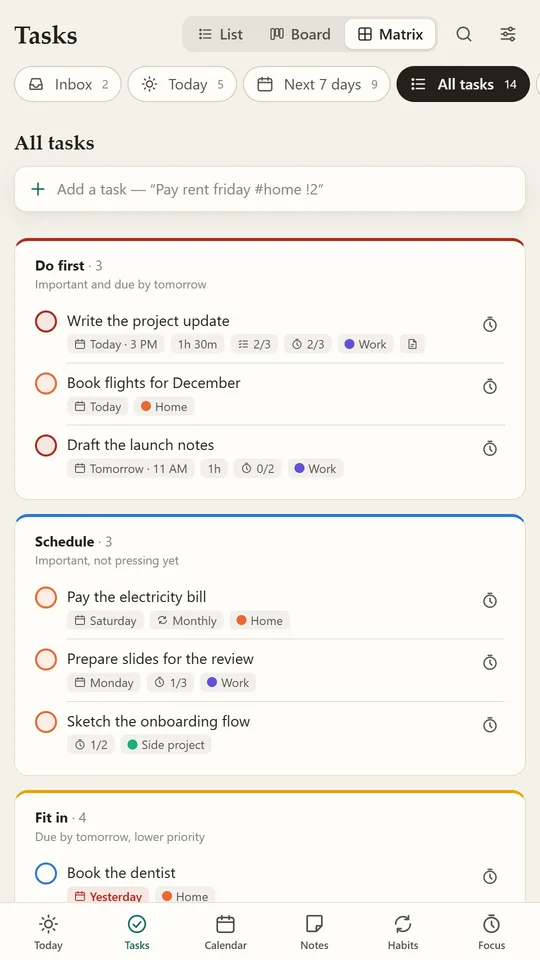
| Tasks | Lists, steps, priorities, repeats and planned focus sessions, shown as a list, a board or an urgent/important matrix | Todoist, TickTick, Trello |
| Quick add | Reads the date, time, repeat, list and priority out of one typed line | Todoist |
| Calendar | A month of events and due tasks, with a journal note per day | Google Calendar, ColorNote |
| Notes | Coloured notes and checklists, pinned and archived, linked with [[Title]], lockable with a passcode | ColorNote, Google Keep |
| Habits | Daily, set-day and N-times-a-week habits with streaks, a strength score and an 18-week history | Loop Habit Tracker |
| Focus | A session timer tied to a task; a plant grows while it runs and joins the day’s garden | Focus To-Do, Forest |
| Progress | Points and levels for finished tasks, habits and focus time, with daily charts | Habitica |
Search and commands are on Ctrl K, and ? lists the keyboard shortcuts. Sync, sharing, AI assistants and cloud storage are left out on purpose, because each one needs a server.
The stack: plain modules and one JSON document
Section titled “The stack: plain modules and one JSON document”There is no UI framework. The app is plain ES modules: src/core/ holds data and rules with no DOM, src/views/ has one file per screen, and src/platform/ holds what changes inside the Android app. Vite serves the modules in development and bundles them for release. Types are JSDoc comments checked by tsc with nothing emitted, and the rules have headless tests on node --test:
npm run dev # http://localhost:8770npm test # quick add, repeats, habits, levelsnpm run typecheck # tsc over the JavaScript, no output filesnpm run build # dist/ for any static hostAll 14 tests passed when I ran node --test on the repository for this post.
All state lives in one object saved to localStorage under the key meridian.v1. Views change store.data directly and call store.commit(source). That schedules a debounced save and tells listeners which view made the change, so a view doesn’t redraw itself in the middle of its own edit. Settings → Back up writes the object to a file, and Restore reads one back. Clearing the site’s data erases everything, which is why the backup exists.
Quick add: a parser built from small regexes
Section titled “Quick add: a parser built from small regexes”Typing Submit report every friday 4pm #work !1 creates a task titled “Submit report” in the work list, due on Friday at 4 PM, repeating weekly, with priority 1. The parser in src/core/quickadd.js runs a fixed sequence of patterns over the line. Each pattern that matches is removed from the text, and whatever is left becomes the title:
/** Try a pattern; `use` returns false to leave the text alone. */const take = (pattern, use) => { const m = new RegExp(pattern, 'iu').exec(text); if (!m || use(m) === false) return false; text = `${text.slice(0, m.index)} ${text.slice(m.index + m[0].length)}`; return true;};The order matters. Tags (#list, !1 or p1, for 45m) come first. Repeats come before plain weekday names, so every friday is read as a repeat and not as “this Friday”. Then times, ranges like 3-4pm, and dates, from ISO dates down to tomorrow, in 3 days and next tuesday. A bare at 3 is read as 3 PM, since hours from 1 to 7 are more likely afternoon. A time with no date means the next time the clock shows it.
These are real outputs, from calling parseQuick with the clock fixed at 9:00 AM on Friday, November 20, 2026:
Submit report every friday 4pm #work !1 -> title "Submit report", 2026-11-20 16:00, repeat every 1 week, priority 1, list workDentist nov 25 3:30pm for 45m -> title "Dentist", 2026-11-25 15:30, duration 45Call mom tonight -> title "Call mom", 2026-11-20 19:00Standup weekdays 9:15 -> title "Standup", 2026-11-20 09:15, repeat every weekdayPlan trip 3-4pm next tuesday p2 -> title "Plan trip", 2026-12-01 15:00-16:00, duration 60, priority 2Anything the parser doesn’t recognise stays in the title. “Read chapter 3 tomorrow” becomes a task titled “Read chapter 3” for the next day: a bare number is only read as a time after at or @, or with am/pm or a colon.
Habit strength that forgives a missed day
Section titled “Habit strength that forgives a missed day”A streak resets to zero the first time you miss. Meridian keeps the streak but also shows a strength score, an exponential moving average over the days the habit is scheduled:
for (let d = start; d <= upTo; d = addDays(d, 1)) { if (!h.days.includes(dow(d))) continue; if (d === upTo && !h.log[d]) break; // today is not over score = score * 0.9 + (h.log[d] ? 0.1 : 0);}Each scheduled day moves the score 10% of the way towards 1 if the habit was done, or towards 0 if it wasn’t. After a long run, one miss costs about a tenth of the score, not all of it. Today only counts once it is ticked, so an unfinished day doesn’t drag the number down at breakfast. Habits with a weekly target (“three times a week”) use the same idea per week, with weights of 0.6 and 0.4. The current week counts only once its target is met.
Points work the same way across the app: 10 for a task, plus 5 for an urgent one or 3 for a high-priority one, 2 for a subtask, 5 for a habit and 1 per focus minute. Level L starts at 50·L·(L−1) points (0, 100, 300, 600, 1000…). levelInfo inverts that with the quadratic formula: floor((1 + sqrt(1 + xp / 12.5)) / 2).
Locked notes with Web Crypto
Section titled “Locked notes with Web Crypto”A note can be locked with a passcode. src/core/vault.js derives an AES-GCM key from the passcode with PBKDF2 (210,000 iterations of SHA-256 and a random 16-byte salt). Each locked note’s title, body and checklist are sealed with a fresh 12-byte IV. Only the sealed form is stored. The key lives in memory until the app closes or Lock now is used.
To check a passcode without storing it, the vault keeps a known string sealed with the key. Unlocking derives a key from the typed passcode and tries to open that string:
export async function unlockVault(passcode) { const v = store.data.settings.vault; if (!v) return false; try { const k = await derive(passcode, v.salt); if ((await open(k, v.check)) !== CHECK) return false; key = k; return true; } catch { return false; }}A wrong passcode fails AES-GCM’s authentication and lands in the catch. There is no recovery path: without the passcode, nobody can open a locked note, including the app. Web Crypto needs a secure context. In a browser that means HTTPS or localhost; the Android app serves itself from https://localhost, which counts.
The Android build
Section titled “The Android build”The Android app is the same dist/ wrapped in Capacitor 8, with package name io.github.friendlyuser.meridian, target API 36 and a minimum of Android 7.0. It is set up the same way as Afterlight and released with the same signing scripts: a GitHub Actions workflow builds an unsigned app bundle and a debug APK, and a local script signs the bundle with an upload key that never goes into a repository. The Afterlight Android post walks through that pipeline.
A few things behave differently inside the app:
- Reminders. In a browser tab, a reminder can only show while the tab is open. In the app,
src/platform/Reminders.jshands them to Android as local notifications, so they arrive with the app closed. It doesn’t track individual changes. After any edit, it cancels every pending notification and schedules the next 40 timed items in the coming 14 days. Tasks notify at their time, and events notify ten minutes early. - No exact alarms. The notifications plugin declares
SCHEDULE_EXACT_ALARM, and the manifest removes it withtools:node="remove". Reminders are scheduled as inexact alarms instead, so they can arrive a minute or two late. - Backups. A WebView has no downloads folder, so Back up writes the file to the app’s cache and opens the share sheet. The app’s storage is also included in Android’s device backup (
allowBackup="true"), which is what restores it on a new phone. - Permissions. The app has the Internet permission because the WebView requires it, but it contacts nothing. It asks for notifications only when reminders are turned on.
Things to know before relying on it
Section titled “Things to know before relying on it”- Your data is only as safe as your backups. One
localStoragedocument is simple and fast, but uninstalling the app or clearing the browser’s site data removes it. Settings → Back up is the only copy you control. - A locked note’s passcode can’t be reset. Forget it and the note is gone.
- Reminders on the web are best effort. Use the Android app if notifications matter.
- Nothing syncs. The web version and the Android app keep separate data. You can move data between them with a backup file.
© 2026 David Li · Home · Blog · RSS ·Classic site · Built with Astro, Starlight and three.js · Logos:Font Awesome Free (CC BY 4.0)