Building an MCP server in Python with FastMCP
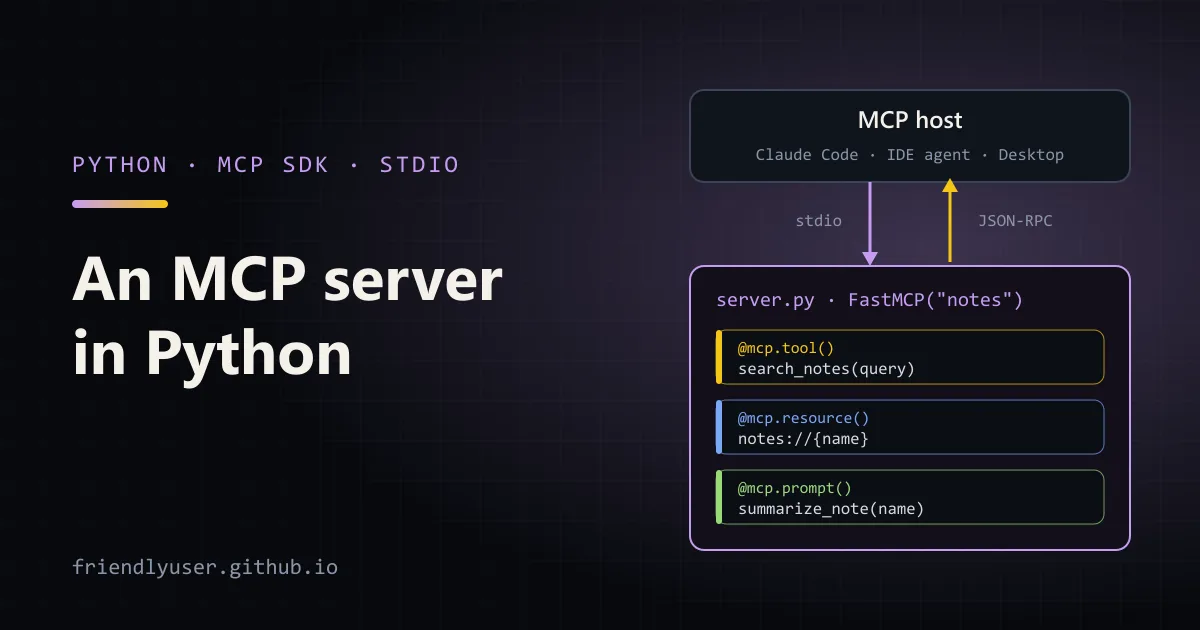
The Model Context Protocol (MCP) is a JSON-RPC protocol that lets an LLM host, such as Claude Code, Claude Desktop or an IDE agent, call code you own. You write a small server that exposes a few functions, and any MCP-aware host can discover and use them without a custom plugin for each one.
This post builds a small server in Python that gives a model access to a folder of Markdown notes. It uses the official mcp SDK and its FastMCP class, runs over the stdio transport, gets tested with a script and the MCP Inspector, and ends up registered in Claude Code. Examples were written against mcp 1.27.0 and Python 3.12.
The three things a server can expose
Section titled “The three things a server can expose”An MCP server offers three kinds of capability, and it is worth knowing which is which before writing any code:
- Tools are functions the model decides to call: “search the notes for
pg_dump”. They take JSON arguments described by a JSON Schema and return content. Anything with side effects belongs here. - Resources are read-only data addressed by URI, like
notes://backups. The host (or the user) decides when to attach them to the context; the model doesn’t call them the way it calls tools. - Prompts are reusable message templates the user picks, often shown as slash commands in the host’s UI.
Most servers in the wild are mostly tools. Resources and prompts are useful, but host support for them varies more, so put the core functionality in tools.
Project setup
Section titled “Project setup”Create a project with uv and add the SDK with its CLI extra, which brings the mcp dev command used later:
uv init notes-mcpcd notes-mcpuv add "mcp[cli]"mkdir notesprintf '# Postgres backups\n\nRun pg_dump nightly and keep 14 days.\nRestore with pg_restore --clean.\n' > notes/backups.mdprintf '# Release checklist\n\nTag the release, update the changelog, then publish to PyPI.\n' > notes/release.mdThe server
Section titled “The server”FastMCP turns decorated Python functions into MCP capabilities. It reads the type hints to build each tool’s input schema and uses the docstring as the description the model sees, so both are part of your interface, not decoration.
# server.py: an MCP server that exposes a folder of Markdown notesfrom pathlib import Path
from mcp.server.fastmcp import FastMCP
NOTES_DIR = Path(__file__).parent / "notes"
mcp = FastMCP("notes")

@mcp.tool()def search_notes(query: str, limit: int = 5) -> list[dict]:    """Search the notes folder for lines containing the query (case-insensitive).
    Returns the note name, line number and matching line for each hit.    """    hits = []    for path in sorted(NOTES_DIR.glob("*.md")):        for lineno, line in enumerate(path.read_text(encoding="utf-8").splitlines(), 1):            if query.lower() in line.lower():                hits.append({"note": path.stem, "line": lineno, "text": line.strip()})                if len(hits) >= limit:                    return hits    return hits

@mcp.tool()def add_note(name: str, body: str) -> str:    """Create a new note. Fails if a note with that name already exists."""    path = NOTES_DIR / f"{name}.md"    if path.exists():        raise ValueError(f"note {name!r} already exists")    path.write_text(body, encoding="utf-8")    return f"created {path.name}"

@mcp.resource("notes://{name}")def read_note(name: str) -> str:    """The full Markdown text of one note."""    path = NOTES_DIR / f"{name}.md"    if not path.is_file():        raise ValueError(f"no note called {name!r}")    return path.read_text(encoding="utf-8")

@mcp.prompt()def summarize_note(name: str) -> str:    """Ask the model to summarise one note as three bullet points."""    return f"Read the note at notes://{name} and summarise it in three bullet points."

if __name__ == "__main__":    mcp.run()  # stdio transport by default
A few details matter here:
limit: int = 5becomes an optional integer in the schema;query: stris required. The generated schema forsearch_notesis{"properties": {"query": {"type": "string", ...}, "limit": {"default": 5, "type": "integer", ...}}, "required": ["query"], ...}.- Raising an exception inside a tool doesn’t crash the server. The SDK returns a result with
isError: trueand the message as text, which the model can read and react to. notes://{name}is a resource template. The{name}placeholder maps to the function argument, so one function serves every note.
mcp.run() with no arguments uses the stdio transport: the host starts your script as a child process and exchanges JSON-RPC messages over stdin and stdout. That is the simplest option for local tools, because there is no port, no auth and no server to keep running. For a server that several people share over the network, FastMCP also supports the Streamable HTTP transport with mcp.run(transport="streamable-http").
Testing it with a client script
Section titled “Testing it with a client script”Before wiring the server into a host, call it from Python with the SDK’s client classes. This starts server.py as a subprocess, exactly as a host would:
# test_client.py: start server.py over stdio and call it like a host wouldimport asyncio
from mcp import ClientSession, StdioServerParametersfrom mcp.client.stdio import stdio_client
params = StdioServerParameters(command="python", args=["server.py"])

async def main() -> None:    async with stdio_client(params) as (read, write):        async with ClientSession(read, write) as session:            await session.initialize()
            tools = await session.list_tools()            print("tools:", [t.name for t in tools.tools])
            result = await session.call_tool("search_notes", {"query": "pg_"})            print("structured:", result.structuredContent)
            templates = await session.list_resource_templates()            print("templates:", [t.uriTemplate for t in templates.resourceTemplates])
            note = await session.read_resource("notes://release")            print("resource:", note.contents[0].text.splitlines()[0])
            prompt = await session.get_prompt("summarize_note", {"name": "backups"})            print("prompt:", prompt.messages[0].content.text)

asyncio.run(main())
Run it with uv run test_client.py. The output (with the server’s INFO log lines, which go to stderr, removed):
tools: ['search_notes', 'add_note']structured: {'result': [{'note': 'backups', 'line': 3, 'text': 'Run pg_dump nightly and keep 14 days.'}, {'note': 'backups', 'line': 4, 'text': 'Restore with pg_restore --clean.'}]}templates: ['notes://{name}']resource: # Release checklistprompt: Read the note at notes://backups and summarise it in three bullet points.Because search_notes has a return type annotation, the SDK also sends structured content alongside the text content. A list return value is wrapped as {"result": [...]}, since structured content has to be a JSON object. Calling add_note with an existing name returns isError=True and the text Error executing tool add_note: note 'backups' already exists.
This script is easy to turn into a pytest test, and it catches most mistakes (a bad schema, an exception at import time, a print to stdout) faster than clicking around in a host.
Testing it with the MCP Inspector
Section titled “Testing it with the MCP Inspector”The MCP Inspector is a browser UI for poking at a server by hand: list tools, fill in arguments, read resources and watch the raw messages. The SDK’s CLI starts it for you:
uv run mcp dev server.pyOr run it directly with npx, giving the command that starts your server:
npx @modelcontextprotocol/inspector uv run server.pyBoth need Node.js. The Inspector prints a local URL; open it, click Connect, and use the Tools, Resources and Prompts tabs. The notifications pane is the place to look when a tool fails, because it shows the error result as the host would receive it.
Adding it to Claude Code
Section titled “Adding it to Claude Code”Claude Code registers MCP servers with claude mcp add. Everything after -- is the command that starts the server. Use an absolute path for --directory, because Claude Code may start the server from a different working directory:
claude mcp add notes -- uv run --directory /home/me/notes-mcp server.pyclaude mcp listThe default scope is local: the server is available to you, in the current project only. --scope project writes the entry to a .mcp.json file in the repository so teammates get it too (Claude Code asks each of them to approve project servers before using them), and --scope user makes it available in all your projects. Environment variables for the server go in -e KEY=value options.
Inside a Claude Code session, /mcp shows the server’s status and its tools. Ask something like “which of my notes mention pg_dump?” and Claude will call search_notes. Tool names show up as mcp__notes__search_notes, which is also the name to use in permission rules if you want to allow a tool without being asked each time.
Gotchas
Section titled “Gotchas”- Write descriptions for the model. The docstring is all the model knows about a tool. Say what it returns and when to use it, and keep tool names distinct. Two tools called
searchandfindwill get mixed up. - Return small results. Everything a tool returns lands in the model’s context. Cap result counts (like
limitabove) and return excerpts, not whole files. - Validate inputs anyway. The schema checks types, not meaning. In
add_note, anamelike../../somewherewould write outside the notes folder; a real server should reject path separators. - Tools with side effects need care. Hosts usually ask the user before running a tool, but users click “allow always”. Make destructive tools explicit about what they do, and prefer adding a separate tool over a
delete: boolflag on a harmless one. - There are two packages called FastMCP.
mcp.server.fastmcpships inside the official SDK. The separatefastmcppackage on PyPI is a different, larger project that grew out of the original FastMCP; its imports (from fastmcp import FastMCP) and features differ. Check which one a tutorial uses before copying code. - Restart after changes. Hosts start a stdio server once per session. After editing
server.py, reconnect from/mcpor restart the host.
Further reading
Section titled “Further reading”© 2026 David Li · Home · Blog · RSS ·Classic site · Built with Astro, Starlight and three.js · Logos:Font Awesome Free (CC BY 4.0)