Caddy as a Reverse Proxy with Automatic HTTPS
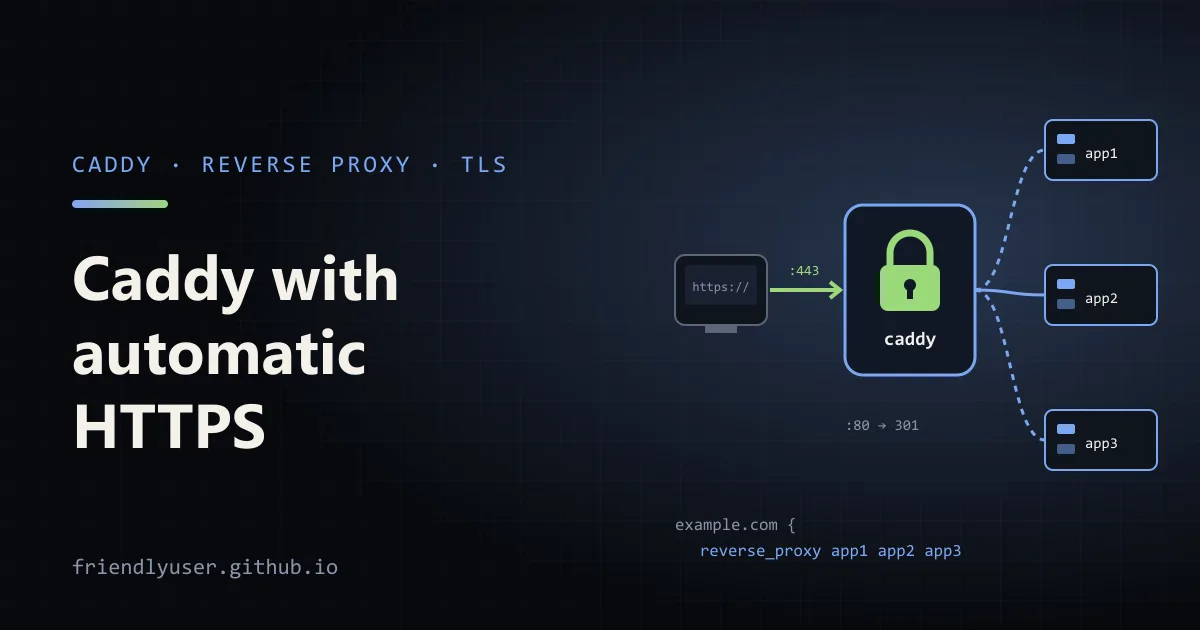
Caddy is a web server and reverse proxy that gets and renews TLS certificates for you. Give it a domain name and an upstream address, and it obtains a certificate from Let’s Encrypt or ZeroSSL, redirects HTTP to HTTPS, and keeps the certificate renewed. There is no certbot, cron job or separate TLS config.
For putting one or a few apps on the internet, that makes it the shortest path from “my app listens on port 3000” to a working https:// URL. This post covers the Caddyfile you need for that, what automatic HTTPS depends on, and a Docker Compose setup you can run locally with Caddy’s own certificate authority. Examples were written against Caddy 2.11.
The smallest useful Caddyfile
Section titled “The smallest useful Caddyfile”Caddy’s config file is called Caddyfile. This is a complete one:
example.com { reverse_proxy localhost:3000}With that file, caddy run in the same directory (or the systemd service the official packages install, which reads /etc/caddy/Caddyfile) does the following:
- Listens on ports 80 and 443.
- Gets a certificate for
example.comfrom a public ACME certificate authority. - Redirects
http://example.comtohttps://example.com. - Proxies every HTTPS request to the app on
localhost:3000. - Renews the certificate well before it expires.
For a quick test without a file, caddy reverse-proxy --from example.com --to localhost:3000 does the same from the command line.
What automatic HTTPS needs
Section titled “What automatic HTTPS needs”Caddy can only prove it controls a domain if the certificate authority can reach it. Before the first start, check these:
- DNS points at the server. The domain’s
A(andAAAA, if you have IPv6) records must resolve to the machine running Caddy. A staleAAAArecord is a common cause of failures, because the CA may try to reach that address instead of the IPv4 one. - Ports 80 and 443 are reachable from the internet. The HTTP-01 challenge uses port 80 and TLS-ALPN-01 uses 443. Open them in the firewall and the cloud security group, and forward them if you are behind a router.
- Caddy can bind to them. Ports below 1024 need root or the
CAP_NET_BIND_SERVICEcapability. The official packages and Docker image handle this. - Certificate storage persists. Caddy keeps certificates and ACME account keys in its data directory (
/datain Docker). If that disappears on every restart, Caddy requests new certificates every time and soon runs into the CA’s rate limits.
It’s also worth setting an email address, which the CA uses for expiry and account notices:
{  email admin@example.com}
example.com {  reverse_proxy localhost:3000}
The block with no name at the top of a Caddyfile holds global options. While you’re testing DNS and firewall setup, add acme_ca https://acme-staging-v02.api.letsencrypt.org/directory to it, so failed attempts count against Let’s Encrypt’s much higher staging limits. Remove it when everything works.
If you can’t open port 80 or 443, or you need a wildcard certificate, the alternative is the DNS-01 challenge. That needs a Caddy build with your DNS provider’s plugin (built with xcaddy or downloaded from the Caddy website), configured in a tls block with the provider’s API token.
Several sites in one file
Section titled “Several sites in one file”Each site gets its own block, and each gets its own certificate:
{  email admin@example.com}
(common) {  encode zstd gzip  header {    Strict-Transport-Security "max-age=31536000"    X-Content-Type-Options "nosniff"    Referrer-Policy "strict-origin-when-cross-origin"    -Server  }}
example.com {  import common  reverse_proxy localhost:3000}
www.example.com {  redir https://example.com{uri} permanent}
api.example.com {  import common  reverse_proxy localhost:8000}
docs.example.com {  import common  root * /srv/docs  file_server}
(common) is a snippet, a named block you pull into sites with import. encode compresses responses for clients that accept it. header sets response headers; the -Server line removes Caddy’s Server: Caddy header. redir ... permanent sends a 301, and {uri} is a placeholder for the request path and query.
You can also route by path within one site. handle_path strips the matched prefix before proxying, while handle keeps it:
example.com { handle_path /api/* { reverse_proxy localhost:8000 # /api/users arrives as /users } handle { root * /srv/app try_files {path} /index.html # single-page app fallback file_server }}Directives inside a site are sorted by Caddy’s built-in directive order, not by where you wrote them. handle and handle_path blocks at the same level are mutually exclusive: only the first matching one runs. Caddy sorts them by their matchers, more specific paths first, so a handle with no matcher always ends up last and acts as the fallback.
Headers going to and from the app
Section titled “Headers going to and from the app”By default reverse_proxy passes the original Host header through and adds X-Forwarded-For, X-Forwarded-Proto and X-Forwarded-Host. Most frameworks can use those to build correct absolute URLs, once you tell them they’re behind a proxy.
header_up and header_down change headers on the way to and from the upstream:
example.com { reverse_proxy localhost:3000 { header_up X-Request-Id {http.request.uuid} header_down -X-Powered-By }}Older configs often contain one more header_up line, for proxying to an upstream that is itself an HTTPS site with its own hostname, such as an external API or a storage bucket. That upstream expects its own name in Host, not yours:
assets.example.com { reverse_proxy https://my-bucket.s3.amazonaws.com { header_up Host {upstream_hostport} }}Since Caddy 2.11.0 this is done automatically for HTTPS upstreams, so on 2.11 you can drop the header_up Host line. It does no harm if you’re also running older Caddy versions.
If Caddy itself sits behind another proxy or a CDN, it ignores incoming X-Forwarded-* headers by default, because a client could forge them. Tell it which proxies to trust with the trusted_proxies server option in the global block.
Load balancing
Section titled “Load balancing”List more than one upstream and Caddy balances between them:
example.com {  reverse_proxy app1:3000 app2:3000 app3:3000 {    lb_policy least_conn    lb_try_duration 5s
    health_uri /healthz    health_interval 10s    health_timeout 2s
fail_duration 30s }}lb_policypicks the upstream. The default israndom. Others includeround_robin,least_conn,first(for failover), andip_hashorcookiefor sticky sessions.lb_try_durationlets Caddy retry another upstream if the chosen one is down, for up to that long. It’s off by default, so a dead upstream means a failed request.- Active health checks (
health_uri,health_interval) poll each upstream in the background and stop sending traffic to any that fail. - Passive health checks (
fail_duration) mark an upstream as down for that long after a request to it fails, without any polling.
Running it with Docker Compose
Section titled “Running it with Docker Compose”Here is a full example you can run on your own machine. Two instances of traefik/whoami, a tiny server that replies with its own hostname, sit behind Caddy, which serves them on https://localhost with a certificate from Caddy’s internal CA.
compose.yaml:
services:  caddy:    image: caddy:2    restart: unless-stopped    ports:      - "80:80"      - "443:443"      - "443:443/udp"   # HTTP/3    volumes:      - ./Caddyfile:/etc/caddy/Caddyfile:ro      - caddy_data:/data      - caddy_config:/config    depends_on:      - app1      - app2
  app1:    image: traefik/whoami  app2:    image: traefik/whoami
volumes: caddy_data: caddy_config:Caddyfile, next to it:
{  skip_install_trust}
localhost {  reverse_proxy app1:80 app2:80 {    lb_policy round_robin  }}
Containers in a Compose project share a network, so Caddy reaches the apps by service name. Nothing except Caddy publishes ports to the host.
Start it and make a few requests:
docker compose up -ddocker compose cp caddy:/data/caddy/pki/authorities/local/root.crt ./caddy-root.crtcurl --cacert caddy-root.crt https://localhost/curl --cacert caddy-root.crt https://localhost/Each response starts with a Hostname: line, and with round_robin it alternates between the two app containers.
The caddy_data volume is the important one. It holds the certificates, and for public sites, the ACME account. Never mount it on a temporary path.
To apply Caddyfile changes without restarting the container (and without dropping connections):
docker compose exec -w /etc/caddy caddy caddy reloadThe same setup works on a public server: replace localhost with your domain, remove skip_install_trust, and point DNS at the server.
Local HTTPS with the internal CA
Section titled “Local HTTPS with the internal CA”The example above relies on a Caddy rule: for localhost, IP addresses and other names that can’t get a public certificate (such as names ending in .localhost, .local, .internal or .home.arpa), Caddy doesn’t use a public CA. It creates its own root certificate authority, stores it in the data directory, and issues certificates from it. Any other site can opt in with tls internal, and the local_certs global option switches every site to the internal CA.
Browsers don’t trust that root until you install it:
- Caddy on the host:
caddy trustinstalls the root into the system trust store (and some browser stores). Caddy also tries to do this on its own the first time it issues a local certificate, which may prompt for your password.caddy untrustremoves it. - Caddy in Docker: copy
root.crtout of the container, as above, and import it into your OS or browser trust store.skip_install_truststops Caddy from attempting the install inside the container, where it can’t work anyway.
Local HTTPS is worth the setup when your app uses things browsers only allow in secure contexts (service workers, Secure cookies, some Web APIs), or when you want the local setup to match production.
Checking a config
Section titled “Checking a config”caddy fmt --overwrite Caddyfile # normalise formattingcaddy validate --config Caddyfile # parse and load it without startingcaddy adapt --config Caddyfile --pretty # show the JSON it turns intoUnder the hood the Caddyfile is converted into Caddy’s native JSON config. adapt is useful when a directive doesn’t behave as you expect: it shows exactly what Caddy understood.
Gotchas
Section titled “Gotchas”- Indentation is not syntax, but braces are. An opening
{must be at the end of a line, and the closing}on its own line. - Rate limits are real. Repeatedly restarting with a fresh data directory, or a broken DNS setup retried in a loop, can lock a domain out of Let’s Encrypt for a while. Use the staging CA while debugging.
- Ports are sometimes already taken. If Apache or nginx is installed, it may hold port 80. Caddy then fails to start with an “address already in use” error.
- Caddy is not a full API gateway. It handles routing, TLS, compression and simple auth (
basic_auth). For per-client rate limits, request transformation or complex auth flows, put that logic in the app or use a dedicated gateway.
Further reading
Section titled “Further reading”© 2026 David Li · Home · Blog · RSS ·Classic site · Built with Astro, Starlight and three.js · Logos:Font Awesome Free (CC BY 4.0)