Streaming LLM responses to the browser with server-sent events
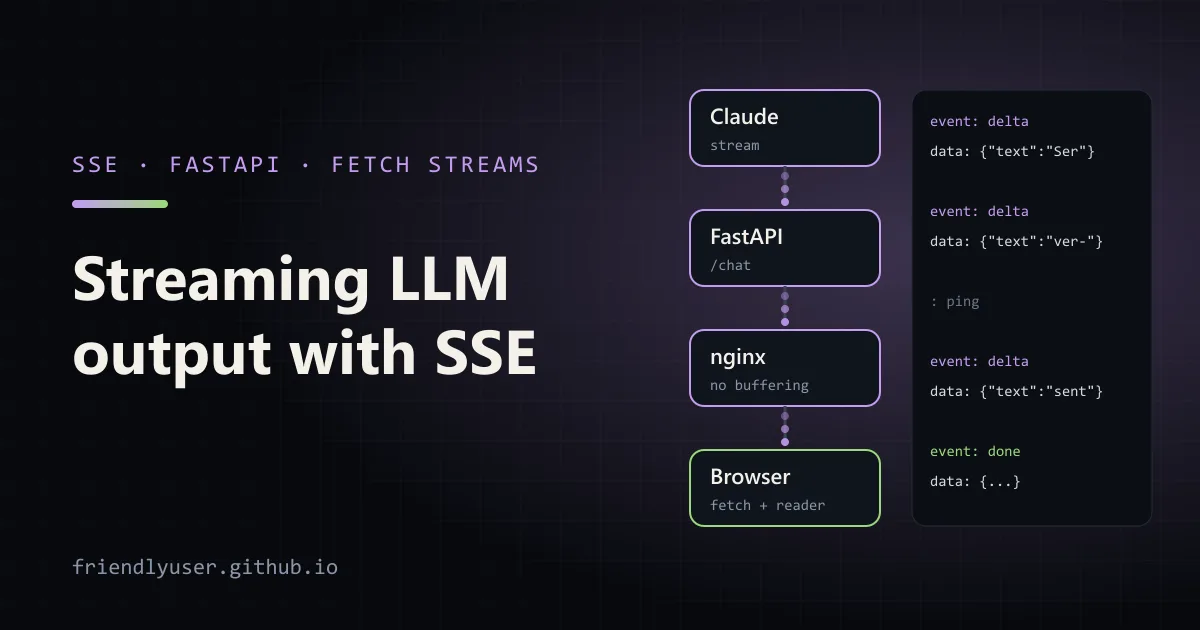
A model that takes 20 seconds to write an answer feels broken if the user stares at a spinner the whole time, and fine if the words appear as they are generated. Server-sent events (SSE) are the simplest way to push those words from your server to a browser: a plain HTTP response that stays open and delivers small text messages.
This post covers the SSE wire format, a FastAPI endpoint that relays a streamed Claude response, two ways to consume it in the browser (EventSource, and fetch with a ReadableStream for POST requests), and the two things that break streaming in production: proxy buffering and cancellation. Examples use Python 3.12, FastAPI 0.141, the anthropic SDK 0.121 and claude-sonnet-4-5.
The wire format
Section titled “The wire format”An SSE response has the content type text/event-stream and a body made of messages separated by a blank line. Each message is a few field: value lines:
event: deltadata: {"text": "Hello"}
event: deltadata: {"text": " world"}
: this line is a comment, often used as a keep-alive ping
event: donedata: {"stop_reason": "end_turn"}
The fields that matter:
data:is the payload. Severaldata:lines in one message are joined with newlines. Sending one line of JSON per message avoids having to think about that.event:names the message type. Without it, the type ismessage.id:andretry:support automatic reconnection inEventSource. They are less useful for LLM output, where reconnecting halfway through a generation rarely makes sense.- Lines starting with
:are comments and are ignored by clients.
That’s the whole format. It’s one-way (server to client), it’s text, and it runs over ordinary HTTP, so it works with existing load balancers, auth and CORS rules. If you need the client to talk back mid-stream, use a WebSocket; for “send a prompt, stream the answer”, SSE is enough.
The server: relaying a model stream
Section titled “The server: relaying a model stream”The Anthropic SDK already streams over SSE from the API. The server’s job is to read that stream and re-emit it in a format your frontend controls, without exposing your API key to the browser.
# app.py: relay a streamed Claude response to the browser as server-sent eventsimport asyncioimport jsonimport loggingimport os
from anthropic import AsyncAnthropicfrom fastapi import FastAPI, Requestfrom fastapi.responses import FileResponse, StreamingResponsefrom pydantic import BaseModel
MODEL = os.environ.get("CLAUDE_MODEL", "claude-sonnet-4-5")client = AsyncAnthropic()  # reads ANTHROPIC_API_KEYapp = FastAPI()log = logging.getLogger("uvicorn.error")

class ChatRequest(BaseModel):    message: str

def sse(event: str, data: dict) -> str:    # One SSE message: an event name, one data line of JSON, and a blank line to end it.    return f"event: {event}\ndata: {json.dumps(data)}\n\n"

async def relay(req: ChatRequest):    try:        async with client.messages.stream(            model=MODEL,            max_tokens=1024,            messages=[{"role": "user", "content": req.message}],        ) as stream:            async for text in stream.text_stream:                yield sse("delta", {"text": text})            final = await stream.get_final_message()            yield sse("done", {"stop_reason": final.stop_reason,                               "output_tokens": final.usage.output_tokens})    except asyncio.CancelledError:        # The browser went away. Leaving the `async with` block closes the        # upstream connection, so the model stops generating.        log.info("client disconnected, upstream stream closed")        raise    except Exception as exc:  # report errors in-band; the 200 status is already sent        log.exception("stream failed")        yield sse("error", {"message": type(exc).__name__})

@app.post("/chat")async def chat(req: ChatRequest):    return StreamingResponse(        relay(req),        media_type="text/event-stream",        headers={            "Cache-Control": "no-cache",            "X-Accel-Buffering": "no",  # tell nginx not to buffer this response        },    )

@app.get("/")async def index():    return FileResponse("index.html")
Run it with:
uv run --with anthropic --with fastapi --with uvicorn uvicorn app:app --port 8000A few design choices here:
- Your own event format. The browser gets
delta,doneanderrorevents with small JSON payloads, not the raw Anthropic events. That keeps the frontend independent of the provider, and you can add fields (a message ID, citations) later. text_streamyields only the text deltas. For tool use or thinking blocks you would iterate the stream’s events instead, and decide what to forward.- Errors after the first byte go in-band. Once streaming has started, the HTTP status is already 200, so a failure halfway through has to be sent as an
errorevent. Send a generic message to the browser and log the details on the server.
You can watch the raw stream with curl; -N turns off curl’s own buffering:
curl -N -X POST http://127.0.0.1:8000/chat \ -H 'Content-Type: application/json' \ -d '{"message": "Explain server-sent events in three sentences."}'The browser: EventSource or fetch
Section titled “The browser: EventSource or fetch”Browsers have a built-in SSE client, EventSource. It parses the format, dispatches named events and reconnects automatically:
const source = new EventSource('/chat-stream?q=' + encodeURIComponent(question));source.addEventListener('delta', (e) => { output.textContent += JSON.parse(e.data).text;});source.addEventListener('done', () => source.close());The catch is that EventSource can only make GET requests, with no request body and no custom headers. A chat prompt (often long, sometimes with a conversation history) doesn’t belong in a query string, and you can’t send an Authorization header. Its automatic reconnect also works against you here: if the connection drops, it re-sends the request and starts a new, billed generation, unless you call close() in your error handler.
So for LLM output, use fetch with a POST body and read the response as a stream. The parsing is about twenty lines:
// sse_client.mjs: POST a prompt and read the SSE response with fetch + ReadableStream.// The streamChat function works unchanged in browsers and in Node 18+.export async function streamChat(message, { onEvent, signal }) {  const res = await fetch('http://127.0.0.1:8000/chat', {    method: 'POST',    headers: { 'Content-Type': 'application/json' },    body: JSON.stringify({ message }),    signal,  });  if (!res.ok) throw new Error(`HTTP ${res.status}`);
  const reader = res.body.pipeThrough(new TextDecoderStream()).getReader();  let buffer = '';  while (true) {    const { value, done } = await reader.read();    if (done) break;    buffer += value;    // Messages end with a blank line. Keep any partial message for the next read.    const messages = buffer.split(/\r?\n\r?\n/);    buffer = messages.pop();    for (const raw of messages) {      let event = 'message';      const data = [];      for (const line of raw.split(/\r?\n/)) {        if (line.startsWith(':')) continue; // comment, e.g. a keep-alive ping        if (line.startsWith('event:')) event = line.slice(6).trim();        else if (line.startsWith('data:')) data.push(line.slice(5).replace(/^ /, ''));      }      if (data.length) onEvent(event, JSON.parse(data.join('\n')));    }  }}
// Command-line demo: node sse_client.mjs "question" [stop after N events]const controller = new AbortController();const stopAfter = Number(process.argv[3] ?? Infinity);let seen = 0;try {  await streamChat(process.argv[2] ?? 'Say hello', {    signal: controller.signal,    onEvent(event, data) {      if (event === 'delta') process.stdout.write(data.text);      else console.log(`\n[${event}]`, data);      if (++seen >= stopAfter) controller.abort(); // cancel: closes the HTTP connection    },  });} catch (err) {  if (err.name !== 'AbortError') throw err;  console.log('\n[aborted by client]');}
In a page, call streamChat with a relative URL and append each delta to the output element. Running the demo against the server prints the text as it arrives, then the done event; with a second argument of 3, it aborts after three events. The [aborted by client] line is printed by the client, and the server logs client disconnected, upstream stream closed.
If you don’t want to maintain the parser, Microsoft’s @microsoft/fetch-event-source package wraps the same approach with an EventSource-like API.
Cancellation
Section titled “Cancellation”When the user clicks Stop or closes the tab, three things should happen: the browser closes the connection, your server notices, and your server stops the upstream model request so you aren’t paying for tokens nobody will read.
- Browser:
controller.abort()on theAbortControllerpassed tofetch. Closing the tab does the same thing. - Server: Starlette notices the disconnect and cancels the response’s generator, which raises
asyncio.CancelledErrorinsiderelay(). Re-raise it after any cleanup; swallowing it confuses the server. - Upstream: because the stream is opened with
async with, leaving the block closes the HTTP connection to the API, and generation stops. Output tokens produced before the cancel are still billed.
Test this deliberately: start a long answer, abort it, and check the server log. If your relay keeps a model stream alive after the client is gone (for example because it collects the full response into a list before yielding anything), every abandoned request costs a full generation.
Proxies that buffer
Section titled “Proxies that buffer”The most common report about SSE is “it works locally, but in production the text arrives all at once”. Something between the server and the browser is buffering the response:
- nginx buffers proxied responses by default. The
X-Accel-Buffering: noresponse header turns buffering off for that response; alternatively setproxy_buffering off;in the location block. Also raiseproxy_read_timeoutabove your longest generation, since the default of 60 seconds counts time between reads. - Compression middleware (gzip in nginx,
GZipMiddlewarein FastAPI, a CDN) can hold data until it has enough to compress. Excludetext/event-streamfrom compression. - Load balancers and CDNs have idle timeouts. If the model can go quiet for a long time (a long thinking phase, a slow tool call), send a comment line such as
: ping\n\nevery 15 seconds or so to keep the connection alive. Cache-Control: no-cachestops intermediaries from caching the response.
With HTTP/1.1, browsers also limit the number of open connections per host (six in Chrome and Firefox), and every open SSE stream uses one. Over HTTP/2 that limit doesn’t apply in the same way, so serve the app over HTTP/2 if users keep several streams open.
Gotchas
Section titled “Gotchas”- Render incrementally, but safely. Appending text to
textContentis safe. If you render Markdown as it streams, re-render the whole message from the accumulated text on each update, and sanitise the HTML; model output is untrusted input. - Tokens are not words. Deltas can split a word, or a multi-byte character across network chunks.
TextDecoderStreamhandles the byte side; the buffer-and-split loop handles messages split across reads. - Keep the final message.
get_final_message()gives you the usage numbers and stop reason. Log them, and tell the user whenstop_reasonismax_tokensso a cut-off answer doesn’t look complete. - Rate limits still apply. Streaming doesn’t change how requests count against API limits; a 429 arrives before the stream starts, so handle it before returning the
StreamingResponseif you want a proper HTTP error.
Further reading
Section titled “Further reading”© 2026 David Li · Home · Blog · RSS ·Classic site · Built with Astro, Starlight and three.js · Logos:Font Awesome Free (CC BY 4.0)