Writing a tool-use loop for the Claude API by hand
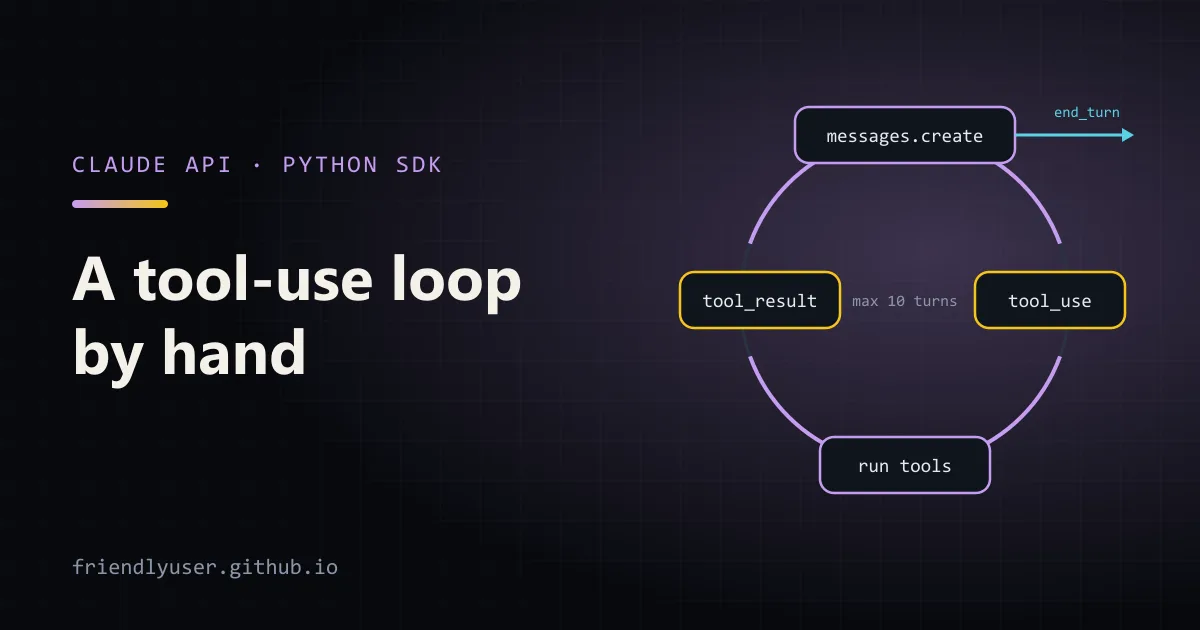
Tool use lets a model ask your code to do things: search a database, read a file, call an internal API. The model never runs anything itself. It returns a request to call a tool, your program runs it and sends the result back, and that repeats until the model has what it needs to answer.
The SDKs ship helpers that run this loop for you (the Python SDK’s beta tool_runner, for one). Writing the loop by hand is still worth doing once: it is about 40 lines, it shows exactly what goes over the wire, and it is the version you want when you need approval prompts, logging, or custom limits in the middle of the loop. Examples use Python 3.12, the anthropic SDK 0.84 and claude-sonnet-4-5.
The protocol in four steps
Section titled “The protocol in four steps”- You send a request with a
toolslist. Each tool has aname, adescriptionand aninput_schema(JSON Schema for its arguments). - If the model wants a tool, the response has
stop_reason == "tool_use"and one or moretool_usecontent blocks, each with anid, anameand aninputdict. - You run each tool and send a new
usermessage containing onetool_resultblock per call, each pointing back at itstool_use_id. - Repeat until
stop_reasonis something else, usuallyend_turn.
The API is stateless. Every request carries the whole conversation, including the assistant turns that contain the tool_use blocks. If you drop those, the tool_result blocks refer to calls the API has never seen and the request fails.
A worked example: answering questions from team notes
Section titled “A worked example: answering questions from team notes”The example gives the model two tools over a folder of Markdown files: search_notes to find lines that mention a phrase, and read_note to read one file. Create a notes folder with a couple of files first:
mkdir notesprintf '# Deploys\nProduction deploys run from the release branch every Tuesday.\nRollback: run `make rollback` within 30 minutes.\n' > notes/deploys.mdprintf '# On-call\nThe on-call rotation changes every Monday at 09:00.\nPage the secondary if the primary has not acked in 10 minutes.\n' > notes/oncall.mdpip install anthropicexport ANTHROPIC_API_KEY=...Here is the whole program:
import jsonimport osfrom collections.abc import Callablefrom pathlib import Path
import anthropicfrom anthropic.types import MessageParam, ToolParam, ToolResultBlockParam
MODEL = os.environ.get("CLAUDE_MODEL", "claude-sonnet-4-5")NOTES_DIR = Path("notes")MAX_TURNS = 10
client = anthropic.Anthropic()
TOOLS: list[ToolParam] = [    {        "name": "search_notes",        "description": (            "Search the team's Markdown notes for a word or phrase (case-insensitive). "            "Returns matching file names with the matching lines. "            "Use this first to find which note to read."        ),        "input_schema": {            "type": "object",            "properties": {                "query": {"type": "string", "description": "Text to look for"},            },            "required": ["query"],        },    },    {        "name": "read_note",        "description": "Read one note in full. Pass a file name returned by search_notes.",        "input_schema": {            "type": "object",            "properties": {                "name": {"type": "string", "description": "File name, e.g. deploys.md"},            },            "required": ["name"],        },    },]

class ToolError(Exception):    """An error the model should see and can recover from."""

def search_notes(query: str) -> str:    hits = []    for path in sorted(NOTES_DIR.glob("*.md")):        for line in path.read_text(encoding="utf-8").splitlines():            if query.lower() in line.lower():                hits.append(f"{path.name}: {line.strip()}")    return "\n".join(hits) if hits else "No matches."

def read_note(name: str) -> str:    path = (NOTES_DIR / name).resolve()    if path.parent != NOTES_DIR.resolve() or not path.is_file():        raise ToolError(f"No note named {name!r}. Use search_notes to find file names.")    return path.read_text(encoding="utf-8")

HANDLERS: dict[str, Callable[..., str]] = {"search_notes": search_notes, "read_note": read_note}

def run_tool(name: str, tool_input: dict) -> tuple[str, bool]:    try:        return HANDLERS[name](**tool_input), False    except ToolError as err:        return str(err), True    except KeyError:        return f"Unknown tool {name!r}.", True    except TypeError as err:  # wrong or missing arguments        return f"Bad arguments for {name}: {err}", True

def ask(question: str) -> str:    messages: list[MessageParam] = [{"role": "user", "content": question}]
    for turn in range(MAX_TURNS):        response = client.messages.create(            model=MODEL,            max_tokens=4096,            system="Answer questions using the team's notes. Cite the note file names you used.",            tools=TOOLS,            messages=messages,        )        # Always keep the assistant turn, tool_use blocks included.        messages.append({"role": "assistant", "content": response.content})
        if response.stop_reason != "tool_use":            if response.stop_reason == "max_tokens":                raise RuntimeError("Response hit max_tokens; raise the limit.")            if response.stop_reason == "refusal":                raise RuntimeError("The model declined to answer.")            return "".join(b.text for b in response.content if b.type == "text")
        results: list[ToolResultBlockParam] = []        for block in response.content:            if block.type != "tool_use":                continue            print(f"  -> {block.name}({json.dumps(block.input)})")            output, is_error = run_tool(block.name, block.input)            results.append(                {                    "type": "tool_result",                    "tool_use_id": block.id,                    "content": output,                    "is_error": is_error,                }            )        # All results for this turn go back in ONE user message.        messages.append({"role": "user", "content": results})
    raise RuntimeError(f"Gave up after {MAX_TURNS} model calls.")

if __name__ == "__main__":    print(ask("How do I roll back a bad production deploy, and how long do I have?"))
Run it with python agent.py. The printed arrows show the tool calls as they happen: typically a search_notes for something like “rollback”, then a read_note("deploys.md"), then a final answer that cites deploys.md. The exact calls vary from run to run, which is the point: the model decides.
The parts that are easy to get wrong
Section titled “The parts that are easy to get wrong”Append response.content, not just the text
Section titled “Append response.content, not just the text”The assistant message you append must be the full response.content list. It contains the tool_use blocks, and any text the model wrote before deciding to call a tool (“Let me check the notes.”). The SDK accepts its own response block objects in messages, so there is no need to convert them to dicts.
One user message for all results
Section titled “One user message for all results”When the model wants several tools at once, one response contains several tool_use blocks. Run all of them and return all the tool_result blocks in a single user message. Splitting them across several messages is a common mistake. It produces a conversation shape the model rarely sees, and it tends to stop making parallel calls afterwards.
The calls in one turn don’t depend on each other, so you can run them concurrently with a thread pool or asyncio.gather if they are slow. The order of the result blocks does not have to match, because each one names its tool_use_id.
If you need strictly one call per turn (for instance, every call needs a human approval), pass tool_choice={"type": "auto", "disable_parallel_tool_use": True}.
Errors are results, not exceptions
Section titled “Errors are results, not exceptions”When a tool fails in a way the model could fix, such as a wrong file name, a bad argument or an empty search, send the error back as a tool_result with "is_error": True and a message that says what to do differently. In the example, read_note("rollback.md") comes back as No note named 'rollback.md'. Use search_notes to find file names., and the model’s next move is to search.
That is also why run_tool catches TypeError. Tool inputs follow your schema most of the time, not all of the time, and a misspelled argument should become a message to the model, not a stack trace for you.
Keep real failures as real exceptions. If the database is down, no amount of model retrying will help. Let that propagate out of the loop.
Validate tool inputs that do damage
Section titled “Validate tool inputs that do damage”read_note resolves the path and checks it is directly inside notes/. Without that check, {"name": "../.env"} would read a file you never meant to expose. Treat tool inputs like any other untrusted input: they are generated from text, and that text can include content from documents or web pages the model read earlier.
For tools with side effects (sending email, writing to a database, spending money), put a confirmation step in the loop before calling the handler. This is the main reason to own the loop.
Put a limit on it
Section titled “Put a limit on it”MAX_TURNS stops a confused model from calling tools forever. Ten model calls is a lot for a lookup task. Pick a number from what your task needs and log when you hit it. You can also track response.usage.input_tokens across turns, because each turn resends the growing conversation, and cost grows with it.
Handle every stop reason
Section titled “Handle every stop reason”The loop exits on anything other than tool_use. The ones to handle explicitly:
stop_reason | What it means | What to do |
|---|---|---|
end_turn | The model finished | Return the text |
tool_use | It wants one or more tools | Run them and loop |
max_tokens | The response was cut off | Raise max_tokens; a cut-off tool_use block has incomplete input |
refusal | The model declined | Surface it; don’t retry blindly |
pause_turn | A long server-side tool turn was paused | Only with server tools such as web search; send the conversation back as is to continue |
Writing tool descriptions
Section titled “Writing tool descriptions”Descriptions do more for reliability than any loop code. The model picks tools and fills arguments based on the description strings, so write them like documentation for a new colleague:
- Say what the tool returns, not only what it does. “Returns matching file names with the matching lines” tells the model what it can do next.
- Say when to use it, and in what order. “Use this first to find which note to read” saves a round of guessing file names.
- Describe each argument’s format with an example (
e.g. deploys.md). - Keep the tool count small. Two or three focused tools beat ten overlapping ones.
When to use the SDK’s tool runner instead
Section titled “When to use the SDK’s tool runner instead”If your loop has none of the custom parts above (no approvals, no special error handling, no budget logic), the SDK’s beta tool runner does the same thing with less code: decorate the Python functions with @beta_tool, pass them to client.beta.messages.tool_runner(...), and iterate over the messages it yields. It builds the input schema from the function signature and docstring. It is a beta API, so expect some churn. The hand-written loop above only depends on the stable Messages API.
Gotchas
Section titled “Gotchas”- Tool results can be large. Returning a whole file or table on every call fills the context quickly. Return what the model needs (matching lines, the first N rows) and offer a second tool to get more.
- The model can still answer without tools. If it answers from its own knowledge instead of searching, say in the system prompt that answers must come from the tools, and ask for citations so you can check.
- Tool inputs are dicts parsed from JSON. Use
block.inputas is; don’t parse the serialized text yourself. - Forced tool choice and extended thinking don’t mix.
tool_choiceof{"type": "any"}or a specific tool is not supported with extended thinking. Useautoand steer in the prompt.
Further reading
Section titled “Further reading”- Tool use overview
- How to implement tool use, including parallel calls and error results
- anthropic-sdk-python on GitHub
© 2026 David Li · Home · Blog · RSS ·Classic site · Built with Astro, Starlight and three.js · Logos:Font Awesome Free (CC BY 4.0)