Validating untrusted input at runtime with Zod 4
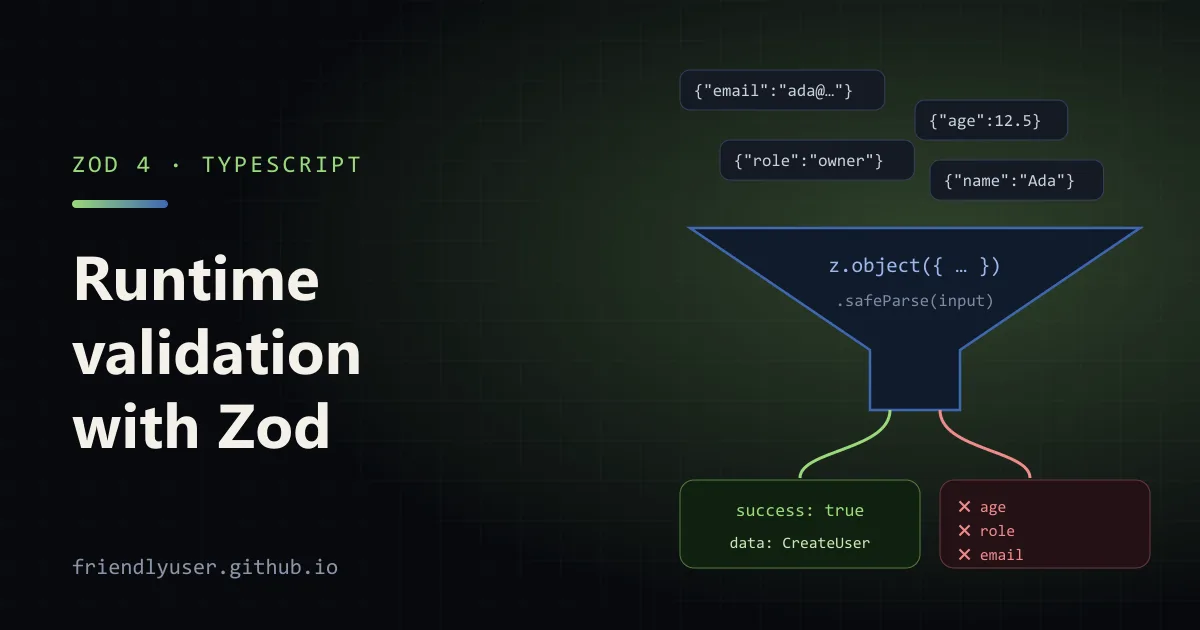
TypeScript types disappear when your code runs, so they can’t tell you whether a request body, a webhook payload or process.env actually has the shape you declared. Zod is a schema library that checks values at runtime and infers the matching TypeScript type from the same schema, so the check and the type can’t drift apart. You write the schema once, parse untrusted data at the edge of your program, and everything past that point works with typed values.
The examples use Zod 4.3, TypeScript 5.9 and Node 24. Zod 4 changed several APIs from Zod 3, and the notes below call out the ones that trip people up when copying older examples.
Install and a first schema
Section titled “Install and a first schema”npm install zodSince Zod 4.0, the package root exports Zod 4. The docs import it as a namespace:
import * as z from "zod";
const CreateUser = z.object({  email: z.email(),  name: z.string().trim().min(1, { error: "Name is required" }).max(100),  age: z.int().min(13).optional(),  role: z.enum(["member", "admin"]).default("member"),  tags: z.array(z.string()).max(10).default([]),});
type CreateUser = z.infer<typeof CreateUser>;// { email: string; name: string; age?: number; role: "member" | "admin"; tags: string[] }
Some Zod 4 details visible here:
- String formats are top-level functions.
z.email(),z.url(),z.uuid()andz.iso.date()replacez.string().email()and friends. The method forms still work in Zod 4 but are deprecated. z.int()accepts only safe integers.z.number().int()does the same.- Custom messages use
error. Zod 3’smessageparameter is still accepted but deprecated. z.objectstrips unknown keys by default. Usez.strictObjectto reject them, orz.looseObjectto pass them through.
Giving the schema and the type the same name is a common convention. TypeScript keeps values and types in separate namespaces, so CreateUser is the schema in expressions and the type in annotations.
parse and safeParse
Section titled “parse and safeParse”CreateUser.parse(data) returns the typed value or throws a ZodError. safeParse returns a result object instead, which I prefer at request boundaries because a validation failure is an expected outcome, not an exception:
const result = CreateUser.safeParse({  email: "not-an-email",  name: "   ",  age: 12.5,  role: "owner",});
if (!result.success) {  console.log(z.prettifyError(result.error));} else {  result.data; // typed as CreateUser}
result is a discriminated union on success, so result.data only exists in the success branch. The output from that run:
✖ Invalid email address → at email✖ Name is required → at name✖ Invalid input: expected int, received number → at age✖ Invalid option: expected one of "member"|"admin" → at roleNote that " " failed the min(1) check because .trim() runs first. Zod collects every issue in one pass rather than stopping at the first one, so a form can show all its errors at once.
Formatting errors
Section titled “Formatting errors”error.issues is the raw list: each issue has a code, a path and a message. Zod 4 has three helpers for turning it into something useful:
| Helper | Shape | Good for |
|---|---|---|
z.prettifyError(err) | A multi-line string, as above | Logs, CLI output, startup errors |
z.flattenError(err) | { formErrors: string[], fieldErrors: { field: string[] } } | Flat forms and simple API responses |
z.treeifyError(err) | Nested { errors, properties, items } mirroring the input | Nested objects and arrays |
For the same failed parse, z.treeifyError(result.error) starts like this:
{ "errors": [], "properties": { "email": { "errors": ["Invalid email address"] }, "name": { "errors": ["Name is required"] } }}Zod 3’s error.format() and error.flatten() methods are deprecated in Zod 4 in favour of these functions.
Validating a request body
Section titled “Validating a request body”Here is a complete HTTP endpoint using only node:http, so it runs without a framework. Save it as server.ts in a folder with "type": "module" in its package.json:
import { createServer, type IncomingMessage } from "node:http";import * as z from "zod";
const CreateUser = z.object({  email: z.email(),  name: z.string().trim().min(1, { error: "Name is required" }).max(100),  age: z.int().min(13).optional(),  role: z.enum(["member", "admin"]).default("member"),});type CreateUser = z.infer<typeof CreateUser>;
async function readJson(req: IncomingMessage): Promise<unknown> {  const chunks: Buffer[] = [];  for await (const chunk of req) chunks.push(chunk as Buffer);  return JSON.parse(Buffer.concat(chunks).toString("utf8"));}
function createUser(input: CreateUser) {  return { id: crypto.randomUUID(), ...input };}
const server = createServer(async (req, res) => {  if (req.method !== "POST" || req.url !== "/users") {    res.writeHead(404).end();    return;  }
  let body: unknown;  try {    body = await readJson(req);  } catch {    res.writeHead(400, { "content-type": "application/json" });    res.end(JSON.stringify({ error: "Body is not valid JSON" }));    return;  }
  const parsed = CreateUser.safeParse(body);  if (!parsed.success) {    res.writeHead(422, { "content-type": "application/json" });    res.end(JSON.stringify({      error: "Validation failed",      details: z.flattenError(parsed.error).fieldErrors,    }));    return;  }
  res.writeHead(201, { "content-type": "application/json" });  res.end(JSON.stringify(createUser(parsed.data)));});
server.listen(3000, () => console.log("listening on http://localhost:3000"));
Run it with node server.ts and send it a few requests:
curl -s -X POST localhost:3000/users -H 'content-type: application/json' \  -d '{"email":"ada@example.com","name":"Ada"}'# status 201: {"id":"c649fa53-...","email":"ada@example.com","name":"Ada","role":"member"}
curl -s -X POST localhost:3000/users -H 'content-type: application/json' \  -d '{"email":"nope","name":"   ","age":9}'# status 422: {"error":"Validation failed","details":{"email":["Invalid email address"],#      "name":["Name is required"],"age":["Too small: expected number to be >=13"]}}
The important part is the unknown type on body. Nothing downstream of safeParse touches unvalidated data, and createUser can only be called with a CreateUser. The same shape works in Express, Fastify or Hono: parse req.body (or the framework’s equivalent) with safeParse in the handler or in a small middleware, and return 400 or 422 with the formatted errors.
Don’t send raw error.issues to clients of a public API without thinking about it. Issues for enums and literals include the list of allowed values, which is usually fine, but a custom refinement might put internal details in a message.
Coercion and transforms
Section titled “Coercion and transforms”Query strings, form posts and environment variables are all strings. Zod has two ways to get other types out of them.
z.coerce runs a JavaScript conversion before validating. z.coerce.number() calls Number(input), then checks that the result is a number. Coercion is blunt, and two cases catch people out:
z.coerce.number().parse(""); // 0, because Number("") is 0z.coerce.boolean().parse("false"); // true, because Boolean("false") is trueFor flags, use z.stringbool() (new in Zod 4) instead. It accepts "true", "1", "yes", "on", "y" and "enabled" as true, the matching negatives as false, and rejects anything else.
.transform() maps a valid value to a new one, and .pipe() validates the result with another schema:
const Ids = z  .string()  .transform((s) => s.split(","))  .pipe(z.array(z.coerce.number<string>()).min(1));
Ids.parse("1,2,3");          // [1, 2, 3]Ids.safeParse("1,x").success; // false
In Zod 4 the input type of z.coerce.number() is unknown, which doesn’t fit after a transform that returns string[]. The type argument in z.coerce.number<string>() narrows the input type so the pipe type-checks.
Once a schema has transforms, its input and output types differ. z.input<typeof Ids> is string, and z.output<typeof Ids> (the same as z.infer) is number[].
To reject a value inside a transform, add an issue and return z.NEVER:
const NumericId = z.string().transform((s, ctx) => { const n = Number(s); if (!Number.isInteger(n)) { ctx.addIssue({ code: "custom", message: "not an integer id" }); return z.NEVER; } return n;});For rules that span several fields, use .refine on the object and point the error at a field with path:
const DateRange = z .object({ from: z.iso.date(), to: z.iso.date() }) .refine((r) => r.from <= r.to, { error: "from must be before to", path: ["to"] });Validating environment variables
Section titled “Validating environment variables”Environment variables are the input people forget to validate, and a typo in a variable name usually shows up as undefined deep inside the app. Parse them once at startup and fail fast:
import * as z from "zod";
const Env = z.object({  NODE_ENV: z.enum(["development", "test", "production"]).default("development"),  PORT: z.coerce.number().int().min(1).max(65535).default(3000),  DATABASE_URL: z.url({ protocol: /^postgres(ql)?$/ }),  LOG_JSON: z.stringbool().default(false),  ALLOWED_ORIGINS: z    .string()    .default("")    .transform((s) => s.split(",").map((o) => o.trim()).filter(Boolean)),});
export type Env = z.infer<typeof Env>;
function loadEnv(source: NodeJS.ProcessEnv = process.env): Env {  const result = Env.safeParse(source);  if (!result.success) {    console.error(`Invalid environment:\n${z.prettifyError(result.error)}`);    process.exit(1);  }  return result.data;}
export const env = loadEnv();
With bad values, the process exits before it opens a port:
$ DATABASE_URL=http://x PORT=abc LOG_JSON=maybe node env.tsInvalid environment:✖ Invalid input: expected number, received NaN → at PORT✖ Invalid URL → at DATABASE_URL✖ Invalid option: expected one of "true"|"1"|"yes"|"on"|"y"|"enabled"|"false"|"0"|"no"|"off"|"n"|"disabled" → at LOG_JSONWith DATABASE_URL=postgresql://localhost/app alone, env is { NODE_ENV: "development", PORT: 3000, DATABASE_URL: "postgresql://localhost/app", LOG_JSON: false, ALLOWED_ORIGINS: [] }. Import env everywhere instead of reading process.env directly, and the rest of the code gets real numbers and booleans.
Gotchas when moving from Zod 3
Section titled “Gotchas when moving from Zod 3”.default() short-circuits. In Zod 4, when the input is undefined, .default(value) returns value as is, without running the schema. The default must therefore match the output type. If you want the default to go through parsing and transforms, use .prefault():
z.string().transform((s) => s.length).default(5).parse(undefined); // 5z.string().transform((s) => s.length).prefault("hello!").parse(undefined); // 6Unknown keys are dropped silently. That’s convenient for request bodies, but a misspelled optional field (agee) just disappears. Use z.strictObject where you control the clients and want typos reported.
Validate at the edges, not everywhere. Parsing has a cost and adds noise. Once a value has been parsed into a typed object, pass the typed object around; don’t re-parse it in every function.
Old tutorials. Examples using invalid_type_error, required_error, errorMap, .format() or .flatten() are Zod 3 style. In Zod 4 the first three are replaced by the single error parameter, and the last two by z.treeifyError and z.flattenError. The migration guide lists each change.
Further reading
Section titled “Further reading”© 2026 David Li · Home · Blog · RSS ·Classic site · Built with Astro, Starlight and three.js · Logos:Font Awesome Free (CC BY 4.0)