Retrieval-augmented generation from scratch with SQLite
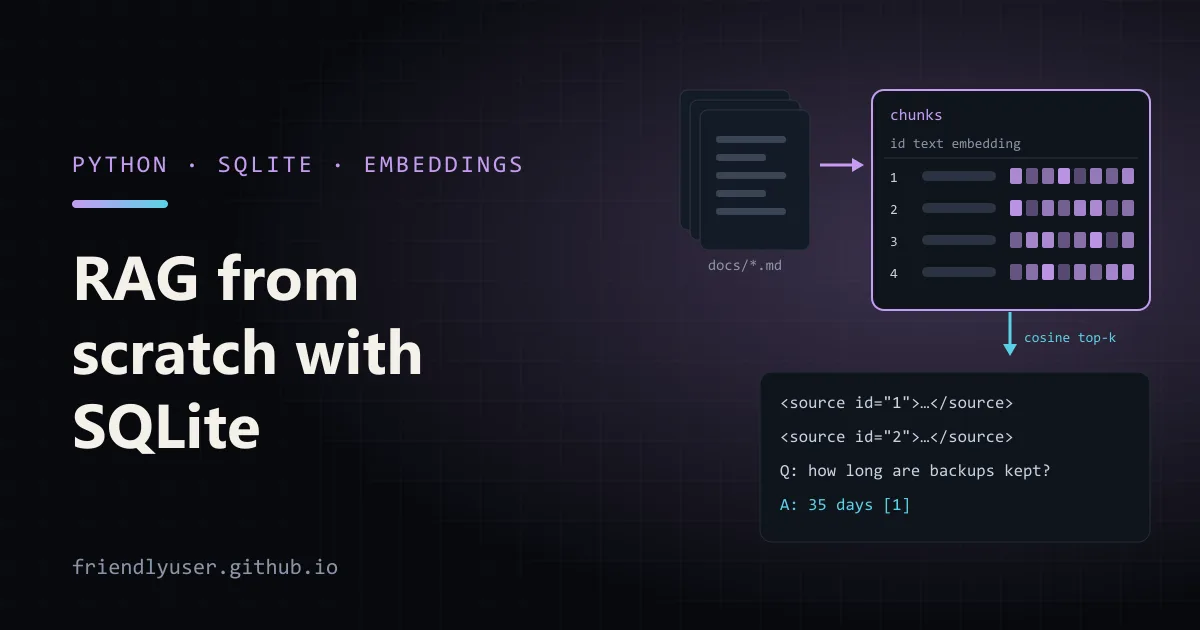
Retrieval-augmented generation (RAG) means: before asking the model a question, find the passages in your own documents that are most likely to contain the answer, and paste them into the prompt. The model answers from those passages instead of from memory, and it can cite them.
Frameworks wrap this in a dozen abstractions, which makes it hard to see that the core is four small steps: chunk, embed, retrieve, generate. This post builds each step in plain Python with SQLite as the vector store, so you can see what every piece does and where it fails. Examples use Python 3.12, sentence-transformers 5.2 with the all-MiniLM-L6-v2 model, NumPy 2.4, sqlite-vec 0.1.6, and claude-sonnet-4-5 through the anthropic SDK 0.79.
python -m venv .venv && source .venv/bin/activate # .venv\Scripts\activate on Windowspip install sentence-transformers numpy anthropic sqlite-vecexport ANTHROPIC_API_KEY=...The first run downloads the embedding model from Hugging Face (about 90 MB) and caches it. After that, everything except the final ask step runs offline.
For test data, put a few Markdown files in a docs/ folder. The examples below use three short product docs: backups.md (backup schedule, 35-day retention, point-in-time recovery), api_limits.md (600 requests per minute, HTTP 429, webhook retries) and sso.md (SAML, identity providers, SCIM).
The whole program
Section titled “The whole program”Here it is in one file. The sections below go through it step by step.
"""Minimal RAG over a folder of Markdown files, stored in SQLite.
python rag.py index docs/python rag.py search "how long are backups kept?"python rag.py ask "how long are backups kept?""""import osimport reimport sqlite3import sysfrom pathlib import Path
import numpy as npfrom sentence_transformers import SentenceTransformer
DB_PATH = "rag.db"EMBED_MODEL = "sentence-transformers/all-MiniLM-L6-v2"  # 384 dimensionsCLAUDE_MODEL = os.environ.get("CLAUDE_MODEL", "claude-sonnet-4-5")
_model: SentenceTransformer | None = None

def embed(texts: list[str]) -> np.ndarray:    """Return one L2-normalised float32 vector per text."""    global _model    if _model is None:        _model = SentenceTransformer(EMBED_MODEL)    vectors = _model.encode(texts, normalize_embeddings=True)    return np.asarray(vectors, dtype=np.float32)

# --- 1. chunk ---------------------------------------------------------------
def chunk(text: str, max_chars: int = 400) -> list[str]:    """Split on blank lines, then pack paragraphs into chunks of up to max_chars."""    paragraphs = [p.strip() for p in re.split(r"\n\s*\n", text) if p.strip()]    chunks: list[str] = []    current = ""    for para in paragraphs:        if current and len(current) + len(para) + 2 > max_chars:            chunks.append(current)            current = ""        current = f"{current}\n\n{para}" if current else para    if current:        chunks.append(current)    return chunks

# --- 2. embed and store -------------------------------------------------------
def connect() -> sqlite3.Connection:    db = sqlite3.connect(DB_PATH)    db.execute("""CREATE TABLE IF NOT EXISTS chunks (        id INTEGER PRIMARY KEY,        source TEXT NOT NULL,        position INTEGER NOT NULL,        text TEXT NOT NULL,        embedding BLOB NOT NULL    )""")    return db

def index(folder: str) -> None:    db = connect()    with db:        db.execute("DELETE FROM chunks")        for path in sorted(Path(folder).glob("**/*.md")):            pieces = chunk(path.read_text(encoding="utf-8"))            vectors = embed(pieces)            db.executemany(                "INSERT INTO chunks (source, position, text, embedding) VALUES (?, ?, ?, ?)",                [(path.name, i, text, vec.tobytes()) for i, (text, vec) in enumerate(zip(pieces, vectors))],            )            print(f"{path.name}: {len(pieces)} chunks")

# --- 3. retrieve -----------------------------------------------------------------
def search(query: str, k: int = 3) -> list[tuple[float, str, str]]:    db = connect()    rows = db.execute("SELECT source, text, embedding FROM chunks").fetchall()    if not rows:        return []    matrix = np.vstack([np.frombuffer(r[2], dtype=np.float32) for r in rows])    query_vec = embed([query])[0]    scores = matrix @ query_vec  # cosine similarity, because every vector is normalised    top = np.argsort(-scores)[:k]    return [(float(scores[i]), rows[i][0], rows[i][1]) for i in top]

# --- 4. generate with citations -----------------------------------------------------
def build_prompt(question: str, hits: list[tuple[float, str, str]]) -> str:    sources = "\n".join(        f'<source id="{n}" file="{source}">\n{text}\n</source>'        for n, (_, source, text) in enumerate(hits, start=1)    )    return (        f"<sources>\n{sources}\n</sources>\n\n"        f"Question: {question}\n\n"        "Answer using only the sources above. After each claim, cite the source id "        "in square brackets, like [1]. If the sources don't contain the answer, "        "say you don't know."    )

def ask(question: str) -> str:    import anthropic
    hits = search(question)    client = anthropic.Anthropic()    response = client.messages.create(        model=CLAUDE_MODEL,        max_tokens=1024,        system="You answer questions about our product documentation.",        messages=[{"role": "user", "content": build_prompt(question, hits)}],    )    answer = "".join(b.text for b in response.content if b.type == "text")    refs = "\n".join(f"[{n}] {source}" for n, (_, source, _) in enumerate(hits, start=1))    return f"{answer}\n\n{refs}"

if __name__ == "__main__":    command, arg = sys.argv[1], sys.argv[2]    if command == "index":        index(arg)    elif command == "search":        for score, source, text in search(arg):            print(f"{score:.3f}  {source}  {text[:70]!r}")    elif command == "ask":        print(ask(arg))
Step 1: chunk
Section titled “Step 1: chunk”You can’t embed a whole manual as one vector: the vector would average over every topic in it, and the prompt would be mostly irrelevant text. So documents are split into chunks, and each chunk is retrieved on its own.
chunk() splits on blank lines and packs whole paragraphs into chunks of up to max_chars. Splitting on paragraph boundaries matters more than the exact size. A chunk that ends mid-sentence loses the half of the sentence that made it relevant.
The size is a trade-off. Small chunks match questions precisely but lose context (“it lets you restore to any minute”: what does?). Large chunks keep context but dilute the embedding and fill the prompt. The 400 characters here suit the tiny sample docs. For real documentation, start around 1,000 characters and measure. One hard limit to know: all-MiniLM-L6-v2 reads at most 256 tokens per input and silently ignores the rest, so chunks much longer than about 1,000 characters lose their ends from the embedding.
Run the indexer:
python rag.py index docs/api_limits.md: 1 chunksbackups.md: 2 chunkssso.md: 2 chunksStep 2: embed and store
Section titled “Step 2: embed and store”An embedding model turns text into a fixed-length vector such that texts with similar meaning get vectors pointing in similar directions. all-MiniLM-L6-v2 produces 384 numbers per text, runs on a CPU, and is small enough to bundle with an app. Hosted embedding APIs give better retrieval on harder text. Anthropic doesn’t offer an embedding model and points to Voyage AI in its docs; the only change here would be the body of embed().
With normalize_embeddings=True, every vector has length 1, which makes the later maths a plain dot product.
Storage is an ordinary SQLite table. The vector goes into a BLOB as raw float32 bytes: vec.tobytes() writes 384 × 4 = 1,536 bytes, and np.frombuffer(blob, dtype=np.float32) reads them back without copying. Keep the dtype consistent on both sides. Writing float64 and reading float32 gives you garbage vectors and no error.
Because it is a normal table, the chunk text, source file and position sit next to the vector, and you can delete, update or filter chunks with ordinary SQL.
Step 3: retrieve
Section titled “Step 3: retrieve”search() loads every vector into a NumPy matrix, embeds the question with the same model, and computes all similarities in one matrix-vector product. For unit-length vectors, the dot product is the cosine similarity: 1 means same direction, around 0 means unrelated.
python rag.py search "how long are backups kept?"0.759 backups.md '# Backups\n\nNightly backups run at 02:00 UTC and copy the primary datab'0.333 backups.md 'Point-in-time recovery is available on the Business plan. It lets you '0.149 api_limits.md '# API rate limits\n\nThe public API allows 600 requests per minute per A'The right chunk wins by a wide margin. Now look at a harder one:
python rag.py search "we keep getting 429 errors"0.225 api_limits.md '# API rate limits\n\nThe public API allows 600 requests per minute per A'0.147 sso.md 'SCIM provisioning creates and deactivates users automatically. Deactiv'0.085 backups.md '# Backups\n\nNightly backups run at 02:00 UTC and copy the primary datab'Still correct, but with a low score. A small embedding model has a weak idea that “429” means “rate limit”. This is where keyword search helps: SQLite’s built-in FTS5 full-text index matches “429” exactly, and combining its results with the vector results (hybrid search) catches the questions each method misses alone.
Brute force is fine for a surprisingly long time. Scoring 100,000 chunks of 384 floats is one matrix product over about 150 MB of data, and you can keep the matrix in memory between queries instead of reading it from SQLite every time as this demo does.
The same search with sqlite-vec
Section titled “The same search with sqlite-vec”When you want the search inside SQLite (bigger tables, or no NumPy in the process), the sqlite-vec extension adds a vec0 virtual table that stores vectors and answers k-nearest-neighbour queries:
"""The same top-k search with sqlite-vec doing the distance math inside SQLite."""import sqlite3import sys
import sqlite_vec
from rag import DB_PATH, embed
db = sqlite3.connect(DB_PATH)db.enable_load_extension(True)sqlite_vec.load(db)db.enable_load_extension(False)
with db:    db.execute("CREATE VIRTUAL TABLE IF NOT EXISTS vec_chunks USING vec0(embedding float[384])")    db.execute("DELETE FROM vec_chunks")    # Copy the vectors over, keyed by the chunk id (same float32 bytes as before).    db.execute("INSERT INTO vec_chunks (rowid, embedding) SELECT id, embedding FROM chunks")
query_vec = embed([sys.argv[1]])[0]rows = db.execute(    """    SELECT chunks.source, chunks.text, knn.distance    FROM (        SELECT rowid, distance FROM vec_chunks        WHERE embedding MATCH ? AND k = 3    ) AS knn    JOIN chunks ON chunks.id = knn.rowid    ORDER BY knn.distance    """,    (sqlite_vec.serialize_float32(query_vec.tolist()),),).fetchall()
for source, text, distance in rows:    print(f"{distance:.3f}  {source}  {text[:60]!r}")
0.695 backups.md '# Backups\n\nNightly backups run at 02:00 UTC and copy the pri'1.155 backups.md 'Point-in-time recovery is available on the Business plan. It'1.304 api_limits.md '# API rate limits\n\nThe public API allows 600 requests per mi'The numbers are distances (smaller is closer), not similarities. The default metric is Euclidean (L2) distance, and for unit-length vectors it ranks results exactly like cosine similarity: 0.695 is sqrt(2 - 2 × 0.759). sqlite-vec 0.1 is pre-1.0 and its KNN search is brute force too, just in C, so the reason to use it is convenience and memory, not a different algorithm.
Some Python builds (the macOS system Python, for example) are compiled without extension loading, and enable_load_extension raises AttributeError. Use a Python from python.org, Homebrew or uv instead.
Step 4: generate with citations
Section titled “Step 4: generate with citations”build_prompt() wraps each retrieved chunk in a numbered <source> tag, puts the question after the sources, and gives three instructions: use only the sources, cite them by number, and say “I don’t know” when they don’t contain the answer. The function then prints the source list under the answer so a reader can check each [n].
python rag.py ask "how long are backups kept?"The answer comes back along the lines of “Backups are kept for 35 days [1]”, followed by the numbered file list.
The “I don’t know” instruction is the most important line in the prompt. Retrieval always returns k chunks, even when none of them is relevant. Without that instruction, the model fills the gap from general knowledge and cites a source that doesn’t say what it claims. Putting the long sources before the question also helps: the model reads the question last, right before it answers.
Claude also has a structured citations feature for document content blocks, which returns the exact cited spans instead of [n] markers in text. It is worth switching to once you need precise quotes. The bracket approach works with any model and is easy to check.
What to measure
Section titled “What to measure”RAG has two parts that fail independently, so measure them separately.
Retrieval first. Write questions that real users would ask, each with the file (or chunk) that answers it, and check whether that file appears in the top k:
"""Hit rate at k: how often the right file is among the retrieved chunks."""from rag import search
QUESTIONS = [    ("How long do you keep backups?", "backups.md"),    ("Can I restore the database to 10 minutes ago?", "backups.md"),    ("We keep getting 429 responses from the API", "api_limits.md"),    ("How many times is a failed webhook retried?", "api_limits.md"),    ("Does SSO work with Microsoft Entra ID?", "sso.md"),    ("When does a removed employee lose access?", "sso.md"),]
for k in (1, 3):    hits = 0    for question, expected in QUESTIONS:        sources = [source for _, source, _ in search(question, k=k)]        if expected in sources:            hits += 1        elif k == 1:            print(f"miss@1: {question!r} -> {sources}")    print(f"hit rate @{k}: {hits}/{len(QUESTIONS)}")
hit rate @1: 6/6hit rate @3: 6/6Three tiny files make this easy. On a real corpus with hundreds of similar pages, this number is where you see the effect of chunk size, the embedding model, and hybrid search. If the right chunk isn’t retrieved, no prompt can fix the answer.
Then the answers. For each question, check whether the answer is correct, whether every claim is supported by the cited source, and whether the model says “I don’t know” for questions the docs can’t answer. Include a few of those on purpose. Grading these needs a human or an LLM judge, so start with 20 to 50 questions you check by hand.
Gotchas
Section titled “Gotchas”- Re-embed everything when you change the embedding model. Vectors from different models are not comparable. Store the model name with the index and refuse to search a mismatched one.
- Long paragraphs aren’t split.
chunk()never breaks a paragraph, so one huge paragraph becomes one oversized chunk. Add a sentence-level split if your documents have those. - Add context to chunks. A chunk that says “It lets you restore to any minute” embeds poorly. Prefixing each chunk with its document title or heading before embedding often improves retrieval.
- Keep the index in sync. The demo rebuilds from scratch. For real use, store a hash of each file and re-embed only the ones that changed.
- You may not need RAG. If all your documents fit comfortably in the context window, putting them all in the prompt (with prompt caching) is simpler and avoids retrieval misses entirely.
Further reading
Section titled “Further reading”- sentence-transformers documentation
- sqlite-vec on GitHub
- Embeddings in the Claude docs
- SQLite FTS5, for adding keyword search
© 2026 David Li · Home · Blog · RSS ·Classic site · Built with Astro, Starlight and three.js · Logos:Font Awesome Free (CC BY 4.0)