Matrix builds and dependency caching in GitHub Actions
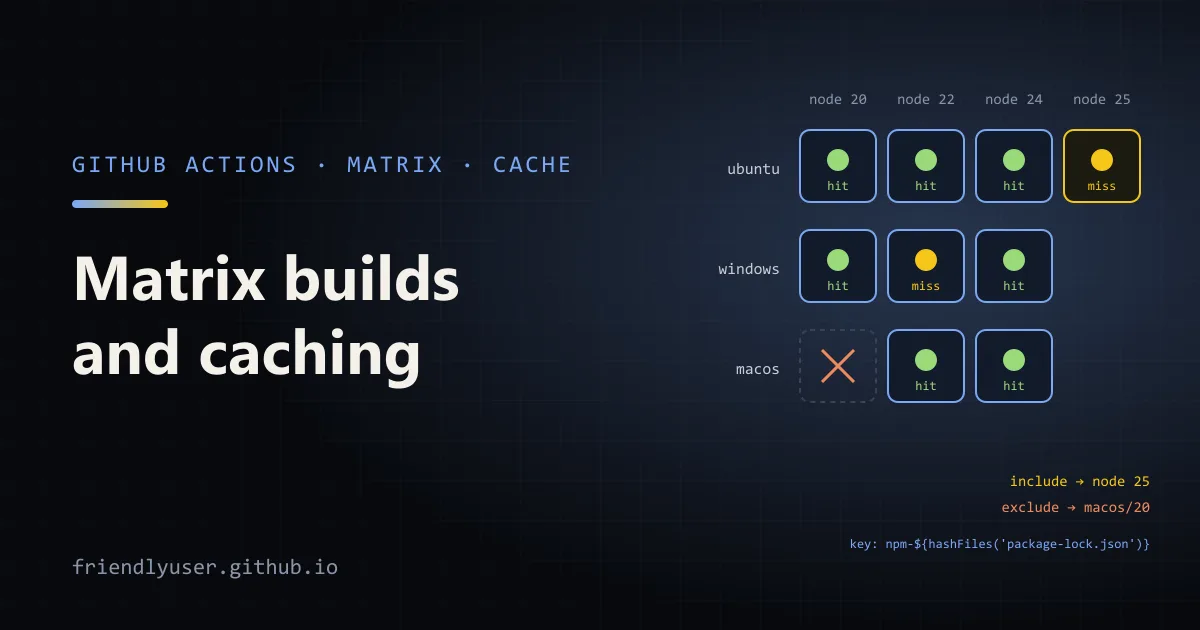
A build matrix runs the same job once for every combination of a few variables, such as operating system and runtime version, so one workflow tests every platform you support. Dependency caching makes each of those jobs cheaper by restoring downloaded packages instead of fetching them again. The two are worth learning together: a matrix multiplies your job count, and caching is what keeps that affordable.
This post covers strategy.matrix with include and exclude, fail-fast and max-parallel, the caching built into the setup-* actions, and actions/cache keys, restore keys and branch scope. Examples use actions/checkout@v6, actions/setup-node@v6 and actions/cache@v5, the current major versions in February 2026, with a Node.js project. The matrix and caching rules are the same for any language.
A basic matrix
Section titled “A basic matrix”name: Test
on: push: branches: [main] pull_request:
jobs: test: name: test (${{ matrix.os }}, node ${{ matrix.node }}) runs-on: ${{ matrix.os }} continue-on-error: ${{ matrix.experimental == true }} strategy: fail-fast: false max-parallel: 4 matrix: os: [ubuntu-latest, windows-latest, macos-latest] node: [20, 22, 24] exclude: - os: macos-latest node: 20 include: - os: ubuntu-latest node: 24 coverage: true - os: ubuntu-latest node: 25 experimental: true steps: - uses: actions/checkout@v6 - uses: actions/setup-node@v6 with: node-version: ${{ matrix.node }} cache: npm - run: npm ci - run: npm test - if: ${{ matrix.coverage }} run: npm run coverageThe two lists os and node produce every combination: 3 × 3 = 9 jobs. Each job sees its values in the matrix context, so runs-on: ${{ matrix.os }} picks the runner and node-version: ${{ matrix.node }} the runtime. The name: line puts both values in the job name, which makes the checks list on a pull request readable.
exclude and include
Section titled “exclude and include”exclude removes combinations. Here it drops macOS with Node 20, leaving 8 jobs.
include is the one people find confusing, because it does two different things:
- If an
includeentry can be added to an existing combination without changing any of the original matrix values, it is merged into it.{os: ubuntu-latest, node: 24, coverage: true}matches the existing Ubuntu/Node 24 job, so that job gets an extracoverage: truevalue, and only it runs the coverage step. No new job is created. - If it can’t, because it would overwrite an original value, it is added as a new combination. Node 25 isn’t in the
nodelist, so{os: ubuntu-latest, node: 25, experimental: true}becomes a ninth job.
exclude is applied before include, so you can’t exclude a combination that an include adds. You can also build a matrix from include alone, as a plain list of jobs, when the combinations don’t form a neat grid.
A matrix can generate at most 256 jobs per workflow run.
fail-fast, max-parallel and experimental legs
Section titled “fail-fast, max-parallel and experimental legs”fail-fastdefaults totrue: when any job in the matrix fails, GitHub cancels the in-progress and queued jobs in it. That saves runner minutes but hides whether the failure is specific to one platform. I set it tofalsefor test matrices, because “fails on Windows only” is the information I want.max-parallelcaps how many matrix jobs run at once. By default GitHub runs as many as runners are available. Lower it if the jobs share an external resource, such as a test database or an API rate limit.continue-on-errorat the job level, driven by a matrix value, lets an experimental leg fail without failing the workflow. Here the Node 25 job can fail while the run as a whole stays green.
Caching with setup-* actions
Section titled “Caching with setup-* actions”The simplest cache is the one built into the setup actions. actions/setup-node with cache: npm caches npm’s download cache (not node_modules), keyed on a hash of package-lock.json. The same one-line option exists elsewhere:
| Action | Input | Values |
|---|---|---|
actions/setup-node | cache | npm, yarn, pnpm |
actions/setup-python | cache | pip, pipenv, poetry |
actions/setup-java | cache | maven, gradle, sbt |
actions/setup-go | cache | on by default, keyed on go.sum |
For monorepos or unusual lockfile locations, pass cache-dependency-path with the lockfile path or a glob.
Since setup-node v5, caching is also turned on automatically for projects whose package.json has a packageManager (or devEngines.packageManager) field. In v6 this automatic behaviour applies only to npm; Yarn and pnpm need the explicit cache input. To turn it off, set package-manager-cache: false.
npm ci still runs on every job. The cache only saves the network download; installing from it is much faster than fetching from the registry, but not free. Caching node_modules directly saves more time but breaks when the runtime version or OS differs from the one that built it, which is exactly what a matrix varies.
actions/cache for everything else
Section titled “actions/cache for everything else”For caches the setup actions don’t cover, such as linter caches, compiled assets or downloaded browsers, use actions/cache. It takes a path to save, a key to save it under, and optional restore-keys to fall back to.
How a key is matched. When the job starts, the action looks for an exact match on key, then a prefix match on key, then each restore-keys prefix in order, picking the most recent cache for a partial match. It does this in the current branch first, then the default branch.
Caches are immutable. If an entry for key already exists, it isn’t overwritten at the end of the job. That has a consequence for incremental caches like ESLint’s: if the key is only a hash of the lockfile, the first run saves a cache and every later run restores the same stale one. The fix is a key that is unique per run, with a restore-keys prefix that finds the latest:
name: Lint
on:  push:    branches: [main]  pull_request:
jobs:  lint:    runs-on: ubuntu-latest    steps:      - uses: actions/checkout@v6      - uses: actions/setup-node@v6        with:          node-version: 24          cache: npm      - run: npm ci
      # Restore on every run; the key includes the commit, so it never matches exactly.      - id: eslint-cache        uses: actions/cache/restore@v5        with:          path: .eslintcache          key: eslint-${{ runner.os }}-${{ hashFiles('package-lock.json', 'eslint.config.*') }}-${{ github.sha }}          restore-keys: |            eslint-${{ runner.os }}-${{ hashFiles('package-lock.json', 'eslint.config.*') }}-
      - run: npx eslint --cache --cache-location .eslintcache .
      # Save only from main, so pull requests don't fill the cache with entries nobody else can use.      - if: ${{ github.ref == 'refs/heads/main' }}        uses: actions/cache/save@v5        with:          path: .eslintcache          key: ${{ steps.eslint-cache.outputs.cache-primary-key }}
This uses the split actions/cache/restore and actions/cache/save actions instead of the combined actions/cache, which restores at the start and saves automatically when the job succeeds. Splitting them gives control over when to save. The restore step’s cache-primary-key output passes the computed key to the save step, so it isn’t written twice.
hashFiles() hashes the matching files, so changing the lockfile or the ESLint config starts a new cache line. runner.os belongs in the key whenever the cached files differ by platform, which in a matrix is most of the time. If the content also depends on the runtime version, add matrix.node too.
When key matches exactly, the cache-hit output is 'true'; a restore-keys match sets it to 'false'. Use it to skip work only when the cache is guaranteed complete, for example if: steps.cache.outputs.cache-hit != 'true' before a download step.
Cache scope: branches and pull requests
Section titled “Cache scope: branches and pull requests”Caches are scoped by branch, which explains most “why didn’t my cache hit?” questions:
- A run can restore caches created on its own branch and on the default branch. A pull request run can also restore from its base branch.
- A run can’t restore caches from sibling or child branches. Two feature branches don’t share caches.
- A
pull_requestrun saves under the pull request’s merge ref (refs/pull/<n>/merge). Only later runs of that same pull request can restore it.
So the default branch’s cache is the one everything else falls back to. Make sure something keeps it warm: a workflow that runs on push to main and saves the caches, as the lint workflow above does. Without that, every new branch starts cold.
Limits and housekeeping
Section titled “Limits and housekeeping”- By default a repository gets 10 GB of cache storage. When it’s full, the least recently accessed entries are evicted first. Since November 2025, admins on paid plans can raise the limit, with usage above the included 10 GB billed.
- Entries not accessed for 7 days are removed.
- Per-run keys like the ESLint example create many entries. They are small and the oldest are evicted first, but avoid per-run keys for large caches.
actions/cache@v5runs on Node 24 and needs Actions Runner 2.327.1 or newer. GitHub-hosted runners already meet that; self-hosted runners may need an update.- You can list and delete caches under the repository’s Actions > Caches page, or with
gh cache listandgh cache delete.
An older post on this blog covers caching npm dependencies with actions/cache in a deployment workflow.
Further reading
Section titled “Further reading”© 2026 David Li · Home · Blog · RSS ·Classic site · Built with Astro, Starlight and three.js · Logos:Font Awesome Free (CC BY 4.0)