Watching files for changes in Rust with the notify crate
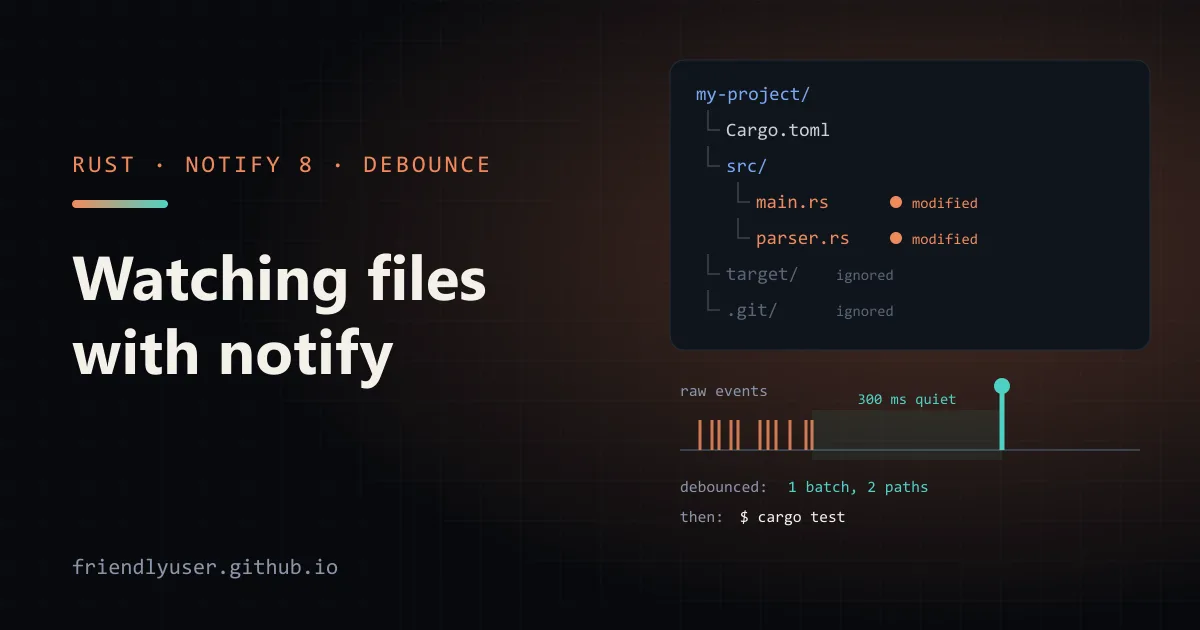
notify is the cross-platform file watching crate most Rust tools use. It wraps each operating system’s native API (inotify on Linux, FSEvents on macOS, ReadDirectoryChangesW on Windows, kqueue on the BSDs) behind one Watcher trait, with a polling fallback for filesystems that don’t send events.
This post covers raw events, why you almost always want to debounce them, a small “rerun a command when files change” tool, and the platform limits you hit in practice. The examples use notify 8.2, notify-debouncer-mini 0.7 and notify-debouncer-full 0.7, which are released together and depend on the same notify version.
Raw events
Section titled “Raw events”[dependencies]notify = "8.2"use std::path::Path;use std::sync::mpsc;
use notify::{Event, EventKind, RecursiveMode, Result, Watcher};
fn main() -> Result<()> { let (tx, rx) = mpsc::channel::<Result<Event>>();
// Picks inotify, FSEvents, ReadDirectoryChangesW or kqueue for this OS. let mut watcher = notify::recommended_watcher(tx)?; watcher.watch(Path::new("."), RecursiveMode::Recursive)?;
for res in rx { match res { Ok(event) => match event.kind { EventKind::Create(_) => println!("created {:?}", event.paths), EventKind::Modify(_) => println!("modified {:?}", event.paths), EventKind::Remove(_) => println!("removed {:?}", event.paths), _ => {} // access events and anything else }, Err(e) => eprintln!("watch error: {e}"), } } Ok(())}recommended_watcher takes an event handler. That can be a closure, or, as here, a std::sync::mpsc::Sender, which gives you a plain blocking loop on the receiving side. Events are delivered on a background thread that notify owns.
The watcher stops when it’s dropped. A classic bug is creating it inside a helper function that returns. Everything compiles, and you never see an event. Keep the watcher alive as long as you want events: store it in a struct, or keep it in main as above.
Event kinds
Section titled “Event kinds”Every Event has a kind and a list of paths. EventKind is a two-level enum:
Create(CreateKind):File,Folder,Any,OtherModify(ModifyKind):Data(...)for content,Metadata(...)for permissions or timestamps,Name(RenameMode)for renames, plusAnyandOtherRemove(RemoveKind):File,Folder,Any,OtherAccess(AccessKind): opens, reads and closes, where the platform reports themAnyandOther
The detail you get depends on the backend. inotify tells you a file was closed after writing. FSEvents often only says “something changed here”. When one backend reports Modify(Data(Content)), another may report Modify(Any). Match on the outer variant unless you’ve checked what each platform you support actually sends.
Run the program, save a file in your editor, and count the events. One save is often several of them: a temporary file created, written, renamed over the original, and metadata updated. The exact sequence depends on the editor, which is the main reason to debounce.
Debouncing with notify-debouncer-mini
Section titled “Debouncing with notify-debouncer-mini”A debouncer collects events and only emits them once a path has been quiet for a given timeout. The mini debouncer is deliberately simple: it emits one event per path per timeout window, without saying what kind of change it was.
[dependencies]notify-debouncer-mini = "0.7"The crate re-exports notify, so you don’t need a separate dependency unless you want to set notify’s features.
use std::path::Path;use std::sync::mpsc;use std::time::Duration;
use notify_debouncer_mini::notify::{RecursiveMode, Watcher};use notify_debouncer_mini::{new_debouncer, DebounceEventResult};
fn main() -> Result<(), Box<dyn std::error::Error>> {    let (tx, rx) = mpsc::channel::<DebounceEventResult>();    let mut debouncer = new_debouncer(Duration::from_millis(300), tx)?;    debouncer        .watcher()        .watch(Path::new("."), RecursiveMode::Recursive)?;
    for result in rx {        match result {            Ok(events) => {                for event in events {                    println!("{:?} {}", event.kind, event.path.display());                }            }            Err(e) => eprintln!("watch error: {e}"),        }    }    Ok(())}
Each DebouncedEvent has a path and a kind that is either Any or AnyContinuous. The second means the path kept changing for longer than the timeout, as with a large file being copied in or a log being appended to. You get a batch (Vec<DebouncedEvent>) per tick, so one save produces one entry per touched path instead of a burst.
A small rerun-on-change tool
Section titled “A small rerun-on-change tool”That’s enough to build the core of tools like cargo watch: watch a directory, and run a command whenever something in it changes.
use std::path::{Path, PathBuf};use std::process::Command;use std::sync::mpsc;use std::time::Duration;
use notify_debouncer_mini::notify::{RecursiveMode, Watcher};use notify_debouncer_mini::{new_debouncer, DebounceEventResult};
const USAGE: &str = "usage: watchrun <dir> <command> [args...]";
/// Paths inside these directories never trigger a run.fn ignored(relative: &Path) -> bool {    relative.components().any(|c| {        let part = c.as_os_str();        part == "target" || part == ".git" || part == "node_modules"    })}
fn run(program: &str, args: &[String]) {    match Command::new(program).args(args).status() {        Ok(status) => println!("--- {program} finished: {status}"),        Err(err) => eprintln!("--- could not start {program}: {err}"),    }}
fn main() -> Result<(), Box<dyn std::error::Error>> {    let mut args = std::env::args().skip(1);    let dir = args.next().ok_or(USAGE)?;    let program = args.next().ok_or(USAGE)?;    let program_args: Vec<String> = args.collect();
    // Canonicalize so event paths share a prefix we can strip.    let root = std::fs::canonicalize(&dir)?;
    let (tx, rx) = mpsc::channel::<DebounceEventResult>();    let mut debouncer = new_debouncer(Duration::from_millis(300), tx)?;    debouncer.watcher().watch(&root, RecursiveMode::Recursive)?;
    println!("watching {}", root.display());    run(&program, &program_args);
    for result in rx {        let events = match result {            Ok(events) => events,            Err(err) => {                eprintln!("watch error: {err}");                continue;            }        };
        let changed: Vec<PathBuf> = events            .into_iter()            .map(|event| event.path)            .filter(|path| !ignored(path.strip_prefix(&root).unwrap_or(path.as_path())))            .collect();        if changed.is_empty() {            continue;        }
        for path in &changed {            println!("changed: {}", path.display());        }        run(&program, &program_args);    }    Ok(())}
Try it on a Rust project:
cargo run --release -- ../my-project cargo test --manifest-path ../my-project/Cargo.tomlNotes on the design:
- Ignore build output. Without the
ignoredcheck,cargo testwrites intotarget/, which triggers another run, which writes intotarget/again. Any command that writes inside the watched tree needs its output paths ignored. The check runs on the path relative to the root, so a parent directory that happens to be calledtargetdoesn’t hide everything. - Why canonicalize. Event paths are built from the path you watched, but not always character for character: FSEvents on macOS can report the resolved path when the watched path goes through a symlink (
/tmpis one), and a relative path like.would make every event path start with./. Canonicalizing first gives the strip inignoreda predictable prefix. - Runs are sequential. The command runs on the main thread, so events arriving during a run wait in the channel and trigger one more run afterwards. Tools like
cargo watchandwatchexecalso offer to kill and restart a long-running command, such as a server, which needsCommand::spawnandChild::killinstead ofstatus.
For anything beyond a personal script, watchexec is a mature tool built on these crates. It handles .gitignore, restarting, and signal forwarding.
When you need event kinds: notify-debouncer-full
Section titled “When you need event kinds: notify-debouncer-full”The mini debouncer throws away what kind of change happened. notify-debouncer-full keeps it and does more work to make events coherent:
- it matches rename
FromandToevents into a single rename event, - it tracks file IDs on platforms that need it, to stitch renames together,
- it emits one
Removefor a deleted directory instead of one per file (on inotify), - it suppresses duplicate creates, and
Modifyevents right after aCreate.
[dependencies]notify-debouncer-full = "0.7"use std::sync::mpsc;use std::time::Duration;
use notify_debouncer_full::{new_debouncer, notify::RecursiveMode, DebounceEventResult};
fn main() -> Result<(), Box<dyn std::error::Error>> { let (tx, rx) = mpsc::channel::<DebounceEventResult>(); // None: let the debouncer pick its tick rate (a quarter of the timeout). let mut debouncer = new_debouncer(Duration::from_millis(500), None, tx)?; debouncer.watch(".", RecursiveMode::Recursive)?;
for result in rx { match result { Ok(events) => { for event in events { println!("{:?} {:?}", event.kind, event.paths); } } Err(errors) => { for error in errors { eprintln!("watch error: {error}"); } } } } Ok(())}Two API differences from the mini version: watch is a method on the debouncer itself (in 0.7, .watcher() is deprecated and does nothing), and errors arrive as a Vec<notify::Error>. Each DebouncedEvent dereferences to a notify::Event, so event.kind and event.paths work directly, and it adds a time field with when the event happened.
Use the full debouncer when you react differently to creates, edits, deletes and renames, for example when syncing files somewhere. If any change means “rebuild”, the mini one is simpler.
Platform notes
Section titled “Platform notes”Linux (inotify). A recursive watch adds one inotify watch per directory under the root. notify walks the tree when you call watch, and adds new directories as they appear. Every watch counts against fs.inotify.max_user_watches, and every watcher instance against fs.inotify.max_user_instances. Both are per user, shared with your editor, your IDE’s language server and anything else watching files. On older kernels the default for watches was 8192, which a big node_modules exhausts. When you run out, watch fails with “No space left on device” (ENOSPC), which confuses everyone the first time. Raise the limits with sysctl:
sudo sysctl fs.inotify.max_user_watches=524288sudo sysctl fs.inotify.max_user_instances=512Add the same settings to a file in /etc/sysctl.d/ to keep them after a reboot. Better still, don’t watch directories you’ll ignore anyway. Watch src/ and a few config files instead of the whole project root.
macOS (FSEvents). FSEvents watches whole directory trees cheaply, so there’s no limit to hit. It may coalesce changes and report less detail about each one, as described above. notify can use kqueue instead (the macos_kqueue feature), but kqueue needs an open file descriptor per watched file, so it’s a poor fit for large trees.
Windows. ReadDirectoryChangesW is recursive natively. Under a heavy burst of changes, its buffer can overflow and events are lost. Treat a watch error as “something changed, rescan”.
Network filesystems, WSL and containers. NFS and SMB mounts often don’t deliver change events at all. The same goes for a Windows directory watched from inside WSL, and for some Docker bind mounts. For those, use notify::PollWatcher, which compares file metadata on an interval you configure. It works everywhere, but it costs CPU and I/O proportional to the number of files, and it notices changes only as often as it polls.
Gotchas
Section titled “Gotchas”- Events are hints, not a log. Backends drop, merge and reorder events under load. Code that needs the true state should rescan the affected directory when an event arrives, and not rebuild state purely from the event stream.
- Watching a single file is fragile. Editors that save by writing a new file and renaming it over the old one replace the inode you were watching. Watch the parent directory and filter by file name.
- Parent deletion. If the watched directory itself is deleted or renamed, you may get nothing further. Watch its parent if that case matters.
- Don’t do slow work in a closure handler. A closure passed to
recommended_watcherruns on notify’s event thread. Send events to a channel and do the work elsewhere.
Further reading
Section titled “Further reading”- notify documentation, especially the “Known Problems” section
- notify-debouncer-mini and notify-debouncer-full
- inotify(7) man page, for the limits and their meaning
© 2026 David Li · Home · Blog · RSS ·Classic site · Built with Astro, Starlight and three.js · Logos:Font Awesome Free (CC BY 4.0)