Writing Reusable Terraform Modules: Inputs, Outputs and Versioning
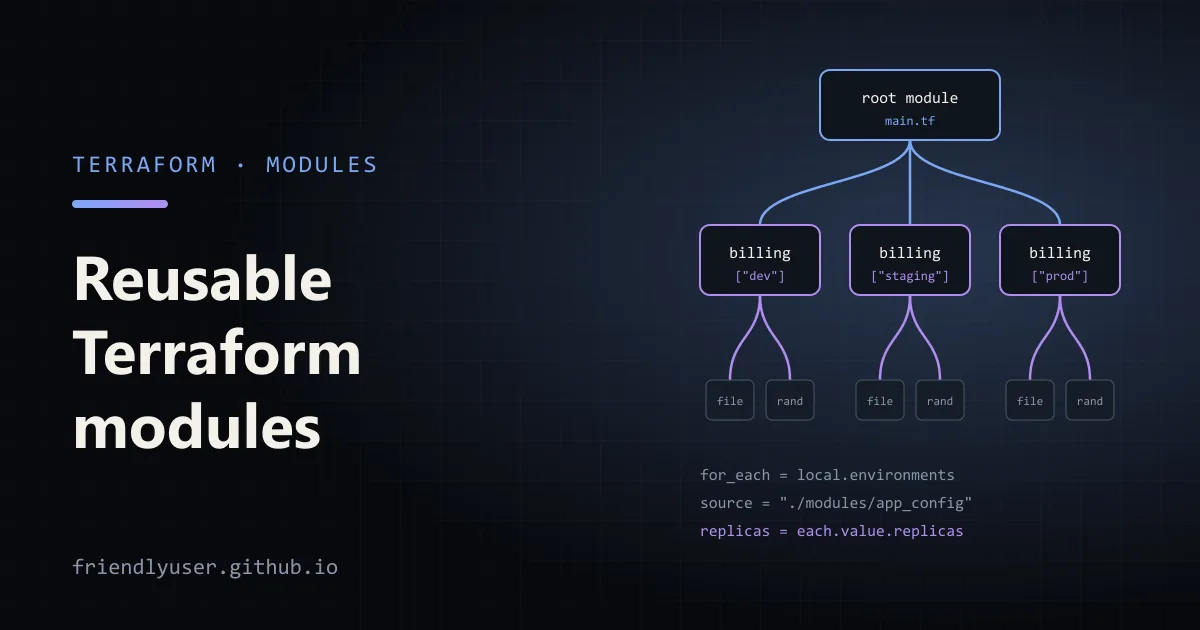
A Terraform module is a directory of .tf files. Every configuration is already one (the root module), and when it calls another directory with a module block, that directory becomes a child module. Modules are how you stop copying the same twenty resources into every environment: write them once, give them inputs and outputs, and call them as often as you need.
This post builds a small module that uses only the random and local providers, so you can run every example on a laptop with no cloud account. The structure, validation, outputs and versioning work the same way for a module that creates real cloud resources. Examples are written for Terraform 1.9 or later, since one validation rule needs 1.9.
Module structure
Section titled “Module structure”The convention, used by the public registry and most teams:
.├── main.tf # root module: calls the child module└── modules/ └── app_config/ ├── versions.tf # required Terraform and provider versions ├── variables.tf # inputs ├── main.tf # resources and locals ├── outputs.tf # outputs └── README.mdTerraform doesn’t care about file names; it reads every .tf file in the directory. The split is for people. A reader should be able to open variables.tf and outputs.tf and understand how to use the module without reading main.tf.
The example module, app_config, generates a JSON config file and a secrets file for one service in one environment, with a random instance suffix and API key.
Declaring requirements
Section titled “Declaring requirements”modules/app_config/versions.tf:
terraform {  required_version = ">= 1.9"
  required_providers {    local = {      source  = "hashicorp/local"      version = ">= 2.4"    }    random = {      source  = "hashicorp/random"      version = ">= 3.5"    }  }}
A reusable module states minimum versions with >=. The root module, which is what actually gets deployed, picks the exact range. If every module pinned ~> 2.4 and another needed ~> 2.5, Terraform couldn’t find a version that satisfies both.
Note that there is no provider "random" {} block. Reusable modules declare which providers they need but leave configuring them to the caller. A module with its own provider blocks can’t be used with for_each or count, which rules out the most useful way to call it.
Inputs with validation
Section titled “Inputs with validation”modules/app_config/variables.tf:
variable "name" {  description = "Service name, used in file names and the generated config."  type        = string
  validation {    condition     = can(regex("^[a-z][a-z0-9-]{2,30}$", var.name))    error_message = "name must be 3-31 characters: lowercase letters, digits and hyphens, starting with a letter."  }}
variable "environment" {  description = "Deployment environment."  type        = string
  validation {    condition     = contains(["dev", "staging", "prod"], var.environment)    error_message = "environment must be one of: dev, staging, prod."  }}
variable "replicas" {  description = "Number of instances to run."  type        = number  default     = 1
  validation {    condition     = var.replicas >= 1 && var.replicas <= 10 && floor(var.replicas) == var.replicas    error_message = "replicas must be a whole number from 1 to 10."  }
  # Cross-variable validation (Terraform 1.9+): prod needs redundancy.  validation {    condition     = var.environment != "prod" || var.replicas >= 2    error_message = "prod needs at least 2 replicas."  }}
variable "settings" {  description = "Extra key/value settings merged into the config."  type        = map(string)  default     = {}}
variable "output_dir" {  description = "Directory to write the config file to."  type        = string  default     = "generated"}
Some guidelines:
- Always set
type. Without it, a variable accepts anything, and mistakes surface as confusing errors deep inside the module instead of at the call site. - A variable with no
defaultis required. Callers get an error if they leave it out. Give defaults only where there is a sensible one. - Validation runs before anything is planned. A failing
conditionstops Terraform with an “Invalid value for variable” error that shows yourerror_message, pointing at the caller’s line. Write the message for the person calling the module. can(...)turns an expression that would error (likeregexwith no match) intofalse, which makes it the usual wrapper for pattern checks.- Cross-variable rules. Since Terraform 1.9, a condition can refer to other variables, like the
prodrule above. On older versions, only the variable being validated was allowed.
Use sensitive = true on inputs that carry secrets, so Terraform hides their values in plan output.
Resources and outputs
Section titled “Resources and outputs”modules/app_config/main.tf:
resource "random_password" "api_key" {  length  = 32  special = false}
resource "random_id" "suffix" {  byte_length = 3}
locals {  full_name = "${var.name}-${var.environment}-${random_id.suffix.hex}"
  config = {    service     = var.name    environment = var.environment    instance_id = local.full_name    replicas    = var.replicas    log_level   = var.environment == "prod" ? "info" : "debug"    settings    = var.settings  }}
resource "local_file" "config" {  filename        = "${path.root}/${var.output_dir}/${var.name}.${var.environment}.json"  content         = jsonencode(local.config)  file_permission = "0644"}
resource "local_sensitive_file" "secrets" {  filename        = "${path.root}/${var.output_dir}/${var.name}.${var.environment}.secrets.env"  content         = "API_KEY=${random_password.api_key.result}\n"  file_permission = "0600"}
path.root is the root module’s directory, so the files land next to the caller’s configuration rather than inside the module.
modules/app_config/outputs.tf:
output "full_name" {  description = "Generated instance name, e.g. orders-dev-a1b2c3."  value       = local.full_name}
output "config_file" {  description = "Path of the generated JSON config."  value       = local_file.config.filename}
output "config" {  description = "The config as an object, for use by other modules."  value       = local.config}
output "api_key" {  description = "Generated API key."  value       = random_password.api_key.result  sensitive   = true}
Outputs are the module’s public interface. The caller can only read what you output: module.orders.full_name works, module.orders.random_id.suffix does not. An output that exposes a sensitive value must itself be marked sensitive = true, or Terraform refuses to plan.
Calling the module
Section titled “Calling the module”The root main.tf pins provider versions and calls the module twice: once directly, and once per environment with for_each:
terraform {  required_version = ">= 1.9"
  required_providers {    local = {      source  = "hashicorp/local"      version = "~> 2.5"    }    random = {      source  = "hashicorp/random"      version = "~> 3.6"    }  }}
module "orders" {  source = "./modules/app_config"
  name        = "orders"  environment = "dev"  settings = {    database_url = "postgres://localhost/orders"  }}
locals {  environments = {    dev     = { replicas = 1 }    staging = { replicas = 2 }    prod    = { replicas = 3 }  }}
module "billing" {  source   = "./modules/app_config"  for_each = local.environments
  name        = "billing"  environment = each.key  replicas    = each.value.replicas}
output "orders_config_file" {  value = module.orders.config_file}
output "billing_instances" {  value = { for env, m in module.billing : env => m.full_name }}
Run it:
terraform init # downloads the random and local providers, links the local moduleterraform planterraform applycat generated/billing.prod.jsonterraform output billing_instancesThe plan lists resources by their full address, such as module.billing["prod"].local_file.config and module.orders.random_id.suffix. That address is how you target one instance (terraform plan -target='module.billing["prod"]') or move it in state.
Change prod = { replicas = 3 } to 1 and run terraform plan again to see the validation error. Nothing gets planned, and the error points at the module call that passed the bad value.
for_each over modules
Section titled “for_each over modules”for_each on a module block works the same as on a resource. It takes a map or a set of strings, and inside the block each.key and each.value refer to the current element. Prefer for_each over count: instances are keyed by name (module.billing["staging"]), so removing staging from the map destroys only staging. With count, removing an element from the middle of a list shifts the indexes of everything after it, and Terraform plans to replace those too.
Local, Git and registry sources
Section titled “Local, Git and registry sources”source decides where the module comes from:
# A local path: always starts with ./ or ../, no versionmodule "local_example" {  source = "./modules/app_config"}
# A public registry module: NAMESPACE/NAME/PROVIDER, with a version constraintmodule "vpc" {  source  = "terraform-aws-modules/vpc/aws"  version = "~> 6.0"  # ... inputs ...}
# A Git repository, pinned to a tag with ?ref=module "app_config" {  source = "git::https://github.com/acme/terraform-app-config.git?ref=v1.2.0"}
# A subdirectory of a repository: note the double slashmodule "network" {  source = "git::https://github.com/acme/infra-modules.git//network?ref=v3.0.1"}
The version argument only works for registry sources (the public registry, or a private registry in HCP Terraform or Terraform Enterprise). For Git sources, the version is whatever ref you check out, so pin it to a tag or a commit hash, never a branch.
After changing a source or version, run terraform init again. terraform init -upgrade fetches the newest module and provider versions that match your constraints.
Versioning your own modules
Section titled “Versioning your own modules”If more than one configuration uses a module, give it a version:
- Put the module in its own repository (or a directory of a monorepo) and tag releases with semantic versions:
v1.2.0. - Breaking changes get a new major version: removing or renaming a variable or output, adding a required variable, or changing resource addresses so that callers would see a destroy and re-create.
- Callers pin with
?ref=v1.2.0(Git) orversion = "~> 1.2"(registry). The pessimistic~>operator allows newer minor and patch releases of 1.x but not 2.0. - When you rename resources inside a module, add a
movedblock so existing state follows the rename instead of being destroyed:
moved { from = local_file.cfg to = local_file.config}Testing a module
Section titled “Testing a module”terraform test (Terraform 1.6 and later) runs .tftest.hcl files from the module’s tests/ directory. A test can check that validation rejects bad input:
variables {  name        = "orders"  environment = "prod"  replicas    = 1}
run "prod_needs_two_replicas" {  command         = plan  expect_failures = [var.replicas]}
Run terraform init and then terraform test inside modules/app_config. The run passes only if planning fails on the replicas validation.
Gotchas
Section titled “Gotchas”- The lock file doesn’t cover modules.
.terraform.lock.hclrecords provider versions and hashes, not module versions. Pin modules explicitly withversionor?ref=. - Don’t wrap a single resource in a module. A module that only passes every argument through to one resource adds a layer of indirection and no value. Modules pay off when they group several resources with a decision built in.
- Avoid deep nesting. A module that calls a module that calls a module is hard to debug and hard to change. One or two levels is plenty.
- Inputs are the API. Every variable you add is something you have to support. Start with few inputs and good defaults, and add more when a caller needs them.
countandfor_eachcan’t depend on values only known after apply. The keys of the map you pass tofor_eachmust be known at plan time.
Further reading
Section titled “Further reading”© 2026 David Li · Home · Blog · RSS ·Classic site · Built with Astro, Starlight and three.js · Logos:Font Awesome Free (CC BY 4.0)