Timeouts and cancellation for fetch with AbortSignal
fetch has no timeout option. A request to a server that accepts the connection and never answers can stay pending for minutes, and a search box that fires a request per keystroke can have its answers arrive out of order. Both problems have the same fix: pass an AbortSignal to fetch and abort it when you no longer want the response.
The API is small: AbortController for cancelling by hand, AbortSignal.timeout() for deadlines, and AbortSignal.any() for combining them. It works the same way in browsers and in Node. The examples here were run on Node 24.14 and type-checked with TypeScript 5.9.
Cancelling by hand with AbortController
Section titled “Cancelling by hand with AbortController”An AbortController owns a signal. Pass controller.signal to fetch, call controller.abort(), and the promise rejects:
const controller = new AbortController();const request = fetch("/api/report", { signal: controller.signal });
cancelButton.onclick = () => controller.abort();
try {  const res = await request;  console.log(await res.json());} catch (err) {  if (err.name === "AbortError") console.log("cancelled");  else throw err;}
A controller is single-use. Once aborted, its signal stays aborted, and any later fetch that receives it rejects immediately. Create a new controller per request.
Deadlines with AbortSignal.timeout
Section titled “Deadlines with AbortSignal.timeout”For a timeout you don’t need a controller or a setTimeout. AbortSignal.timeout(ms) returns a signal that aborts itself:
const res = await fetch(url, { signal: AbortSignal.timeout(5_000) });The two kinds of abort reject with different errors, which is what lets you treat them differently. Both are DOMExceptions:
| Cause | err.name | Message in Node 24 |
|---|---|---|
controller.abort() | "AbortError" | This operation was aborted |
AbortSignal.timeout() fires | "TimeoutError" | The operation was aborted due to timeout |
controller.abort(reason) | whatever reason is | fetch rejects with reason itself |
The last row is easy to miss: if you pass a reason, such as controller.abort(new Error("user navigated away")), fetch rejects with that exact value, not with an AbortError. Code that checks err.name === "AbortError" won’t recognise it. I’d only pass a reason if every catch site knows about it.
The timeout covers the body too
Section titled “The timeout covers the body too”The signal stays attached to the response body. If headers arrive in time but the body is slow, res.json() or res.text() rejects with the same TimeoutError. That matters for large downloads: a 5 second timeout on a request whose body takes a minute to stream will fail partway through. Set the deadline for the whole operation, or read the body with its own signal if you need separate limits.
Combining signals with AbortSignal.any
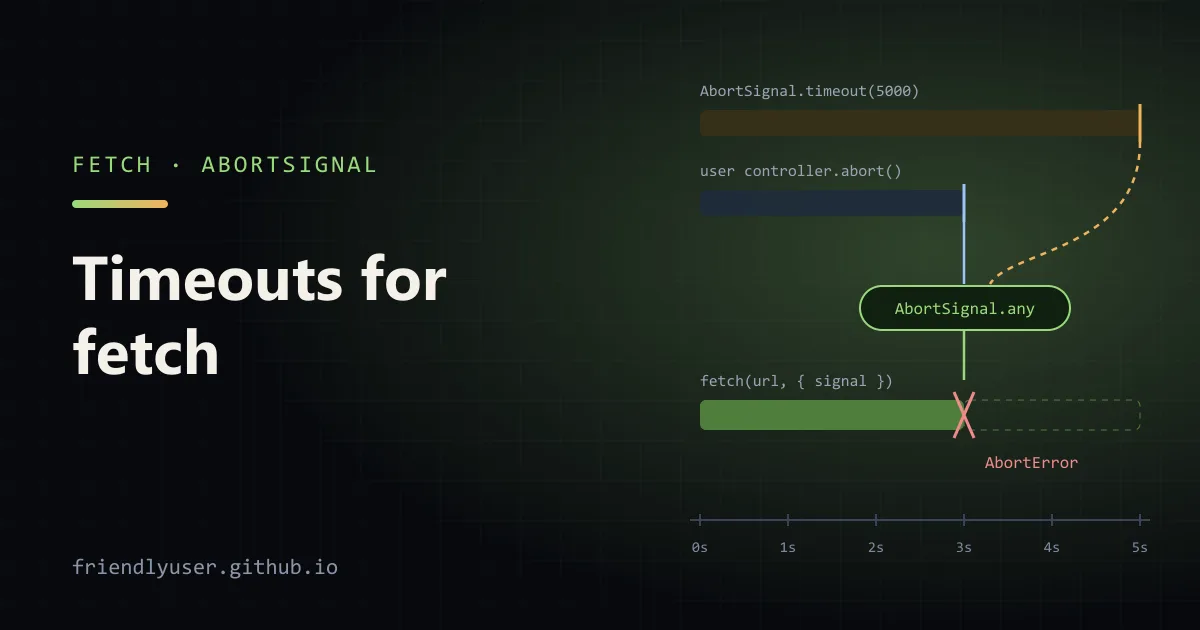
Section titled “Combining signals with AbortSignal.any”Real code often needs both: a timeout and a way for the caller to cancel. AbortSignal.any() takes a list of signals and returns one that aborts as soon as any of them does, with that signal’s reason:
const signal = AbortSignal.any([userController.signal, AbortSignal.timeout(5_000)]);If the user cancels first, the error is an AbortError. If the timeout fires first, it’s a TimeoutError. AbortSignal.any is available in all current major browsers and in Node since 20.3.
A fetchJson helper with timeouts, cancellation and retries
Section titled “A fetchJson helper with timeouts, cancellation and retries”Here is a helper I’d put in a project instead of calling fetch directly. It always applies a timeout, accepts an optional caller signal, and has a retry wrapper that uses a per-attempt timeout plus an overall deadline. Save it as fetch-json.ts:
export class HttpError extends Error {  readonly status: number;  constructor(status: number, url: string) {    super(`HTTP ${status} from ${url}`);    this.name = "HttpError";    this.status = status;  }}
type FetchJsonOptions = RequestInit & { timeoutMs?: number };
export async function fetchJson<T>(url: string, options: FetchJsonOptions = {}): Promise<T> {  const { timeoutMs = 10_000, signal, ...init } = options;  const timeout = AbortSignal.timeout(timeoutMs);  const combined = signal ? AbortSignal.any([signal, timeout]) : timeout;
  const res = await fetch(url, { ...init, signal: combined });  if (!res.ok) throw new HttpError(res.status, url);  return (await res.json()) as T; // the signal also covers reading the body}
export function isTimeout(err: unknown): boolean {  return err instanceof DOMException && err.name === "TimeoutError";}
export function isAbort(err: unknown): boolean {  return err instanceof DOMException && err.name === "AbortError";}
const sleep = (ms: number, signal?: AbortSignal) =>  new Promise<void>((resolve, reject) => {    signal?.throwIfAborted();    const timer = setTimeout(resolve, ms);    signal?.addEventListener(      "abort",      () => {        clearTimeout(timer);        reject(signal.reason);      },      { once: true },    );  });
export async function fetchJsonWithRetry<T>(  url: string,  { attempts = 3, timeoutMs = 2_000, deadlineMs = 5_000, signal }:    { attempts?: number; timeoutMs?: number; deadlineMs?: number; signal?: AbortSignal } = {},): Promise<T> {  // One signal for the whole operation: the caller's cancel plus an overall deadline.  const overall = AbortSignal.any([AbortSignal.timeout(deadlineMs), ...(signal ? [signal] : [])]);
  for (let attempt = 1; ; attempt++) {    try {      return await fetchJson<T>(url, { signal: overall, timeoutMs });    } catch (err) {      const retryable =        (isTimeout(err) && !overall.aborted) || // this attempt timed out, the deadline hasn't        (err instanceof HttpError && err.status >= 500);      if (!retryable || attempt >= attempts) throw err;      await sleep(200 * 2 ** (attempt - 1), overall);    }  }}
Some decisions worth pointing out:
- Retry only what’s worth retrying. A per-attempt timeout or a 5xx gets another try. An
AbortErrormeans someone cancelled on purpose, and a 4xx won’t fix itself. - The overall deadline wins.
overallis passed into every attempt and into the backoffsleep, so when the deadline passes, whatever is in progress stops at once, including the wait between attempts. sleeprespects the signal. A plainsetTimeoutpromise would keep a cancelled operation waiting for its backoff to finish.- Retrying non-idempotent requests is your call. This helper is for reads. Retrying a
POSTthat timed out can create the same order twice, because a timeout tells you nothing about whether the server acted.
To try it, save this as try.ts next to the helper, in a folder whose package.json has "type": "module". It starts a local server with slow and flaky endpoints:
import { createServer } from "node:http";import { fetchJson, fetchJsonWithRetry, isAbort, isTimeout } from "./fetch-json.ts";
let calls = 0;const server = createServer((req, res) => {  const url = new URL(req.url ?? "/", "http://localhost");  const delay = Number(url.searchParams.get("delay") ?? 0);  if (url.pathname === "/flaky") {    calls++;    // First two calls hang for 3 s, the third answers at once.    setTimeout(() => res.end(JSON.stringify({ call: calls })), calls < 3 ? 3_000 : 0);    return;  }  setTimeout(() => res.end(JSON.stringify({ delay })), delay);});server.listen(8787);
const base = "http://localhost:8787";
async function report(label: string, work: Promise<unknown>) {  const started = performance.now();  try {    console.log(label, "->", await work);  } catch (err) {    const kind = isTimeout(err) ? "timed out" : isAbort(err) ? "cancelled" : String(err);    console.log(label, "->", kind);  } finally {    console.log(`   took ${Math.round(performance.now() - started)} ms`);  }}
await report("fast", fetchJson(`${base}/?delay=100`, { timeoutMs: 1_000 }));await report("slow", fetchJson(`${base}/?delay=3000`, { timeoutMs: 1_000 }));
const user = new AbortController();setTimeout(() => user.abort(), 300);await report("cancelled", fetchJson(`${base}/?delay=3000`, { timeoutMs: 1_000, signal: user.signal }));
await report("retry", fetchJsonWithRetry(`${base}/flaky`, { timeoutMs: 1_000, deadlineMs: 5_000 }));
server.closeAllConnections();server.close();
Run it with node try.ts (Node 22.18+ runs TypeScript directly). The output from my run:
fast -> { delay: 100 } took 115 msslow -> timed out took 1012 mscancelled -> cancelled took 308 msretry -> { call: 3 } took 2650 msThe retry run is two 1-second timeouts, backoffs of 200 and 400 ms, and a third attempt that succeeds immediately.
Cancelling stale requests in React effects
Section titled “Cancelling stale requests in React effects”In a component that fetches when a prop changes, the effect cleanup is the place to abort. React runs the cleanup before the next effect and on unmount, so a response for an old query can never overwrite a newer one:
import { useEffect, useState } from "react";
type User = { id: string; name: string };
type State =  | { status: "idle" }  | { status: "loading" }  | { status: "done"; users: User[] }  | { status: "error"; message: string };
export function UserSearch({ query }: { query: string }) {  const [state, setState] = useState<State>({ status: "idle" });
  useEffect(() => {    if (!query) return;    const controller = new AbortController();    const signal = AbortSignal.any([controller.signal, AbortSignal.timeout(8_000)]);    setState({ status: "loading" });
    fetch(`/api/users?q=${encodeURIComponent(query)}`, { signal })      .then((res) => {        if (!res.ok) throw new Error(`HTTP ${res.status}`);        return res.json() as Promise<User[]>;      })      .then((users) => setState({ status: "done", users }))      .catch((err: unknown) => {        if (err instanceof DOMException && err.name === "AbortError") return; // superseded or unmounted        if (err instanceof DOMException && err.name === "TimeoutError") {          setState({ status: "error", message: "The search took too long. Try again." });          return;        }        setState({ status: "error", message: String(err) });      });
    return () => controller.abort();  }, [query]);
  if (state.status === "loading") return <p>Searching…</p>;  if (state.status === "error") return <p role="alert">{state.message}</p>;  if (state.status === "done") {    return (      <ul>        {state.users.map((u) => (          <li key={u.id}>{u.name}</li>        ))}      </ul>    );  }  return null;}
The important line is the AbortError check. An aborted request is not an error the user needs to see; it means a newer request replaced it. In development, React’s Strict Mode mounts each component twice, so you’ll see one aborted request in the Network panel for every search. That is the cleanup working, not a bug.
Data-fetching libraries such as TanStack Query pass an AbortSignal to your query function for the same purpose. If you use one, forward that signal to fetch instead of creating your own controller.
Gotchas
Section titled “Gotchas”- Check
err.name, notinstanceof.DOMExceptionexists globally in browsers and in Node 17+, but if a reason was passed toabort(), the error may be any type. Name checks are the most portable. - An aborted request may still have reached the server. Aborting stops your code from waiting; it doesn’t undo anything. If the server received a
POSTbefore you aborted, it may well have processed it. - Timeouts measure active time. MDN notes that the
AbortSignal.timeout()timer is based on active rather than elapsed time, so it effectively pauses while a document is in the back/forward cache or a worker is suspended. - Don’t reuse a signal across unrelated requests. One controller per logical operation. Sharing a signal across a page’s requests means one cancel aborts all of them, which is occasionally what you want (on navigation) and usually not.
- Pass the signal down. A function that calls
fetchshould accept asignalparameter and pass it along. Cancellation only works if every layer forwards it.
Further reading
Section titled “Further reading”© 2026 David Li · Home · Blog · RSS ·Classic site · Built with Astro, Starlight and three.js · Logos:Font Awesome Free (CC BY 4.0)