Explicit resource management in TypeScript with using and await using
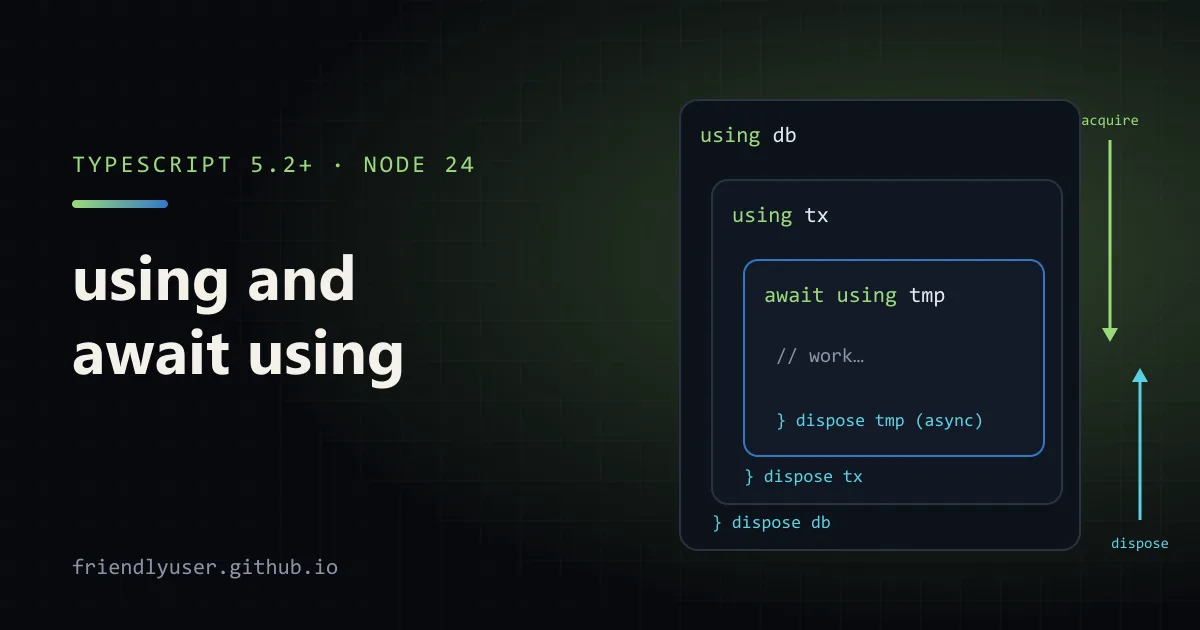
using declares a variable whose value is cleaned up automatically when the enclosing block exits, however it exits: normal return, break, or a thrown error. It is JavaScript’s version of C#‘s using and Python’s with, and it replaces the try { ... } finally { thing.close() } blocks that every codebase with files, sockets, locks or database handles collects.
TypeScript has supported the syntax since 5.2. What changed since then is the runtime side: V8 ships it natively, so Node 24 runs using without any compilation, and Node’s own APIs now return disposable objects. Examples here were checked with TypeScript 7.0, 6.0 and 5.9 on Node 24.14.
The protocol: Symbol.dispose and Symbol.asyncDispose
Section titled “The protocol: Symbol.dispose and Symbol.asyncDispose”An object is disposable if it has a [Symbol.dispose]() method. An object is async-disposable if it has [Symbol.asyncDispose]() returning a promise. TypeScript’s types for these are the global Disposable and AsyncDisposable interfaces.
function timer(label: string): Disposable {  const start = performance.now();  console.log(`start ${label}`);  return {    [Symbol.dispose]() {      console.log(`end ${label} after ${(performance.now() - start).toFixed(1)} ms`);    },  };}
function work() {  using outer = timer("outer");  using inner = timer("inner");  console.log("working");  // inner is disposed first, then outer: reverse order of declaration}
work();
Output:
start outerstart innerworkingend inner after 0.2 msend outer after 2.2 msThe rules are short:
using x = exprcallsx[Symbol.dispose]()when the block that contains it ends.- Several
usingdeclarations in one block are disposed in reverse order, like a stack. That matters when one resource depends on another. await using x = exprcalls and awaitsx[Symbol.asyncDispose]()(falling back toSymbol.dispose). It is only allowed whereawaitis: in async functions and at the top level of modules.nullandundefinedare allowed and skipped, sousing conn = maybeConnection()works.usingbindings are constant, likeconst.
Project setup
Section titled “Project setup”You need TypeScript 5.2 or later, and the type declarations for the disposable globals. Here is the tsconfig.json used for the examples:
{ "compilerOptions": { "target": "es2022", "lib": ["es2022", "esnext.disposable"], "module": "nodenext", "types": ["node"], "strict": true, "rootDir": "src", "outDir": "dist" }, "include": ["src"]}Plus "type": "module" in package.json (for top-level await) and npm install -D typescript @types/node.
Two settings decide what you get:
libprovides the types:Disposable,AsyncDisposable,DisposableStack,AsyncDisposableStack,SuppressedError,Symbol.dispose. Add"esnext.disposable"to your lib list, or use"esnext"for everything.targetdecides the output. Belowesnext, TypeScript rewritesusinginto atry/finallywith helper functions (__addDisposableResource,__disposeResources). With"target": "esnext", it emitsusingunchanged for the runtime to handle.
Both work on Node 24. The downlevelled output still needs Symbol.dispose to exist at runtime: the helper throws Symbol.dispose is not defined. if it doesn’t. Node 20 and 22 define both symbols, but not the using syntax or DisposableStack. For older runtimes or browsers without support, keep the lower target and polyfill the symbols (and DisposableStack, if you use it) before any other code runs.
Example: a temp directory that cleans itself up
Section titled “Example: a temp directory that cleans itself up”The classic finally cleanup is a temporary directory. As a disposable, it looks like this:
import { mkdtempSync, rmSync, writeFileSync, readdirSync, existsSync } from "node:fs";import { mkdtempDisposable } from "node:fs/promises";import { tmpdir } from "node:os";import { join } from "node:path";
// Your own disposable: a temp directory that deletes itself.function tempDir(prefix = "app-"): Disposable & { path: string } {  const path = mkdtempSync(join(tmpdir(), prefix));  return {    path,    [Symbol.dispose]() {      rmSync(path, { recursive: true, force: true });    },  };}
function exportReport(): string {  using dir = tempDir("report-");  writeFileSync(join(dir.path, "data.csv"), "id,total\n1,42\n");  console.log("files:", readdirSync(dir.path));  return dir.path;} // dir is removed here, even if writeFileSync throws
const path = exportReport();console.log("still exists after scope?", existsSync(path));
// Node 24.4+ ships the same thing built in, in sync and async forms.async function withBuiltIn() {  await using dir = await mkdtempDisposable(join(tmpdir(), "builtin-"));  writeFileSync(join(dir.path, "x.txt"), "hi");  return dir.path;}
const p2 = await withBuiltIn();console.log("built-in removed?", !existsSync(p2));
files: [ 'data.csv' ]still exists after scope? falsebuilt-in removed? trueThe pattern to notice is the return type Disposable & { path: string }: a disposable is just an object, so it can carry whatever data the caller needs. Node 24.4 added fs.mkdtempDisposableSync and fs.promises.mkdtempDisposable, which return exactly this shape (path, remove() and the dispose method), so in new code you can skip writing your own.
Other Node APIs that are disposable include FileHandle from fs/promises (async), DatabaseSync from node:sqlite, and timers. Check the “@since” notes in the Node docs before relying on one in a library that supports older Node versions.
Example: a database connection and a transaction
Section titled “Example: a database connection and a transaction”node:sqlite is built into Node, which makes it a convenient place to show the database pattern. DatabaseSync closes itself on dispose. The more interesting resource is a transaction that rolls back unless you explicitly commit:
import { DatabaseSync } from "node:sqlite";
// A transaction that rolls back unless you call commit().function transaction(db: DatabaseSync) {  db.exec("BEGIN");  let done = false;  return {    commit() {      db.exec("COMMIT");      done = true;    },    [Symbol.dispose]() {      if (!done) db.exec("ROLLBACK");    },  };}
function transfer(db: DatabaseSync, from: number, to: number, amount: number) {  using tx = transaction(db);  db.prepare("UPDATE accounts SET balance = balance - ? WHERE id = ?").run(amount, from);  const row = db.prepare("SELECT balance FROM accounts WHERE id = ?").get(from) as { balance: number };  if (row.balance < 0) throw new Error(`account ${from} would go negative`);  db.prepare("UPDATE accounts SET balance = balance + ? WHERE id = ?").run(amount, to);  tx.commit();}
{  using db = new DatabaseSync(":memory:"); // closed at the end of this block  db.exec("CREATE TABLE accounts (id INTEGER PRIMARY KEY, balance INTEGER NOT NULL)");  db.exec("INSERT INTO accounts VALUES (1, 100), (2, 0)");
  transfer(db, 1, 2, 30);  try {    transfer(db, 1, 2, 500);  } catch (err) {    console.log("failed:", (err as Error).message);  }  console.log(db.prepare("SELECT id, balance FROM accounts ORDER BY id").all());  console.log("open inside block:", db.isOpen);}
failed: account 1 would go negative[ [Object: null prototype] { id: 1, balance: 70 }, [Object: null prototype] { id: 2, balance: 30 }]open inside block: trueThe second transfer throws halfway through, after the first UPDATE ran. The disposer sees that commit() was never called and rolls back, so account 1 keeps its 70. There is no try/catch/finally in transfer at all, and adding another early return or throw later can’t skip the rollback.
The same shape works for pooled connections in a client library like pg, where “dispose” means “release back to the pool”. Wrap pool.connect() in a function that returns the client plus a [Symbol.asyncDispose] (or [Symbol.dispose]) method that calls client.release(), and every request handler can write await using client = await connect(). Check whether your driver already provides a disposable before you write the wrapper.
DisposableStack: several resources, one owner
Section titled “DisposableStack: several resources, one owner”using ties a resource to a block. Sometimes the owner is an object instead: a class that opens a directory and a database in its constructor and closes both in its own dispose method. DisposableStack collects resources and disposes them together, in reverse order:
stack.use(resource)adds a disposable and returns it.stack.adopt(value, onDispose)adds a value that isn’t disposable, with a cleanup callback.stack.defer(fn)adds a plain callback.stack.move()transfers everything to a new stack and leaves the old one empty.stack.dispose()disposes everything.DisposableStackis itselfDisposable.
move() solves the half-constructed object problem. If the constructor acquires two resources and the second throws, the first must be cleaned up, but on success, both must stay open:
import { DatabaseSync } from "node:sqlite";import { mkdtempDisposableSync } from "node:fs";import { tmpdir } from "node:os";import { join } from "node:path";
class Workspace implements Disposable {  readonly dir: string;  readonly db: DatabaseSync;  readonly #resources: DisposableStack;
  constructor() {    // If anything below throws, `stack` disposes what was already acquired.    using stack = new DisposableStack();    const tmp = stack.use(mkdtempDisposableSync(join(tmpdir(), "ws-")));    this.dir = tmp.path;    this.db = stack.use(new DatabaseSync(join(this.dir, "cache.db")));    stack.defer(() => console.log("workspace cleaned up"));    // Everything worked: take ownership so `stack` is empty when it is disposed.    this.#resources = stack.move();  }
  [Symbol.dispose]() {    this.#resources.dispose();  }}
{  using ws = new Workspace();  ws.db.exec("CREATE TABLE kv (k TEXT PRIMARY KEY, v TEXT)");  console.log("workspace at", ws.dir);}
Reverse order does real work here: the database file is closed before its directory is deleted. On Windows, deleting a directory with an open file in it fails, so the other order would throw.
AsyncDisposableStack is the same API for async resources, with disposeAsync() and await using.
When disposal itself throws
Section titled “When disposal itself throws”If the block throws and then a disposer also throws, neither error is silently lost. JavaScript wraps them in a SuppressedError:
function failingResource(name: string): Disposable {  return {    [Symbol.dispose]() {      throw new Error(`could not close ${name}`);    },  };}
try {  using r = failingResource("socket");  throw new Error("request failed");} catch (err) {  if (err instanceof SuppressedError) {    console.log("error:", (err.error as Error).message);    console.log("suppressed:", (err.suppressed as Error).message);  }}
error: could not close socketsuppressed: request failedRead the naming carefully: .error is the newer error from the disposer, and .suppressed is the original error from the block, which is usually the one you care about. Error-reporting code that only logs err.message will report the cleanup failure and hide the real cause. If you use using widely, teach your logger about SuppressedError. Better still, keep disposers from throwing for expected conditions (closing an already-closed handle, for example).
Gotchas
Section titled “Gotchas”usingis block-scoped, not function-scoped. A resource declared inside anifor a loop body is disposed at the end of that block, on every iteration.- Don’t return a disposed resource.
using db = open(); return db;hands the caller a closed handle. If the caller should own it, useconstand let the caller writeusing. - Disposal is synchronous for
using. A[Symbol.dispose]that starts async work won’t be awaited. Useawait usingandSymbol.asyncDisposefor anything that needs to finish before the code continues. - Not a replacement for every
finally. Logic that needs to inspect the error, or behave differently on success and failure beyond “commit or roll back”, is still clearer astry/catch. - Check your runtime. Node 24 runs the native syntax. Browsers that run V8 (Chrome 134 and later) do too. For anything else, check the compatibility table on MDN and keep TypeScript’s lower target.
Further reading
Section titled “Further reading”© 2026 David Li · Home · Blog · RSS ·Classic site · Built with Astro, Starlight and three.js · Logos:Font Awesome Free (CC BY 4.0)