The satisfies operator in TypeScript: checking values without widening them
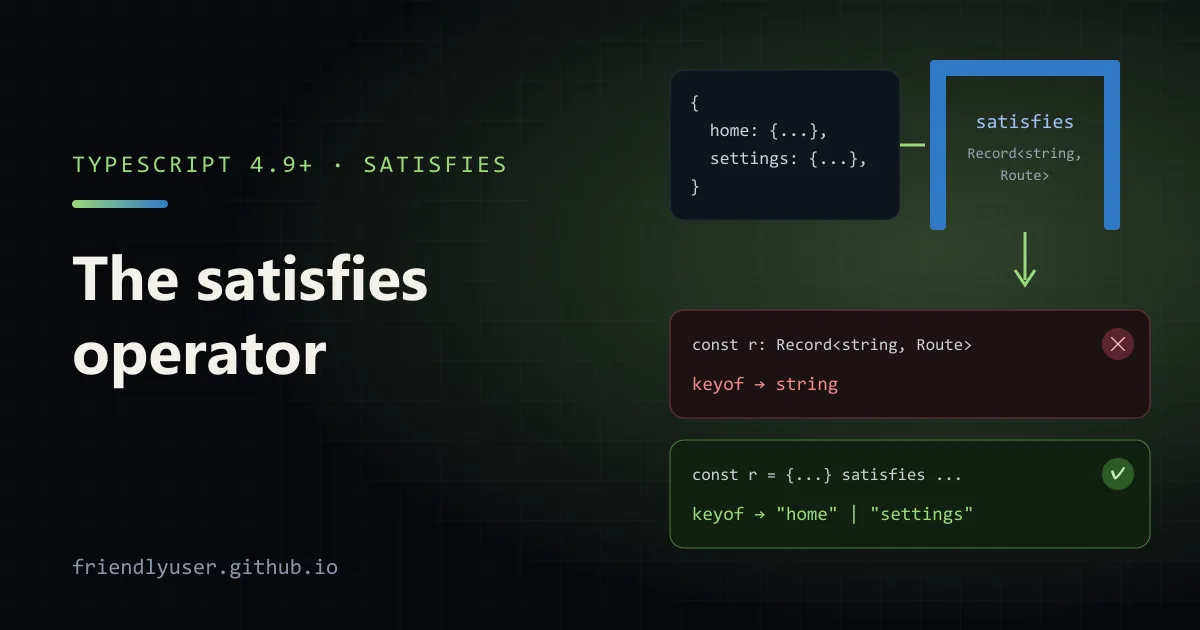
satisfies is a TypeScript operator that checks a value against a type without changing the type the compiler infers for that value. You get the error checking of a type annotation and keep the precise keys and literal types that an annotation would throw away. It has been in the language since TypeScript 4.9, and it is the right tool for config objects, lookup tables and anything else you define once and read many times.
The examples in this post were checked with TypeScript 5.9 in strict mode.
The problem with annotations
Section titled “The problem with annotations”Here is a route table with a type annotation:
type Route = { path: string; auth?: boolean };
const routes: Record<string, Route> = {  home: { path: "/" },  settings: { path: "/settings", auth: true },};
routes.hom;      // no error: any string key is allowedroutes.whatever; // typed as Route, but undefined at runtime
The annotation checks each entry, which is good. It also replaces the inferred type of routes with Record<string, Route>, so the compiler forgets which keys exist. A typo in a key is not an error, and keyof typeof routes is just string.
Leave the annotation off and you get the keys back, but nothing checks the entries. Mistype auth: "yes" and TypeScript happily infers auth: string.
What satisfies does
Section titled “What satisfies does”Move the type to the right-hand side with satisfies:
const routes = {  home: { path: "/" },  settings: { path: "/settings", auth: true },} satisfies Record<string, Route>;
routes.hom;// error: Property 'hom' does not exist on type '{ home: ...; settings: ... }'
type RouteName = keyof typeof routes; // "home" | "settings"
The object is still checked against Record<string, Route>, including excess property checks, so both of these are errors:
const bad = { admin: { path: "/admin", auth: "yes" }, // error: string is not assignable to boolean home: { path: "/", title: "Home" }, // error: 'title' does not exist in type 'Route'} satisfies Record<string, Route>;But the type of routes is what TypeScript inferred from the literal, not Record<string, Route>. The rule of thumb: an annotation says “this variable is a T”, and satisfies says “this value must fit T, but remember what it actually is”.
Union-typed properties stay narrow
Section titled “Union-typed properties stay narrow”The case that motivated the operator is a value whose properties can be one of several types. Annotate it, and every read gets the whole union:
type RGB = [number, number, number];type ColorName = "red" | "green" | "blue";
const annotated: Record<ColorName, string | RGB> = {  red: [255, 0, 0],  green: "#00ff00",  blue: [0, 0, 255],};annotated.green.toUpperCase();// error: Property 'toUpperCase' does not exist on type 'string | RGB'
With satisfies, each property keeps the type of the value you actually wrote:
const palette = {  red: [255, 0, 0],  green: "#00ff00",  blue: [0, 0, 255],} satisfies Record<ColorName, string | RGB>;
palette.green.toUpperCase();         // fine, green is a stringconst redChannel: number = palette.red[0]; // fine, red is a tuple
Because the key type is a union of literals rather than string, satisfies Record<ColorName, ...> also checks that every key is present. Leave out blue and you get “Property ‘blue’ is missing”. That makes it a cheap exhaustiveness check for lookup tables keyed by a union.
A config object you can run
Section titled “A config object you can run”This is the pattern I use most: one config entry per environment, checked for completeness, with the exact shape of each entry still visible to the code that reads it. Save it as config.ts:
type Env = "development" | "staging" | "production";type EnvConfig = {  apiUrl: string;  logLevel: "debug" | "info" | "warn";  sampleRate?: number;};
const config = {  development: { apiUrl: "http://localhost:3000", logLevel: "debug" },  staging: { apiUrl: "https://staging.example.com", logLevel: "info", sampleRate: 1 },  production: { apiUrl: "https://api.example.com", logLevel: "warn", sampleRate: 0.1 },} satisfies Record<Env, EnvConfig>;
// sampleRate is known to exist in production, so this is a plain numberconst rate: number = config.production.sampleRate;
// development has no sampleRate, and the compiler knows it// config.development.sampleRate; // error
// logLevel keeps its literal type: "debug", not "debug" | "info" | "warn"const level = config.development.logLevel;
// Each entry is still assignable wherever an EnvConfig is expectedfunction connect(c: EnvConfig): string {  return c.apiUrl;}console.log(connect(config.staging), rate, level);
Type-check it with npx tsc --noEmit --strict config.ts. On Node 22.18 or later you can also run it directly with node config.ts, which prints https://staging.example.com 0.1 debug. Add a fourth environment to Env and the compiler points at config until you add an entry for it.
Two details in that example surprised me the first time:
logLevelis inferred as the literal"debug". Normally a string inside an object literal widens tostring, butsatisfiesprovides a contextual type, and when that type is a union of string literals TypeScript keeps the literal.- Values passed through
satisfiesare still ordinary objects. You can handconfig.stagingto a function that takesEnvConfigwith no cast.
The same idea works for handler maps. Callback parameters are typed from the contextual type, so this compiles under noImplicitAny, and keyof typeof handlers gives you the event names:
type Handler = (payload: unknown) => void;
const handlers = {  created: (p) => console.log("created", p), // p: unknown  deleted: (p) => console.log("deleted", p),} satisfies Record<string, Handler>;
type EventName = keyof typeof handlers; // "created" | "deleted"
as const satisfies
Section titled “as const satisfies”as const makes a literal deeply readonly and keeps every string and number as a literal type. Combine it with satisfies to get both the narrowest possible type and a check:
type Flag = { name: string; default: boolean };
const flags = [  { name: "new-nav", default: false },  { name: "dark-mode", default: true },] as const satisfies readonly Flag[];
type FlagName = (typeof flags)[number]["name"]; // "new-nav" | "dark-mode"
A few things to know about this combination:
- Order matters.
as consthas to apply directly to the literal, so it comes first. Writing([...] satisfies Flag[]) as constis an error, because a const assertion can only be applied to a literal expression. - Say
readonlyin the target type when you mean it. TypeScript 5.9 accepts bothsatisfies Flag[]andsatisfies readonly Flag[]here, but writingreadonlydocuments that the data is not meant to be mutated. - You may not need
as constat all. As the config example showed,satisfiesalone already keeps literals for properties whose target type is a literal union. Reach foras constwhen you want literals for properties typed as plainstring, as withnameabove, or when you want the data to be readonly.
satisfies, annotation or as?
Section titled “satisfies, annotation or as?”| You want | Use |
|---|---|
A variable whose type is exactly T (other code assigns to it, or the inferred type is noise) | const x: T = ... |
A value checked against T, but with its own precise type kept | const x = ... satisfies T |
| Literal, readonly types and a check | const x = ... as const satisfies T |
| To override the compiler | as T, and only when you can’t avoid it |
The difference between satisfies and as matters. as is an assertion: {} as Route compiles even though path is missing, because you told the compiler to trust you. satisfies never makes an invalid value pass.
For function parameters and return types, keep using annotations. satisfies is for values defined in place.
Gotchas
Section titled “Gotchas”let still widens. satisfies affects the type of the expression, not the declaration. With let, TypeScript widens literals as usual:
type Theme = "light" | "dark";let mode = "dark" satisfies Theme; // mode: stringmode = "anything"; // no errorIf you want a variable that can only hold a Theme, that is an annotation: let mode: Theme = "dark".
Empty arrays become never[]. const items = [] satisfies string[] infers never[], and items.push("a") is then an error. Annotate empty collections instead.
Wider type for consumers. If you export a satisfies-checked object from a library, its full inferred type becomes part of your public API, including every key. Sometimes that’s what you want; if you want to keep the freedom to change it, annotate the export with the interface instead.
Framework configs. Many config files now accept export default { ... } satisfies Config as an alternative to a defineConfig() helper. Both give you checking and editor completion; the helper can also apply defaults at runtime, so use whichever the framework documents.
Further reading
Section titled “Further reading”© 2026 David Li · Home · Blog · RSS ·Classic site · Built with Astro, Starlight and three.js · Logos:Font Awesome Free (CC BY 4.0)