Building and publishing a TypeScript library with Vite library mode
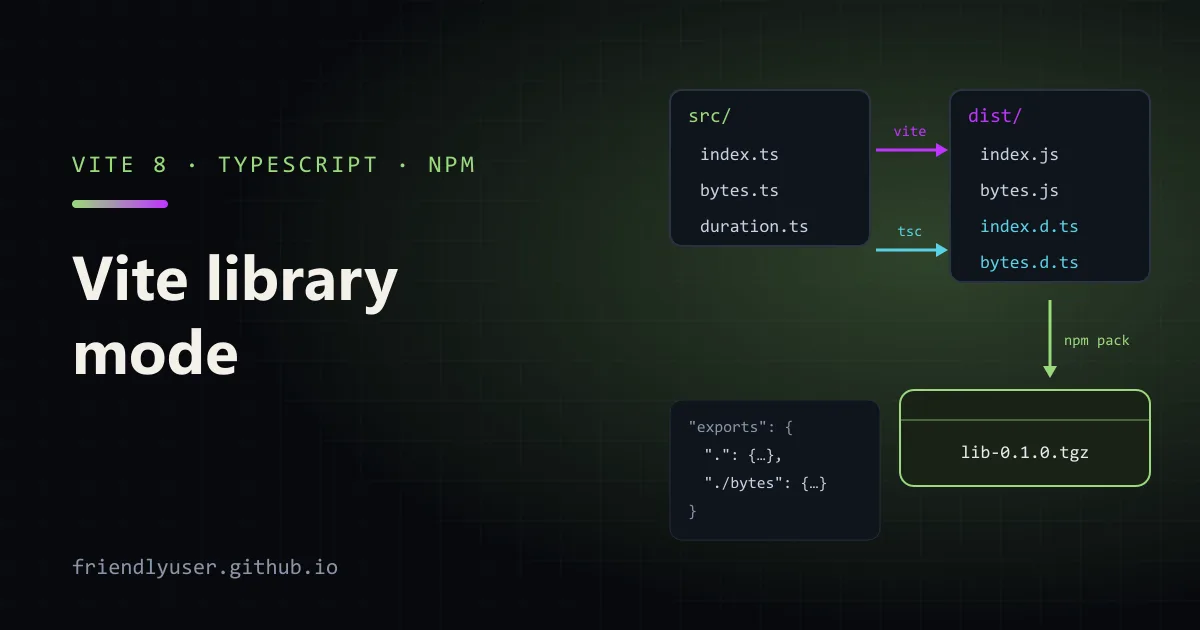
Vite is mostly known as an app dev server, but it also has a library mode: point it at an entry file and it produces a bundle meant to be imported by other code, not loaded by an HTML page. For a TypeScript library that means one tool for compiling, tree-shaking internal modules, and emitting clean ESM, with tsc alongside it for the type declarations.
This post builds a small library from scratch and covers the parts that usually go wrong: dependencies that get bundled by accident, missing or broken .d.ts files, and an exports map that doesn’t match what’s in the tarball. Examples use Vite 8.3, TypeScript 7.0 and Node 24.
The library
Section titled “The library”The example is tiny-format, with two helpers and a function that uses a runtime dependency (picocolors) so there’s something to externalise:
tiny-format/ src/ bytes.ts duration.ts index.ts package.json tsconfig.json tsconfig.build.json vite.config.tsmkdir tiny-format && cd tiny-formatnpm init -ynpm install picocolorsnpm install -D vite typescript @types/nodeconst UNITS = ["B", "kB", "MB", "GB", "TB"] as const;
/** Format a byte count with SI units: 1536 -> "1.5 kB". */export function formatBytes(bytes: number, digits = 1): string { if (!Number.isFinite(bytes)) throw new RangeError(`not a finite number: ${bytes}`); let value = Math.abs(bytes); let unit = 0; while (value >= 1000 && unit < UNITS.length - 1) { value /= 1000; unit += 1; } const sign = bytes < 0 ? "-" : ""; return `${sign}${unit === 0 ? value : value.toFixed(digits)} ${UNITS[unit]}`;}const UNITS: Record<string, number> = { ms: 1, s: 1000, m: 60_000, h: 3_600_000 };
/** Parse "1h30m", "90s" or "250ms" into milliseconds. */export function parseDuration(input: string): number { const parts = [...input.matchAll(/(\d+(?:\.\d+)?)(ms|s|m|h)/g)]; if (parts.length === 0 || parts.map((p) => p[0]).join("") !== input.replace(/\s+/g, "")) { throw new SyntaxError(`invalid duration: ${JSON.stringify(input)}`); } return parts.reduce((total, [, n, unit]) => total + Number(n) * UNITS[unit], 0);}import pc from "picocolors";import { formatBytes } from "./bytes.js";
export { formatBytes } from "./bytes.js";export { parseDuration } from "./duration.js";
export interface SizeReport { label: string; bytes: number;}
/** One line per entry, with sizes over the limit in red. */export function sizeTable(entries: SizeReport[], limitBytes = Infinity): string { const width = Math.max(...entries.map((e) => e.label.length)); return entries .map(({ label, bytes }) => { const size = formatBytes(bytes); return `${label.padEnd(width)} ${bytes > limitBytes ? pc.red(size) : pc.green(size)}`; }) .join("\n");}Note the .js extensions on the relative imports, even though the files are .ts. Vite doesn’t need them, but the declaration files are generated from these imports, and consumers using "moduleResolution": "nodenext" reject extensionless relative imports inside an ESM .d.ts. I tested it: without the extensions, the build succeeds and the consumer’s tsc fails with error TS2835, “Relative import paths need explicit file extensions”.
The Vite config
Section titled “The Vite config”import { defineConfig } from "vite";import pkg from "./package.json" with { type: "json" };
type Deps = { dependencies?: Record<string, string>; peerDependencies?: Record<string, string> };const { dependencies = {}, peerDependencies = {} } = pkg as Deps;
// Anything listed in dependencies or peerDependencies stays an import instead of being bundled.const deps = [...Object.keys(dependencies), ...Object.keys(peerDependencies)];
export default defineConfig({ build: { lib: { entry: { index: "src/index.ts", bytes: "src/bytes.ts", }, formats: ["es"], fileName: (_format, entryName) => `${entryName}.js`, }, rolldownOptions: { external: (id) => id.startsWith("node:") || deps.some((dep) => id === dep || id.startsWith(`${dep}/`)), }, sourcemap: true, minify: false, },});What each part does:
build.lib.entrytakes a single path or an object of named entries. Two entries give two public files,index.jsandbytes.js, so users can importtiny-format/byteswithout pulling inpicocolors. Code shared between entries is not duplicated: in the output,index.jsimportsformatBytesfrom./bytes.js.formats: ["es"]produces ESM only. Without it, Vite defaults to["es", "umd"]for a single entry and["es", "cjs"]for several. UMD only matters if people load your library with a<script>tag. CommonJS output matters less than it used to, because Node 20.19+ and 22.12+ canrequire()an ES module.fileNamecontrols the output names. The default is based on the package name, which is rarely what you want with several entries.rolldownOptions.externalis the most important setting. By default Vite bundles everything it can resolve, includingpicocolors. A bundled dependency gets duplicated in every app that also depends on it directly, and never receives security fixes. The rule here externalises everything independenciesandpeerDependencies, including subpath imports likepkg/sub, plus Node built-ins. Dev dependencies get bundled, which is usually right for small helpers you don’t want to expose.minify: falseis a library convention. The app that consumes your code minifies everything anyway, and readable output makes stack traces and bug reports easier.
Since Vite 8, production builds run on Rolldown, and the old build.rollupOptions key is now build.rolldownOptions. The old name still works but is marked deprecated in the types.
Type declarations with tsc
Section titled “Type declarations with tsc”Vite strips types and doesn’t emit .d.ts files, so declarations need a separate step. The simplest reliable option is tsc with emitDeclarationOnly. Use two configs: one for type-checking the whole project, one for emitting declarations from src:
{ "compilerOptions": { "target": "es2022", "lib": ["es2022"], "module": "esnext", "moduleResolution": "bundler", "strict": true, "verbatimModuleSyntax": true, "resolveJsonModule": true, "skipLibCheck": true, "types": ["node"], "noEmit": true }, "include": ["src", "vite.config.ts"]}{ "extends": "./tsconfig.json", "compilerOptions": { "noEmit": false, "declaration": true, "emitDeclarationOnly": true, "rootDir": "src", "outDir": "dist", "types": [] }, "include": ["src"]}"types": [] in the build config keeps Node’s types out of the library’s declarations unless the source actually imports from node: modules. The explicit rootDir puts dist/index.d.ts next to dist/index.js; TypeScript 6.0 and later refuse to guess it.
The alternative is the vite-plugin-dts plugin, which generates declarations as part of vite build and can roll them up into a single file. It works, but it depends on TypeScript’s JavaScript API through Volar, and that dependency declares a peer range of typescript <7. Installing it next to TypeScript 7 made npm pick TypeScript 6.0 instead. If you want TypeScript 7’s native compiler, emit declarations with tsc.
package.json: the exports map
Section titled “package.json: the exports map”{ "name": "tiny-format", "version": "0.1.0", "description": "Format byte sizes and parse durations", "type": "module", "files": ["dist"], "exports": { ".": { "types": "./dist/index.d.ts", "default": "./dist/index.js" }, "./bytes": { "types": "./dist/bytes.d.ts", "default": "./dist/bytes.js" }, "./package.json": "./package.json" }, "sideEffects": false, "scripts": { "typecheck": "tsc -p tsconfig.json", "build": "vite build && tsc -p tsconfig.build.json", "prepack": "npm run build" }, "dependencies": { "picocolors": "^1.1.1" }, "devDependencies": { "@types/node": "^24.19.2", "typescript": "^7.0.2", "vite": "^8.3.8" }, "license": "MIT"}The parts that matter:
exportsdefines the package’s public entry points. Anything not listed can’t be imported:import "tiny-format/dist/duration.js"fails withERR_PACKAGE_PATH_NOT_EXPORTED. That’s what you want, because it lets you reorganisedistwithout breaking anyone.typescomes first in each condition object. Conditions are matched in order, and TypeScript stops at the first one it understands. Ifdefaultcame first, TypeScript would never reachtypes."./package.json"is exported so tools that read your package metadata keep working.files: ["dist"]is an allow-list for the tarball. npm addspackage.json,READMEandLICENSEon its own.sideEffects: falsetells bundlers that unused modules can be dropped entirely.- The build order matters.
vite buildemptiesdistbefore it writes, so it has to run beforetsc, or it deletes the declarations.prepackmakesnpm packandnpm publishalways build first.
Build it and look at the output
Section titled “Build it and look at the output”npm run typechecknpm run buildvite v8.3.8 building client environment for production...✓ 4 modules transformed.dist/bytes.js 0.53 kB │ gzip: 0.37 kB │ map: 1.00 kBdist/index.js 1.00 kB │ gzip: 0.62 kB │ map: 1.99 kB✓ built in 24msOpen dist/index.js and check the top two lines. You should see import { formatBytes } from "./bytes.js"; and import pc from "picocolors";. If the colour functions from picocolors appear inline instead, the externals rule didn’t match.
Test the tarball before publishing
Section titled “Test the tarball before publishing”Running tests against src says nothing about whether the published package works. The tarball is what users install, so test that:
npm packnpm notice Tarball Contentsnpm notice 137B dist/bytes.d.tsnpm notice 536B dist/bytes.jsnpm notice 1.0kB dist/bytes.js.mapnpm notice 120B dist/duration.d.tsnpm notice 307B dist/index.d.tsnpm notice 1.0kB dist/index.jsnpm notice 2.0kB dist/index.js.mapnpm notice 753B package.jsonnpm notice total files: 8tiny-format-0.1.0.tgzRead the file list: no src, no config files, a .d.ts for every .js entry. Then install the tarball into a scratch project that uses the strictest resolution mode your users might have:
mkdir ../consumer && cd ../consumernpm init -y && npm pkg set type=modulenpm install ../tiny-format/tiny-format-0.1.0.tgznpm install -D typescript @types/nodeimport { formatBytes, parseDuration, sizeTable, type SizeReport } from "tiny-format";import { formatBytes as fb } from "tiny-format/bytes";
const files: SizeReport[] = [ { label: "index.js", bytes: 1_004 }, { label: "vendor.js", bytes: 182_300 },];console.log(sizeTable(files, 100_000));console.log(formatBytes(1536), fb(3_200_000), parseDuration("1h30m"));{ "compilerOptions": { "target": "es2022", "module": "nodenext", "strict": true, "types": ["node"], "rootDir": ".", "outDir": "out" }, "files": ["main.ts"]}npx tsc -p . && node out/main.jsindex.js 1.0 kBvendor.js 182.3 kB1.5 kB 3.2 MB 5400000That checks the runtime import, both subpath exports, and the types under nodenext. Run npx tsc --noEmit --module esnext --moduleResolution bundler as well to cover projects built with a bundler.
Two linters automate most of this. npx publint checks package.json against what is actually in the package. npx @arethetypeswrong/cli --pack . --profile esm-only packs the library and checks that the types resolve under each TypeScript resolution mode. Both reported no problems for this package.
Gotchas
Section titled “Gotchas”- CSS in a library. If the library imports CSS, Vite emits a separate
.cssfile and does not inject it. Export it in theexportsmap (for example"./style.css": "./dist/tiny-format.css") and tell users to import it.build.lib.cssFileNamesets its name. - Peer dependencies for frameworks. A React or Vue component library must list the framework in
peerDependenciesand keep it external. Two copies of React in one app break hooks. - Environment variables. In library mode,
import.meta.env.*is replaced at build time (import.meta.env.MODEbecame the string"production"in my build), whileprocess.env.*is left alone so the consuming app’s bundler can set it. Useprocess.env.NODE_ENVfor dev-only warnings in library code. - Don’t publish untested.
npm publish --dry-runshows what would be uploaded without uploading it. Make the tarball test a CI step before the real publish.
Further reading
Section titled “Further reading”© 2026 David Li · Home · Blog · RSS ·Classic site · Built with Astro, Starlight and three.js · Logos:Font Awesome Free (CC BY 4.0)