Working on Several Branches at Once with git worktree
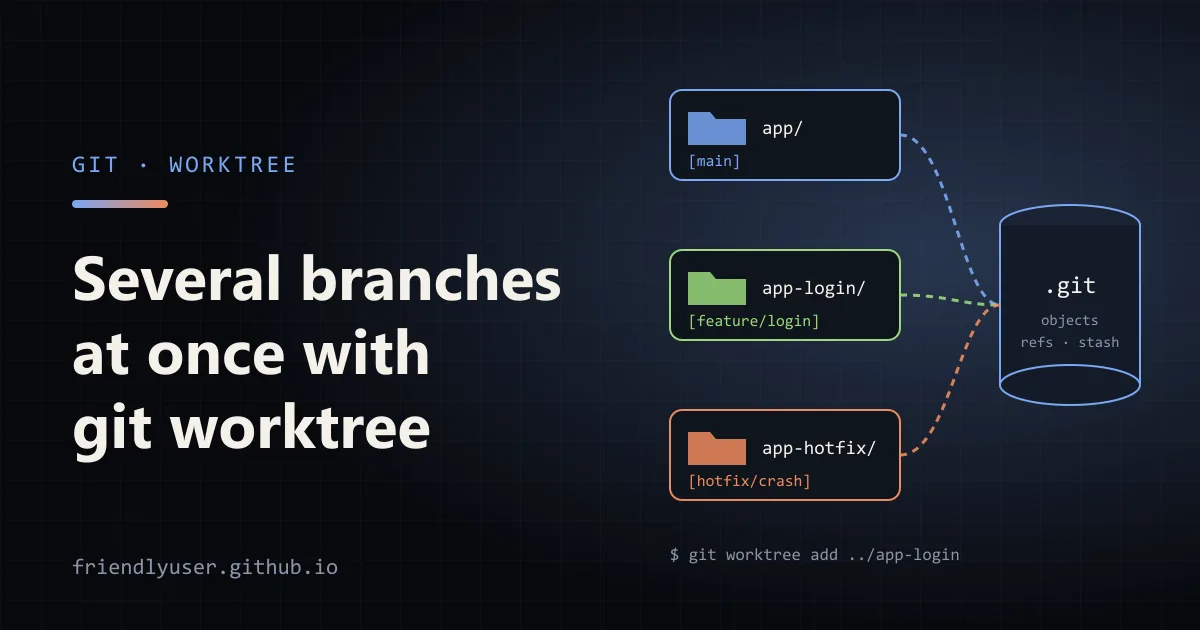
git worktree lets one repository have several working directories, each with a different branch checked out. Instead of stashing your half-finished feature to look at a bug on main, you open the bug in a second directory and leave the feature exactly as it was.
It is also the cheapest way to run things in parallel on the same codebase: a long test suite on one branch while you keep editing another, or several coding agents that each need their own checkout. The commands below were run on Git 2.46; everything shown has been in Git for years.
The model: one repository, many checkouts
Section titled “The model: one repository, many checkouts”A normal clone has one working tree, the directory you edit, plus the .git directory that holds the history. git worktree add creates another working tree attached to the same .git.
What the worktrees share:
- the object store, so no history is copied and adding a worktree is fast even for a large repository;
- branches, tags and remotes: a commit made in one worktree is visible from all of them straight away;
- repository config, hooks and the stash list.
What each worktree has for itself:
- its own files on disk;
- its own
HEAD(which branch or commit is checked out); - its own index (staging area).
The first directory, the one you cloned, is the main worktree. The others are linked worktrees. In a linked worktree, .git is a small file instead of a directory:
gitdir: /home/me/src/app/.git/worktrees/app-loginGit keeps the bookkeeping for each linked worktree under .git/worktrees/<name>/ in the main repository.
Creating worktrees
Section titled “Creating worktrees”Everything below runs from inside the main checkout, ~/src/app. I keep linked worktrees next to it as siblings (../app-<something>), so they don’t show up as untracked files inside the main one.
Check out an existing branch:
git worktree add ../app-login feature/loginCreate a new branch and check it out in one step, like git switch -c:
git worktree add -b hotfix/crash ../app-hotfix mainLeave the branch name out and Git creates a branch named after the directory:
git worktree add ../review-42# Preparing worktree (new branch 'review-42')If the branch only exists on a remote, Git does the same thing git switch does and creates a local tracking branch:
git worktree add ../app-login feature/login# Preparing worktree (new branch 'feature/login')# branch 'feature/login' set up to track 'origin/feature/login'.For a throwaway look at a commit or a tag, use a detached HEAD so you don’t create a branch you’ll have to delete later:
git worktree add --detach ../app-v2 v2.0.0Then cd ../app-login and work as usual. git status, git commit and git push all behave normally.
Listing them
Section titled “Listing them”git worktree list/home/me/src/app eb3a155 [main]/home/me/src/app-hotfix eb3a155 [hotfix/crash]/home/me/src/app-login 0f883e9 [feature/login]For scripts, use --porcelain, which prints one attribute per line with a blank line between worktrees:
worktree /home/me/src/appHEAD eb3a15578b654adcdd330c770c7c7e421902ac66branch refs/heads/main
worktree /home/me/src/app-loginHEAD 0f883e9...branch refs/heads/feature/login
list also flags worktrees whose directory has gone missing as prunable, and ones you have locked as locked.
A branch can only be checked out once
Section titled “A branch can only be checked out once”This is the rule that surprises people. Git refuses to check out a branch that is already checked out in another worktree:
$ git worktree add ../app-login2 feature/loginfatal: 'feature/login' is already used by worktree at '/home/me/src/app-login'The same applies inside a linked worktree: git checkout main fails there while main is checked out in the main worktree. And you can’t delete the branch either:
$ git branch -d feature/loginerror: cannot delete branch 'feature/login' used by worktree at '/home/me/src/app-login'The reason is that two checkouts moving the same branch ref would trample on each other: commit in one, and the other’s files and index no longer match its HEAD. If you really need the same code twice, check out the commit detached (--detach) or create a second branch from it.
A worked example: a hotfix in the middle of a feature
Section titled “A worked example: a hotfix in the middle of a feature”Say you are halfway through feature/search, with uncommitted changes and a dev server running, when a crash report comes in.
cd ~/src/app                      # on feature/search, files modifiedgit fetch origingit worktree add -b hotfix/null-user ../app-hotfix origin/main
cd ../app-hotfixnpm ci                            # dependencies are per directory, see below# fix the bug, run the testsgit commit -am "Handle missing user in session middleware"git push -u origin hotfix/null-user
cd ../app                         # your feature is exactly as you left itgit worktree remove ../app-hotfix
Nothing was stashed, the dev server in ~/src/app kept running, and the hotfix branch still exists after the worktree is removed. Removing a worktree never deletes its branch.
Cleaning up
Section titled “Cleaning up”git worktree remove deletes the directory and Git’s bookkeeping for it. It refuses if the worktree has modified or untracked files:
$ git worktree remove ../app-loginfatal: '../app-login' contains modified or untracked files, use --force to delete itRead that message as “you are about to lose work”, not as something to automatically override with --force.
If you delete a worktree directory by hand (rm -rf, or your file manager), Git still has its entry and still considers the branch checked out. git worktree list shows it as prunable, and prune clears it:
$ git worktree prune -vRemoving worktrees/app-hotfix: gitdir file points to non-existent locationGit also prunes stale entries on its own during git gc, after gc.worktreePruneExpire (three months by default), but running prune yourself frees the branch immediately.
Two more maintenance commands:
git worktree move ../app-login ../loginmoves a linked worktree and updates the bookkeeping. If you moved it without Git, rungit worktree repair <new-path>from the main worktree to reconnect them.git worktree lock --reason "on external drive" ../app-reviewstopsprunefrom removing a worktree that lives on a drive that is sometimes unmounted.unlockundoes it.
What is not shared, and why it matters
Section titled “What is not shared, and why it matters”Each worktree is a separate directory, so anything ignored by Git is per worktree too:
node_modules,.venv,target/and other build output have to be created again in each one. For a big JavaScript project that’s the slowest part ofworktree add. A package manager with a global content-addressed store (pnpm, uv) makes it cheap..envfiles and other local, untracked config don’t follow you. Copy them, or have a setup script that creates them.- IDE state (
.idea/,.vscode/if it is ignored) is per directory.
The flip side is that hooks and repository config are shared. A pre-commit hook installed in the main worktree runs in all of them. If you want a setting in just one worktree, enable extensions.worktreeConfig and use git config --worktree.
The stash is shared as well. A stash made in one worktree shows up in git stash list everywhere, so name your stashes (git stash push -m "search: wip") if you use them across worktrees.
Long builds and coding agents
Section titled “Long builds and coding agents”Worktrees are a good fit for anything that occupies a checkout for a long time:
- Slow test suites or release builds. Add a detached worktree at the commit you want to test, start the build there, and keep working in your main directory. Your edits can’t change the files mid-build.
- Comparing behaviour. Run the old and new version side by side, in two worktrees, on two ports.
- Coding agents. If you run more than one agent on the same repository, give each its own worktree and branch. Two agents editing the same directory will overwrite each other’s files and step on each other’s
git add. In separate worktrees they can’t, and you review each branch as a normal pull request. Several agent tools create worktrees for you for this reason; the cleanup advice below applies to those too.
A small script makes the per-task setup repeatable:
#!/usr/bin/env bash# new-task.sh <branch>: create a sibling worktree on a new branch and set it upset -euo pipefailbranch="$1"dir="../$(basename "$PWD")-${branch//\//-}"
git fetch origingit worktree add -b "$branch" "$dir" origin/maincp .env "$dir/.env" 2>/dev/null || true(cd "$dir" && npm ci)echo "Ready: $dir"
Gotchas
Section titled “Gotchas”- Paths are absolute by default. The
.gitfile in a linked worktree and the bookkeeping in the main repository store absolute paths. Moving the whole parent directory, or opening it from a container with a different mount point, breaks the link until you rungit worktree repair. Git 2.48 added--relative-paths(and theworktree.useRelativePathssetting) for this case. - Some tools assume
.gitis a directory. Most modern tools handle thegitdir:file, but older scripts that read.git/HEADdirectly break inside a linked worktree.git rev-parse --git-dirandgit rev-parse --git-common-dirgive the right paths. - Submodules work in worktrees, but each worktree needs its own
git submodule update --init. The Git documentation still describes multiple checkouts of a superproject as incomplete. - Don’t nest worktrees inside the main one unless you add the directory to
.gitignore. Otherwisegit statusin the main worktree lists the whole linked worktree as untracked. - Clean up regularly.
git worktree listafter a week of agent runs can be long, and every entry holds a branch hostage. Remove what you’ve merged, then rungit worktree prune.
Further reading
Section titled “Further reading”© 2026 David Li · Home · Blog · RSS ·Classic site · Built with Astro, Starlight and three.js · Logos:Font Awesome Free (CC BY 4.0)