Reusable workflows and composite actions in GitHub Actions
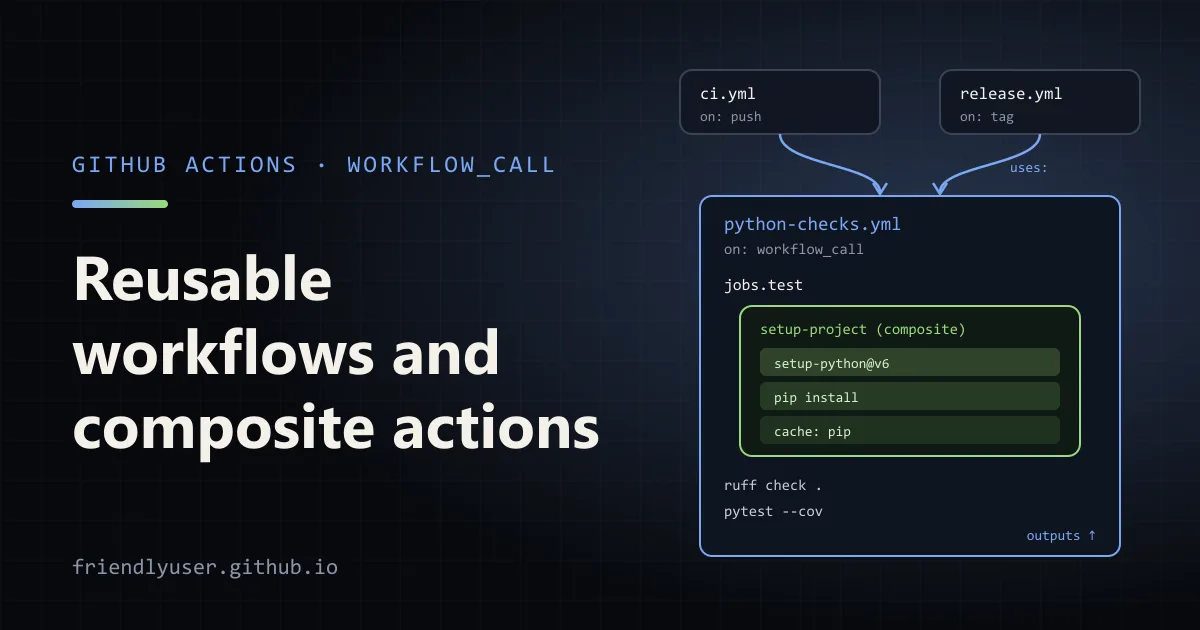
Once a project has more than a couple of workflows, the same steps start appearing everywhere: check out, install the toolchain, restore the cache, install dependencies, run the tests. GitHub Actions has two ways to define those once and reuse them. A reusable workflow is a whole workflow, with its own jobs and runners, that other workflows call as a job. A composite action is a bundle of steps that runs inside the caller’s job, like any other action.
This post builds one of each for a Python project, shows how inputs, secrets and outputs flow between them, and ends with how to choose between them and how to version them. Examples use actions/checkout@v6 and actions/setup-python@v6, the current major versions as of January 2026.
The layout
Section titled “The layout”.github/├── actions/│ └── setup-project/│ └── action.yml # composite action: Python + cached dependencies└── workflows/ ├── python-checks.yml # reusable workflow: lint and test └── ci.yml # the workflow that runs on push and pull requestsThe project also has a requirements-dev.txt containing at least pytest, pytest-cov and ruff.
A composite action
Section titled “A composite action”A composite action lives in its own directory with an action.yml. runs.using: composite marks it as a list of steps:
name: Set up projectdescription: Install Python and the project's dev dependencies, with pip cachinginputs: python-version: description: Python version to install required: false default: "3.13" requirements: description: Requirements file to install required: false default: requirements-dev.txtoutputs: python-version: description: The exact Python version that was installed value: ${{ steps.python.outputs.python-version }}runs: using: composite steps: - id: python uses: actions/setup-python@v6 with: python-version: ${{ inputs.python-version }} cache: pip cache-dependency-path: ${{ inputs.requirements }} - name: Install dependencies shell: bash env: REQUIREMENTS: ${{ inputs.requirements }} run: | python -m pip install --upgrade pip python -m pip install -r "$REQUIREMENTS"Things that differ from steps in a normal workflow:
- Every
runstep needs an explicitshell. There is no default shell inside a composite action. - Inputs are read with
inputs.<name>, and outputs must be mapped explicitly from a step’s output withvalue:. - No
secretscontext. An action can’t read repository secrets itself. If it needs a token, declare an input and have the caller pass${{ secrets.X }}into it. - Inputs go through
env, not straight into the script. Writing${{ inputs.requirements }}directly insiderun:pastes the value into the shell script before it runs, which is a script injection hole if the value ever comes from something like a branch name. Passing it as an environment variable avoids that.
A composite action can call other actions with uses:, as it does with setup-python here, and its steps can have if: conditions.
To use it from a job in the same repository, check out the code first, because a local action is loaded from the workspace:
steps: - uses: actions/checkout@v6 - uses: ./.github/actions/setup-project with: python-version: "3.12"A reusable workflow
Section titled “A reusable workflow”A reusable workflow is an ordinary workflow file with on: workflow_call. It declares typed inputs (string, number or boolean), the secrets it accepts, and the outputs it returns:
name: Python checks (reusable)
on:  workflow_call:    inputs:      python-version:        description: Python version to test on        type: string        default: "3.13"      run-lint:        description: Run ruff before the tests        type: boolean        default: true    secrets:      CODECOV_TOKEN:        required: false    outputs:      python-version:        description: The exact Python version the tests ran on        value: ${{ jobs.test.outputs.python-version }}
permissions:  contents: read
jobs:  test:    runs-on: ubuntu-latest    env:      CODECOV_TOKEN: ${{ secrets.CODECOV_TOKEN }}    outputs:      python-version: ${{ steps.setup.outputs.python-version }}    steps:      - uses: actions/checkout@v6      - id: setup        uses: ./.github/actions/setup-project        with:          python-version: ${{ inputs.python-version }}      - if: ${{ inputs.run-lint }}        run: ruff check .      - run: pytest --cov --cov-report=xml      - if: ${{ env.CODECOV_TOKEN != '' }}        uses: codecov/codecov-action@v5        with:          token: ${{ env.CODECOV_TOKEN }}
Outputs travel up in two hops: the step output becomes a job output (jobs.test.outputs), and the job output becomes a workflow output (on.workflow_call.outputs).
The secret is copied into a job-level env variable because secrets can’t be used directly in an if: condition. Checking env.CODECOV_TOKEN lets the upload step skip itself when no token was passed, for example on pull requests from forks.
Calling it
Section titled “Calling it”A reusable workflow is called by a job, not a step. The job has uses: instead of runs-on: and steps::
name: CI
on:  push:    branches: [main]  pull_request:
jobs:  checks:    strategy:      matrix:        python: ["3.12", "3.13", "3.14"]    uses: ./.github/workflows/python-checks.yml    with:      python-version: ${{ matrix.python }}      run-lint: ${{ matrix.python == '3.13' }}    secrets:      CODECOV_TOKEN: ${{ secrets.CODECOV_TOKEN }}
  summary:    needs: checks    runs-on: ubuntu-latest    steps:      - run: echo "Last finished matrix leg ran Python ${{ needs.checks.outputs.python-version }}"
In the Actions UI, each matrix leg shows up as its own group, with the called workflow’s test job nested under the calling checks job. A few rules for the calling job:
- Only some keys are allowed alongside
uses:with,secrets,strategy,needs,if,permissions,concurrencyandname. Anything about the runner belongs in the called workflow. secrets: inheritpasses all of the caller’s secrets instead of listing them. It is convenient inside one organisation, but explicit secrets document what each workflow needs.envdoes not cross the boundary. Variables set in the caller’s top-levelenvare not visible in the called workflow. Use inputs, or configuration variables (vars).- Matrix outputs. When a reusable workflow runs under a matrix,
needs.checks.outputsholds the value from the last leg to finish successfully, not all of them. That is why the summary step says “last finished”. - Permissions can only shrink. The called workflow can reduce the
GITHUB_TOKENpermissions it receives, but not raise them.
On GitHub.com, reusable workflows can be nested up to ten levels deep, counting the top-level caller, and one workflow file can call up to 50 unique reusable workflows including nested ones. Those limits were raised from four levels and 20 workflows in November 2025. GitHub Enterprise Server releases may still have the older limits.
Calling across repositories
Section titled “Calling across repositories”To share a workflow across repositories, put it in a repository that callers can access and reference it with the repository and a ref:
jobs: checks: uses: my-org/ci-workflows/.github/workflows/python-checks.yml@v1 with: python-version: "3.13"Composite actions work the same way, with a path inside the repository: uses: my-org/ci-workflows/.github/actions/setup-project@v1.
One trap when you move both into a shared repository: uses: ./.github/actions/setup-project inside the reusable workflow resolves against the workspace, which is the caller’s checkout, not the shared repository. Reference the action by its full owner/repo/path@ref from the shared workflow instead.
Access follows the repositories’ visibility. A public repository can only call public workflows. A private or internal repository has to be explicitly opened up for Actions access (in its Actions settings) before other private repositories can use what is in it.
Versioning
Section titled “Versioning”A local reference (./.github/workflows/...) always uses the same commit as the caller, so there is nothing to version. For cross-repository references, the ref after @ can be a branch, a tag or a commit SHA:
- A branch (
@main) means every change to the shared workflow takes effect everywhere immediately. Fine while you are developing it, risky once other teams rely on it. - A tag (
@v1,@v1.4.0) is the usual choice. Many projects move a major tag such asv1forward for compatible changes and createv2for breaking ones, the same scheme GitHub’s own actions use. - A full commit SHA (
@3f2c..., all 40 characters) is the only reference that can’t change underneath you. Pin third-party actions and workflows this way, and let Dependabot or Renovate propose updates.
Changing an input’s type, removing an input, or adding a required secret is a breaking change for every caller.
Which one to use
Section titled “Which one to use”| Composite action | Reusable workflow | |
|---|---|---|
| Unit of reuse | Steps | Jobs |
| Runs on | The caller’s job and runner | Its own runners, chosen in the called workflow |
| Secrets | Only via inputs | Declared secrets, or secrets: inherit |
| Can define services, matrices, environments | No | Yes |
| Shows in logs as | One step with nested steps | Separate jobs |
My rule of thumb: use a composite action for setup sequences you want to drop into many different jobs (install toolchain, configure a registry, restore a cache). Use a reusable workflow when you want to standardise the whole pipeline, including runners, permissions and deployment environments, so that every repository’s CI or release process is the same.
They combine well, as in this post: the reusable workflow defines the job, and the composite action keeps the setup steps short enough to read.
Gotchas
Section titled “Gotchas”- Composite action changes are picked up by every caller on the same ref, so test them on a branch first.
- In logs, a failing step inside a composite action shows as the composite step failing. Give the inner steps
name:values so you can find the failure. - Re-running failed jobs uses the reusable workflow from the first attempt’s commit, even if the ref (such as a branch) has moved since.
- Don’t use the same
concurrencygroup withcancel-in-progress: truein both the caller and the called workflow; the caller can end up cancelled.
Further reading
Section titled “Further reading”© 2026 David Li · Home · Blog · RSS ·Classic site · Built with Astro, Starlight and three.js · Logos:Font Awesome Free (CC BY 4.0)