Smaller Docker images with multi-stage builds
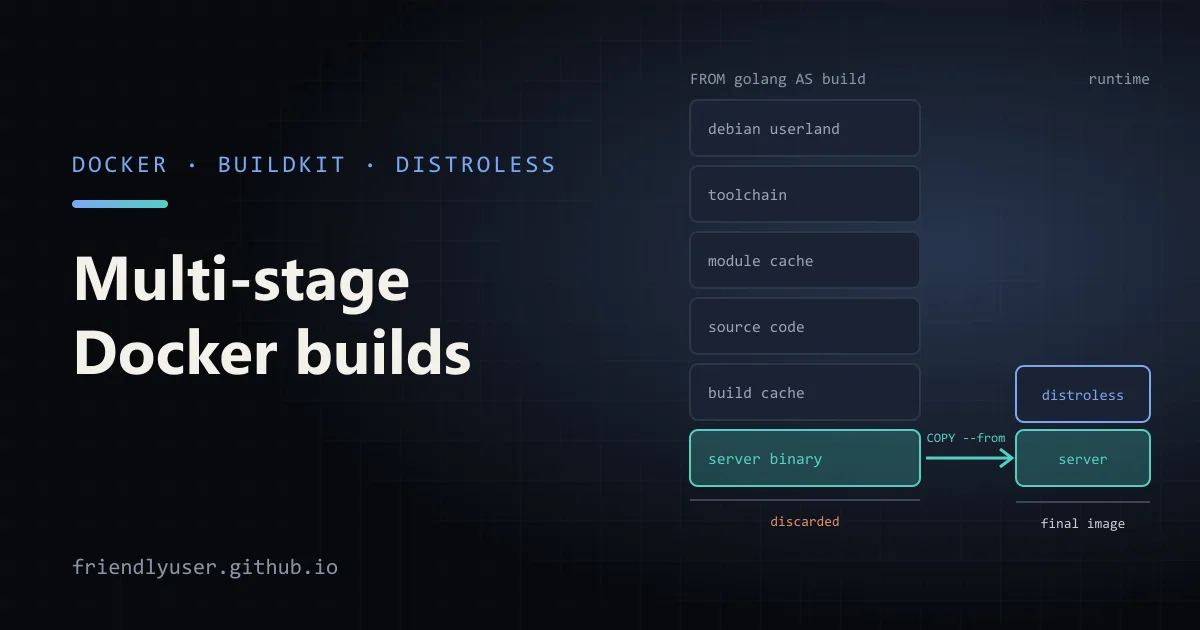
A multi-stage Dockerfile has more than one FROM. Each FROM starts a new stage with its own base image, and later stages can copy files out of earlier ones. The point is to build your application in a stage that has compilers, package managers and headers, then copy only the result into a small runtime stage. The final image ships without any of the build tooling.
That makes images smaller, which means faster pulls and deploys. It also means fewer packages for a vulnerability scanner to flag, and nothing like a compiler left lying around for an attacker to use. This post walks through two examples, a compiled binary on a distroless base and an interpreted web app on a slim base, and then covers cache mounts, .dockerignore and how to check the result. The Dockerfiles use BuildKit, the default builder since Docker Engine 23.0.
The single-stage problem
Section titled “The single-stage problem”A typical first Dockerfile for a compiled service looks like this:
FROM golang:1.25WORKDIR /srcCOPY . .RUN go build -o /server .CMD ["/server"]It works, but the image contains the whole Go toolchain, the module cache, the source code and a Debian userland, all to run one static binary. The official toolchain images are hundreds of megabytes; the binary is usually a few.
Example 1: a static binary on distroless
Section titled “Example 1: a static binary on distroless”Here is a tiny HTTP server using only the standard library:
package main
import (  "fmt"  "log"  "net/http")
func main() { http.HandleFunc("/", func(w http.ResponseWriter, r *http.Request) { fmt.Fprintln(w, "hello from a distroless image") }) log.Fatal(http.ListenAndServe(":8080", nil))}module example.com/server
go 1.25And the multi-stage Dockerfile:
# syntax=docker/dockerfile:1
FROM golang:1.25 AS buildWORKDIR /src# Dependencies first, so this layer is reused until go.mod/go.sum changeCOPY go.* ./RUN --mount=type=cache,target=/go/pkg/mod \    go mod downloadCOPY . .RUN --mount=type=cache,target=/go/pkg/mod \    --mount=type=cache,target=/root/.cache/go-build \    CGO_ENABLED=0 go build -trimpath -ldflags="-s -w" -o /out/server .
FROM gcr.io/distroless/static-debian12:nonrootCOPY --from=build /out/server /serverEXPOSE 8080ENTRYPOINT ["/server"]
What each piece does:
AS buildnames the stage so later stages can refer to it. Without a name you would have to use its index (--from=0), which breaks when stages are reordered.COPY go.* ./beforeCOPY . .is the classic layer-caching trick. The dependency download only reruns whengo.modorgo.sumchanges, not on every source edit.CGO_ENABLED=0produces a statically linked binary that doesn’t need the C library, so it can run on an image with no libc at all.gcr.io/distroless/static-debian12:nonrootis one of Google’s distroless images: CA certificates, time zone data,/etc/passwdentries and little else. There is no shell and no package manager. Thenonroottag sets the default user to UID 65532, so the server doesn’t run as root. Thedebian12in the name is the Debian release the image is built from; distroless supports the previous release for about a year after a new Debian release, so check the README for the current one.COPY --from=buildcopies the one file the runtime needs. Everything else in the build stage is discarded from the final image.
Build and run it:
docker build -t hello-server .docker run --rm -p 8080:8080 hello-serverExample 2: an interpreted app on a slim base
Section titled “Example 2: an interpreted app on a slim base”For languages that need a runtime, distroless is less convenient, and a “slim” image of the same runtime is the usual choice. The build stage installs dependencies into a virtual environment, and the runtime stage copies just that environment.
The app is a minimal FastAPI service in app.py:
from fastapi import FastAPI
app = FastAPI()

@app.get("/")def root() -> dict:    return {"status": "ok"}
requirements.txt lists fastapi and uvicorn; pin exact versions in a real project. The Dockerfile:
# syntax=docker/dockerfile:1
FROM python:3.13-slim AS buildENV PIP_DISABLE_PIP_VERSION_CHECK=1RUN python -m venv /opt/venvENV PATH="/opt/venv/bin:$PATH"COPY requirements.txt .RUN --mount=type=cache,target=/root/.cache/pip \    pip install -r requirements.txt
FROM python:3.13-slimRUN useradd --system --uid 10001 appCOPY --from=build /opt/venv /opt/venvENV PATH="/opt/venv/bin:$PATH" \    PYTHONUNBUFFERED=1WORKDIR /appCOPY app.py .USER appEXPOSE 8000CMD ["uvicorn", "app:app", "--host", "0.0.0.0", "--port", "8000"]
The details that make this work:
- Same base image in both stages. A virtual environment contains absolute paths and links to the interpreter that created it. Copying it to the same path on an image with the same Python version keeps those valid. Mixing, for example, a full
python:3.13builder with a different minor version at runtime gives you a broken environment, and compiled extensions built against one libc won’t load on another. - The build stage is where compilers would go. If a dependency has no prebuilt wheel, add
apt-get install build-essentialto the build stage. The runtime stage never sees it. - Application code comes last. Editing
app.pyonly invalidates the finalCOPY, not the dependency install.
BuildKit cache mounts
Section titled “BuildKit cache mounts”RUN --mount=type=cache,target=... mounts a directory that persists between builds on the same builder but is not stored in the image layer. Package managers keep their download caches there:
| Tool | Cache mount target |
|---|---|
| pip | /root/.cache/pip |
| Go modules and build cache | /go/pkg/mod, /root/.cache/go-build |
| npm | /root/.npm |
The difference from layer caching: when requirements.txt changes, the layer is rebuilt from scratch, but with a cache mount, pip still finds the previously downloaded packages and only fetches what is new. It also means you don’t need --no-cache-dir to keep the cache out of the image.
Cache mounts need the # syntax=docker/dockerfile:1 line or a recent BuildKit. They live on the builder, so in CI, where each job typically starts with a fresh builder, they are usually empty. Exporting the build cache (for example docker buildx build --cache-to type=gha on GitHub Actions) brings back the image layers, but not the contents of cache mounts.
.dockerignore
Section titled “.dockerignore”COPY . . sends everything in the build context unless .dockerignore excludes it. Without one, the context can include .git, local virtual environments, node_modules, test data and .env files with secrets. That makes builds slower, can invalidate the cache on every commit, and can leak files into the image:
.git.venv__pycache__node_modules*.log.envDockerfile.dockerignoreTreat it like .gitignore but stricter: anything not needed by a COPY instruction can go.
Checking the result
Section titled “Checking the result”Compare sizes with:
docker image ls hello-serverdocker history hello-serverdocker history lists each layer with the instruction that created it and its size. On the distroless image you should see the base layers and one layer for the copied binary. A layer of hundreds of megabytes in a final image usually means a COPY brought in more than intended, or a build tool ended up in the runtime stage.
A few other useful commands:
docker build --target build -t hello-build .builds only up to the named stage. Handy for debugging the build environment, or for a test stage that runs your test suite.docker build --check .runs Dockerfile lint rules without building, such as mismatched casing betweenFROMandAS, or aCMDin shell form where the exec (JSON array) form is recommended.- dive, a third-party tool, shows the files added in each layer, which makes it easy to spot what is taking up space.
Gotchas
Section titled “Gotchas”- No shell in distroless.
docker exec -it container shdoesn’t work. Distroless publishes:debugtags that include a BusyBox shell for troubleshooting. Use them temporarily, not in production. - Static binaries still need CA certificates and time zones for HTTPS and
time.LoadLocation.distroless/staticincludes both;FROM scratchdoes not, so you would have to copy them in yourself. - Alpine is not a drop-in slim image. It uses musl instead of glibc. Prebuilt wheels and binaries built for glibc may not work, and builds that compile from source can be slower. Pick it deliberately.
COPY --fromcan reference any image, not just a stage, such asCOPY --from=ghcr.io/astral-sh/uv:latest /uv /bin/. Pin a version or digest when you do, or the build changes whenever that image is updated.- Secrets don’t belong in
ARGorENV. Values set that way stay in the image metadata. UseRUN --mount=type=secretfor tokens needed during the build.
Further reading
Section titled “Further reading”© 2026 David Li · Home · Blog · RSS ·Classic site · Built with Astro, Starlight and three.js · Logos:Font Awesome Free (CC BY 4.0)