dbt Core with DuckDB: models, tests and incremental tables
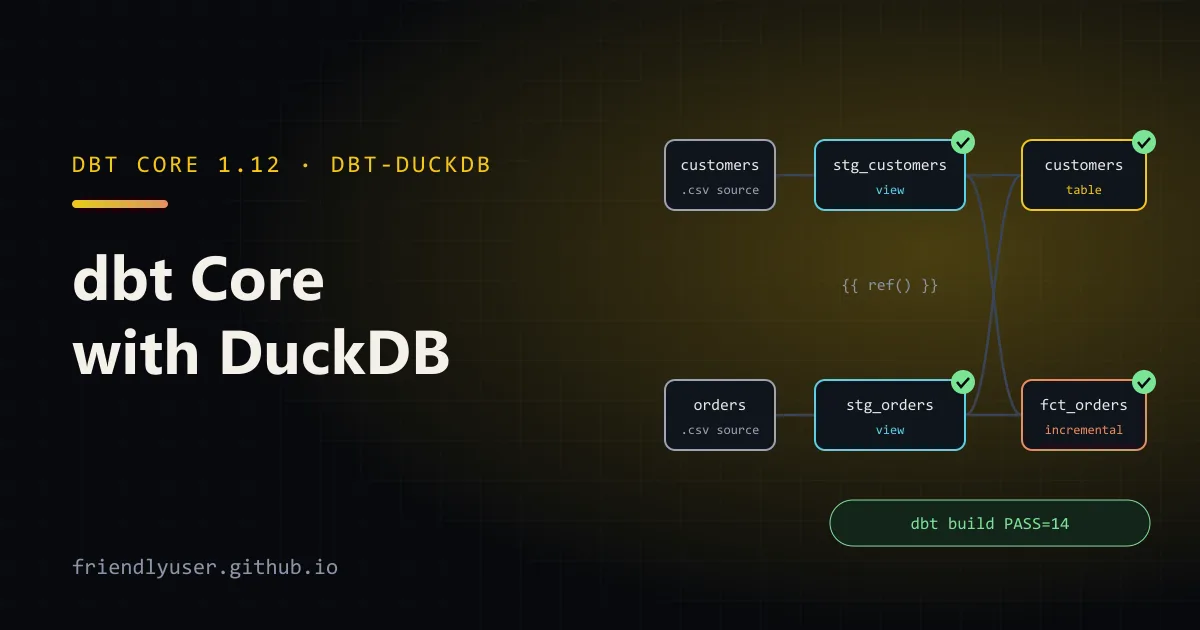
dbt (data build tool) turns a folder of SELECT statements into a tested, dependency-ordered set of tables and views. You write each model as a query, refer to other models with ref(), declare tests in YAML, and dbt build runs everything in the right order. dbt-duckdb is the adapter that runs it on DuckDB, so the whole thing works on a laptop with no warehouse, no server and no credentials.
That makes it a good way to learn dbt, and a practical setup for small analytics projects and CI. This post builds a project from scratch: profile, sources, staging and mart models, generic data tests, and an incremental model. Examples were run with dbt Core 1.12.0 and dbt-duckdb 1.10.1 on Python 3.12.
Install and project layout
Section titled “Install and project layout”dbt-duckdb depends on dbt Core, so one package is enough:
python -m venv .venv && source .venv/bin/activate # Windows: .venv\Scripts\activatepip install dbt-duckdbdbt --versiondbt init can scaffold a project, but the files are small enough to write by hand:
shop/├── dbt_project.yml├── profiles.yml├── data/│ ├── customers.csv│ └── orders.csv└── models/ ├── staging/ │ ├── _sources.yml │ ├── _staging.yml │ ├── stg_customers.sql │ └── stg_orders.sql └── marts/ ├── _marts.yml ├── customers.sql └── fct_orders.sqldbt_project.yml names the project and sets defaults per folder: staging models become views, mart models become tables.
name: shopversion: "1.0.0"profile: shop
model-paths: ["models"]
models:  shop:    staging:      +materialized: view    marts:      +materialized: table
The dbt-duckdb profile
Section titled “The dbt-duckdb profile”The profile tells dbt where to connect. For DuckDB that’s a file path:
shop: target: dev outputs: dev: type: duckdb path: shop.duckdb threads: 4dbt looks for profiles.yml in the current directory before ~/.dbt/, so keeping it in the project works. With DuckDB there’s nothing secret in it. path: ":memory:" gives a throwaway database, which is handy in CI. The adapter also supports extensions, settings, and attaching other databases (another DuckDB file, SQLite, or Postgres) if you need them.
Sources: reading CSV files in place
Section titled “Sources: reading CSV files in place”The raw data is two CSV files:
customer_id,name,country,signed_up_at1,Ada,CA,2026-01-042,Grace,US,2026-02-113,Linus,FI,2026-03-20order_id,customer_id,status,amount_cents,ordered_at101,1,completed,7900,2026-07-01 09:12:00102,2,completed,24900,2026-07-01 13:40:00103,1,returned,950,2026-07-02 10:05:00104,3,completed,18900,2026-07-02 18:22:00105,2,pending,2500,2026-07-03 08:30:00A source declares data that dbt doesn’t create. Normally that’s a table some loader fills. dbt-duckdb adds external_location, which points a source at files that DuckDB reads directly, with {name} replaced by the table name:
sources: - name: raw config: external_location: "data/{name}.csv" tables: - name: customers - name: ordersParquet files, globs and S3 URLs work the same way. (dbt also has seeds, CSVs in a seeds/ folder loaded with dbt seed, which suit small lookup tables. For raw data, reading in place avoids copying.)
Staging models
Section titled “Staging models”Staging models are thin: one per source table, renaming, casting and cleaning, nothing else. Reference sources with {{ source('raw', 'orders') }}:
-- models/staging/stg_orders.sqlselect order_id::integer as order_id, customer_id::integer as customer_id, lower(status) as status, amount_cents / 100.0 as amount, ordered_at::timestamp as ordered_atfrom {{ source('raw', 'orders') }}-- models/staging/stg_customers.sqlselect customer_id::integer as customer_id, trim(name) as customer_name, upper(country) as country_code, signed_up_at::date as signed_up_onfrom {{ source('raw', 'customers') }}Because these are views over the CSV files, they always reflect the current file contents.
Mart models with ref
Section titled “Mart models with ref”Marts are what people query. {{ ref('stg_orders') }} compiles to the right table name and, more importantly, tells dbt that customers depends on stg_orders. dbt builds the dependency graph from these calls; you never list the run order yourself.
-- models/marts/customers.sqlwith orders as (    select * from {{ ref('stg_orders') }}    where status = 'completed')
select    c.customer_id,    c.customer_name,    c.country_code,    count(o.order_id)               as completed_orders,    coalesce(sum(o.amount), 0)      as lifetime_value,    min(o.ordered_at)               as first_order_atfrom {{ ref('stg_customers') }} as cleft join orders as o using (customer_id)group by all
Generic data tests
Section titled “Generic data tests”Tests live in YAML next to the models. dbt ships four generic tests: unique, not_null, accepted_values and relationships. Each compiles to a query that returns the failing rows, and the test passes when it returns none.
models: - name: stg_customers columns: - name: customer_id data_tests: [unique, not_null] - name: stg_orders columns: - name: order_id data_tests: [unique, not_null] - name: status data_tests: - accepted_values: arguments: values: ["pending", "completed", "returned"] - name: customer_id data_tests: - relationships: arguments: to: ref('stg_customers') field: customer_idTwo details that trip up people following older tutorials:
- The key is
data_tests:. The oldertests:still works as an alias. - Test parameters go under
arguments:. Puttingvalues:directly underaccepted_values:, as most older examples do, still runs on dbt 1.12 but logs aMissingArgumentsPropertyInGenericTestDeprecationwarning.
The mart tests are in models/marts/_marts.yml, in the same format (unique and not_null on customers.customer_id and fct_orders.order_id).
An incremental model
Section titled “An incremental model”A table model is rebuilt from scratch on every run. For a large, append-mostly table such as orders or events, that’s wasteful. An incremental model builds the full table on the first run, then on later runs only processes new rows and merges them in:
-- models/marts/fct_orders.sql{{    config(        materialized='incremental',        unique_key='order_id',        incremental_strategy='delete+insert'    )}}
select    o.order_id,    o.customer_id,    c.country_code,    o.status,    o.amount,    o.ordered_at,    current_timestamp as loaded_atfrom {{ ref('stg_orders') }} as ojoin {{ ref('stg_customers') }} as c using (customer_id)
{% if is_incremental() %}-- only orders newer than what the table already holdswhere o.ordered_at > (select max(ordered_at) from {{ this }}){% endif %}is_incremental()is true only when the table already exists, the model is incremental, and you didn’t pass--full-refresh. On the first run thewhereclause isn’t there and every row is loaded.{{ this }}is the model’s own existing table.unique_keywithdelete+insertmakes reruns safe: rows in the new batch whoseorder_idalready exists are deleted from the target first, then the batch is inserted. dbt-duckdb also supportsappendand, on recent DuckDB versions,merge.
On the incremental run, the SQL dbt executes (from target/run/) is a delete and an insert from a temporary table holding the new rows:
delete from "shop"."main"."fct_orders"where (    order_id) in (    select (order_id)    from "fct_orders__dbt_tmp...");
insert into "shop"."main"."fct_orders" ("order_id", "customer_id", "country_code", "status", "amount", "ordered_at", "loaded_at")(    select "order_id", "customer_id", "country_code", "status", "amount", "ordered_at", "loaded_at"    from "fct_orders__dbt_tmp...")
dbt build
Section titled “dbt build”dbt build runs models, tests, seeds and snapshots in dependency order, and runs each model’s tests right after the model. The first run:
dbt buildRunning with dbt=1.12.0Registered adapter: duckdb=1.10.1Found 4 models, 10 data tests, 2 sources, 486 macros
Concurrency: 4 threads (target='dev')
1 of 14 START sql view model main.stg_customers ................................ [RUN]2 of 14 START sql view model main.stg_orders ................................... [RUN]2 of 14 OK created sql view model main.stg_orders .............................. [OK in 0.14s]1 of 14 OK created sql view model main.stg_customers ........................... [OK in 0.15s]...9 of 14 START sql table model main.customers ................................... [RUN]10 of 14 START sql incremental model main.fct_orders ........................... [RUN]10 of 14 OK created sql incremental model main.fct_orders ...................... [OK in 0.13s]...Finished running 1 incremental model, 1 table model, 10 data tests, 2 view models in 0 hours 0 minutes and 0.93 seconds (0.93s).
Completed successfully
Done. PASS=14 WARN=0 ERROR=0 SKIP=0 NO-OP=0 REUSED=0 TOTAL=14Now append two orders to data/orders.csv:
106,3,completed,4500,2026-07-04 11:00:00107,1,completed,24900,2026-07-04 15:45:00and rebuild only fct_orders and what it depends on (the + prefix selects upstream models):
dbt build --select +fct_ordersGrouping fct_orders by loaded_at shows that the second run only inserted the new rows:
┌─────────┬────────┬──────────┬─────────┐│ dbt_run │ orders │ first_id │ last_id ││ int64 │ int64 │ int32 │ int32 │├─────────┼────────┼──────────┼─────────┤│ 1 │ 5 │ 101 │ 105 ││ 2 │ 2 │ 106 │ 107 │└─────────┴────────┴──────────┴─────────┘When a test fails
Section titled “When a test fails”Add an order with status shipped and run dbt build again. The accepted_values test on stg_orders fails, and dbt skips everything downstream of it, so bad data doesn’t reach the marts:
5 of 14 FAIL 1 accepted_values_stg_orders_status__pending__completed__returned . [FAIL 1 in 0.24s]...9 of 14 SKIP relation main.customers ........................................... [SKIP]10 of 14 SKIP relation main.fct_orders ......................................... [SKIP]...Done. PASS=7 WARN=0 ERROR=1 SKIP=6 NO-OP=0 REUSED=0 TOTAL=14That ordering, test each model before building on it, is the main reason to prefer dbt build over dbt run followed by dbt test. The compiled test query is in target/compiled/, so you can run it yourself to see the failing rows. If a check should warn rather than block, set config: {severity: warn} on that test.
To query the results, open the database with DuckDB (duckdb shop.duckdb) or from Python with duckdb.connect("shop.duckdb", read_only=True). Only one process can have the file open for writing, so close other connections before running dbt.
Gotchas
Section titled “Gotchas”- Incremental filters only see what you filter on. The model above uses
ordered_at, so if order 105 later changes frompendingtocompleted, the change is never picked up. Filter on anupdated_atcolumn when rows can change, and keep a lookback window if data can arrive late. - Schema changes. By default, adding a column to an incremental model doesn’t add it to the existing table. Set
on_schema_change='append_new_columns'(orsync_all_columns), or run with--full-refresh. --full-refreshrebuilds incremental models from scratch. You’ll need it after changing the model’s logic.- File locking. DuckDB allows one writer. An open notebook connection to
shop.duckdbmakesdbt buildfail with a lock error. - DuckDB is single-node. For a team with a shared warehouse, the same models move to Snowflake, BigQuery or Postgres by changing the profile, plus some SQL dialect fixes.
Further reading
Section titled “Further reading”© 2026 David Li · Home · Blog · RSS ·Classic site · Built with Astro, Starlight and three.js · Logos:Font Awesome Free (CC BY 4.0)