Python's sqlite3 module: row factories, transactions, WAL and adapters
sqlite3 ships with Python, needs no server, and stores a whole database in one file. That makes it the default choice for CLI tools, desktop apps, test fixtures, caches and small web apps. The module is easy to start with, but a few of its defaults (transaction handling, date conversion, threads) surprise people the first time they matter.
This post covers the parts I’d want someone to know before putting sqlite3 into a real program. Everything was run on Python 3.14; the autocommit attribute needs 3.12 or newer.
Rows you can read by name
Section titled “Rows you can read by name”By default a query returns plain tuples. Set row_factory to sqlite3.Row and each row can be indexed by position or by column name, and turned into a dict:
import sqlite3
conn = sqlite3.connect(":memory:")conn.row_factory = sqlite3.Rowconn.execute("CREATE TABLE users (id INTEGER PRIMARY KEY, name TEXT, email TEXT)")conn.execute("INSERT INTO users (name, email) VALUES (?, ?)", ("ada", "ada@example.com"))
row = conn.execute("SELECT * FROM users").fetchone()print(row["name"], row[2])   # ada ada@example.comprint(row.keys())            # ['id', 'name', 'email']print(dict(row))             # {'id': 1, 'name': 'ada', 'email': 'ada@example.com'}conn.close()
Name lookup is case-insensitive (row["NAME"] works). sqlite3.Row is implemented in C and costs little over a tuple, so I set it on every connection. If you want dataclasses or dicts directly, row_factory accepts any callable taking (cursor, row).
Parameters: ?, named, and executemany
Section titled “Parameters: ?, named, and executemany”Always pass values as parameters, never with f-strings. Positional placeholders take a sequence; named placeholders take a dict:
conn.execute("SELECT * FROM users WHERE name = ?", ("ada",))conn.execute("SELECT * FROM users WHERE name = :name", {"name": "ada"})Mixing them up used to work by accident. Since 3.12 it was deprecated, and on 3.14 passing a tuple to a :name query raises ProgrammingError.
executemany runs one statement for each item in an iterable, which is the fast way to bulk insert because the statement is prepared once:
rows = [("grace", "grace@example.com"), ("linus", "linus@example.com")]conn.executemany("INSERT INTO users (name, email) VALUES (?, ?)", rows)The iterable can be a generator, so you can stream rows from a CSV without building a list first.
Transactions: what with conn: actually does
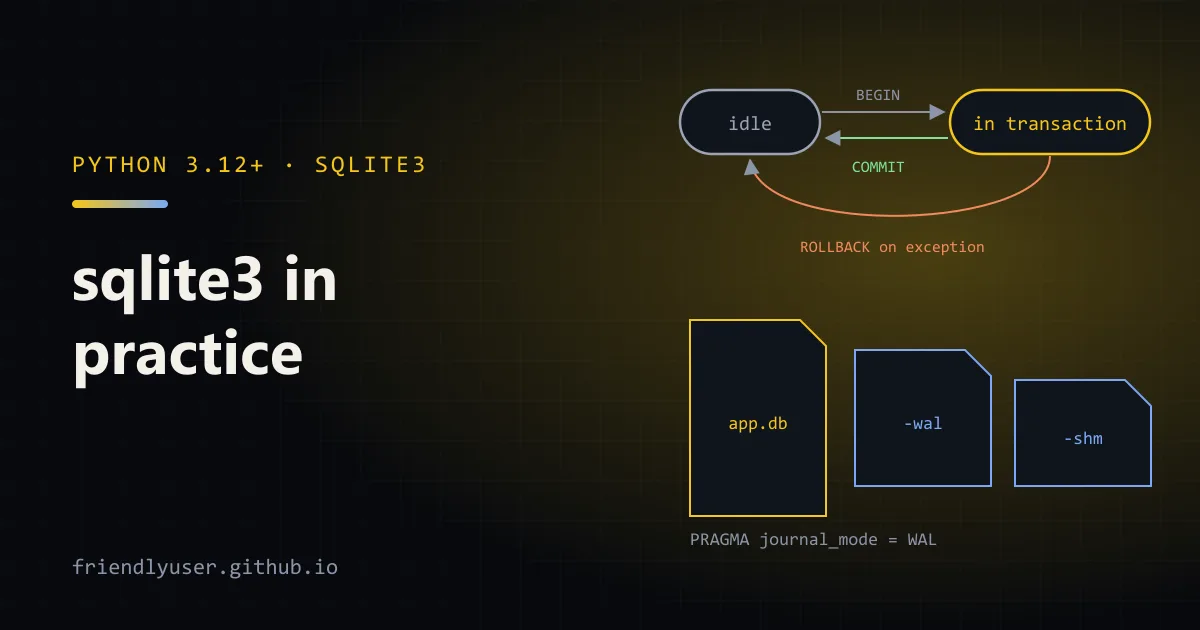
Section titled “Transactions: what with conn: actually does”This is the part that bites. Using the connection as a context manager does not close it. It wraps a transaction:
- If the block finishes normally, it calls
conn.commit(). - If the block raises, it calls
conn.rollback()and re-raises. - Either way, the connection stays open.
from contextlib import closing
with closing(sqlite3.connect("app.db")) as conn:   # closes the connection    with conn:                                     # commits or rolls back        conn.execute("INSERT INTO users (name) VALUES (?)", ("ada",))
If you only write with sqlite3.connect("app.db") as conn:, the connection is never closed. Since Python 3.13 you’ll see a ResourceWarning: unclosed database when it gets garbage collected, if warnings are enabled. Use contextlib.closing or call close() yourself.
Also note that close() does not commit. Anything you didn’t commit is lost.
The autocommit attribute (3.12+)
Section titled “The autocommit attribute (3.12+)”Before 3.12, transaction behaviour was controlled by isolation_level, and the rules were odd: the module silently issued BEGIN before INSERT, UPDATE, DELETE and REPLACE, but not before SELECT or most other statements. That’s still the default, called LEGACY_TRANSACTION_CONTROL, and conn.autocommit reports -1 for it.
Python 3.12 added an autocommit parameter and attribute with two clear modes:
autocommit | Behaviour |
|---|---|
False | PEP 249 style. A transaction is always open. commit() and rollback() end it and immediately start a new one. close() rolls back. |
True | SQLite’s own autocommit mode. Every statement commits on its own unless you write BEGIN and COMMIT yourself. commit() and rollback() do nothing. |
The docs recommend autocommit=False for new code. There’s one catch: with autocommit=False a transaction is open from the moment you connect, and some PRAGMAs don’t work inside a transaction. PRAGMA journal_mode = WAL raises OperationalError: cannot change into wal mode from within a transaction, and PRAGMA foreign_keys = ON is silently ignored. The fix is to connect in autocommit mode, run the PRAGMAs, then switch:
conn = sqlite3.connect("app.db", autocommit=True)conn.execute("PRAGMA foreign_keys = ON")conn.execute("PRAGMA journal_mode = WAL")conn.autocommit = False # opens a transaction from here onWAL mode
Section titled “WAL mode”SQLite’s default rollback journal makes a writer block readers. Write-ahead logging (WAL) appends changes to a separate -wal file instead, so readers keep reading the last committed snapshot while one writer writes. For any database that is read and written at the same time (a web app, a background worker plus a UI), WAL is the setting to turn on.
Things to know:
journal_mode = WALis stored in the database file. Set it once and every later connection uses it.- You’ll see
app.db-walandapp.db-shmnext to the database while it’s open. They’re part of the database; copy all three or useconn.backup(), never just the.dbfile of a live database. - There’s still only one writer at a time. A second writer waits for up to
timeoutseconds (theconnect()default is 5.0) and then raisesOperationalError: database is locked. - WAL doesn’t work over network filesystems, because it relies on shared memory.
- A long-running read transaction stops the WAL from being checkpointed back into the main file, so it keeps growing. With
autocommit=False, aSELECTleaves a transaction open until you commit or roll back, so callconn.commit()after reads on connections that live a long time.
Dates: write your own adapters and converters
Section titled “Dates: write your own adapters and converters”SQLite has no date type. Python used to ship default adapters that stored datetime.date and datetime.datetime as ISO strings and converters that turned date and timestamp columns back into objects. Those defaults were deprecated in Python 3.12, and on 3.14 using them prints:
DeprecationWarning: The default date adapter is deprecated as of Python 3.12; see the sqlite3 documentation for suggested replacement recipesRegistering your own takes four lines and removes the warning:
import datetime as dtimport sqlite3
sqlite3.register_adapter(dt.date, lambda d: d.isoformat())sqlite3.register_adapter(dt.datetime, lambda d: d.isoformat(sep=" "))sqlite3.register_converter("date", lambda b: dt.date.fromisoformat(b.decode()))sqlite3.register_converter("timestamp", lambda b: dt.datetime.fromisoformat(b.decode()))
Adapters run on the way in, for any parameter of that Python type. Converters run on the way out, but only when you ask with detect_types:
PARSE_DECLTYPESmatches the column’s declared type (placed_on date).PARSE_COLNAMESmatches a type in square brackets in the column alias, likeAS "last [date]". You need this for expressions such asMAX(placed_on), which have no declared type and would otherwise come back as a string.
Registrations are global to the process. For timezone-aware datetimes, decide on one convention (I’d store UTC with the offset, which isoformat() includes) and use it everywhere. Storing Unix timestamps as integers is also fine and avoids the question.
A complete example
Section titled “A complete example”This script puts the pieces together: adapters, a connection helper, WAL, a committed batch insert, a rolled-back transaction, and a query that converts an aggregate back into a date.
import datetime as dtimport sqlite3from contextlib import closing
sqlite3.register_adapter(dt.date, lambda d: d.isoformat())sqlite3.register_adapter(dt.datetime, lambda d: d.isoformat(sep=" "))sqlite3.register_converter("date", lambda b: dt.date.fromisoformat(b.decode()))sqlite3.register_converter("timestamp", lambda b: dt.datetime.fromisoformat(b.decode()))

def connect(path: str) -> sqlite3.Connection:    conn = sqlite3.connect(        path,        autocommit=True,  # no transaction yet, so the PRAGMAs below work        detect_types=sqlite3.PARSE_DECLTYPES | sqlite3.PARSE_COLNAMES,        timeout=10,       # seconds to wait for a lock    )    conn.row_factory = sqlite3.Row    conn.execute("PRAGMA foreign_keys = ON")    conn.execute("PRAGMA journal_mode = WAL")    conn.autocommit = False  # PEP 249 behaviour from here on    return conn

with closing(connect("shop.db")) as conn:    with conn:        conn.execute("""            CREATE TABLE IF NOT EXISTS orders (                id INTEGER PRIMARY KEY,                customer TEXT NOT NULL,                total_cents INTEGER NOT NULL,                placed_on date NOT NULL,                created_at timestamp NOT NULL            )""")        now = dt.datetime(2026, 10, 14, 9, 30)        conn.executemany(            "INSERT INTO orders (customer, total_cents, placed_on, created_at) VALUES (?, ?, ?, ?)",            [                ("ada", 1299, dt.date(2026, 10, 1), now),                ("grace", 4500, dt.date(2026, 10, 3), now),                ("ada", 250, dt.date(2026, 10, 9), now),            ],        )
    try:        with conn:            conn.execute(                "INSERT INTO orders (customer, total_cents, placed_on, created_at) "                "VALUES (:c, :t, :d, :n)",                {"c": "linus", "t": 999, "d": dt.date(2026, 10, 10), "n": now},            )            raise RuntimeError("payment failed")    except RuntimeError as e:        print("rolled back:", e)
    rows = conn.execute(        'SELECT customer, SUM(total_cents) AS spent, MAX(placed_on) AS "last [date]" '        "FROM orders GROUP BY customer ORDER BY spent DESC"    ).fetchall()    for row in rows:        print(row["customer"], row["spent"], row["last"], type(row["last"]).__name__)
    print(dict(conn.execute("SELECT * FROM orders WHERE id = 1").fetchone()))    conn.commit()  # end the read transaction
Output on a fresh database:
rolled back: payment failedgrace 4500 2026-10-03 dateada 1549 2026-10-09 date{'id': 1, 'customer': 'ada', 'total_cents': 1299, 'placed_on': datetime.date(2026, 10, 1), 'created_at': datetime.datetime(2026, 10, 14, 9, 30)}Linus’s order isn’t there, because the exception rolled it back. Without PARSE_COLNAMES and the [date] alias, the last column would print as str.
Using sqlite3 from threads
Section titled “Using sqlite3 from threads”By default a connection can only be used by the thread that created it. Try to share one and you get:
ProgrammingError: SQLite objects created in a thread can only be used in that same thread. ...check_same_thread=False turns that check off, and the underlying SQLite library is usually compiled in serialized mode (check sqlite3.threadsafety; 3 means serialized), so it won’t crash. But a shared connection also means a shared transaction: one thread’s commit() commits another thread’s half-finished work. Unless you add your own lock around every transaction, give each thread its own connection:
import sqlite3from concurrent.futures import ThreadPoolExecutorfrom contextlib import closing
DB = "events.db"
with closing(sqlite3.connect(DB, autocommit=True)) as setup:    setup.execute("PRAGMA journal_mode = WAL")    setup.execute("CREATE TABLE IF NOT EXISTS events (worker INTEGER, n INTEGER)")

def worker(worker_id: int) -> int:    # One connection per thread, opened and closed inside the thread.    with closing(sqlite3.connect(DB, timeout=10, autocommit=False)) as conn:        for n in range(200):            with conn:                conn.execute("INSERT INTO events VALUES (?, ?)", (worker_id, n))    return worker_id

with ThreadPoolExecutor(max_workers=4) as pool:    list(pool.map(worker, range(4)))
with closing(sqlite3.connect(DB)) as conn:    print(conn.execute("SELECT worker, COUNT(*) FROM events GROUP BY worker").fetchall())    # [(0, 200), (1, 200), (2, 200), (3, 200)]
With WAL on, readers in other threads aren’t blocked while this runs, and the writers queue up behind SQLite’s write lock using the 10-second timeout. If you see database is locked, it usually means a transaction is held open too long (often a read under autocommit=False), not that the timeout is too short.
In an asyncio app, the same rule applies: run the blocking sqlite3 calls in a thread with asyncio.to_thread, with a connection per thread, or use a single dedicated writer thread fed by a queue.
Gotchas
Section titled “Gotchas”with conn:commits; it doesn’t close. Usecontextlib.closing.close()doesn’t commit.- PRAGMAs like
journal_modeandforeign_keysmust run outside a transaction. Withautocommit=False, set them before switching it on. - Foreign keys are off by default in SQLite, per connection. Turn them on in your connect helper.
- Converters need
detect_types, and aggregates needPARSE_COLNAMESwith an alias. python -m sqlite3 app.db(3.12+) opens an interactive SQL shell if you don’t have thesqlite3CLI installed.
Further reading
Section titled “Further reading”- sqlite3 module documentation, especially “How to use the connection context manager” and “Transaction control”
- SQLite: Write-Ahead Logging
- SQLite: PRAGMA statements
© 2026 David Li · Home · Blog · RSS ·Classic site · Built with Astro, Starlight and three.js · Logos:Font Awesome Free (CC BY 4.0)