Background work in .NET with BackgroundService and PeriodicTimer
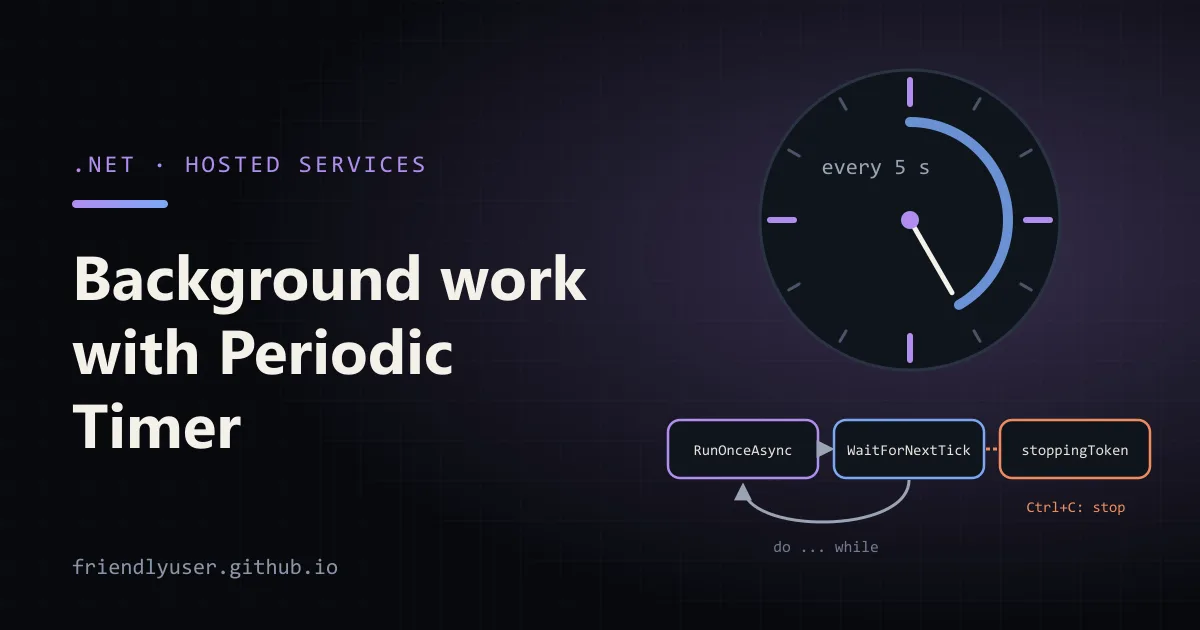
A hosted service is a class the .NET Generic Host starts when the app starts and stops when it shuts down. BackgroundService is the base class for the common case: one long-running loop, such as a job that deletes expired sessions every few minutes or drains a queue. It runs inside your web app or a standalone worker process, with the same dependency injection, configuration and logging as the rest of the app.
This post builds a small cleanup worker with BackgroundService and PeriodicTimer, then covers the parts that cause trouble in production: scoped services, shutdown and unhandled exceptions. The code targets .NET 10. I ran it on .NET 9, and one .NET 10 behaviour change is called out where it matters.
IHostedService or BackgroundService
Section titled “IHostedService or BackgroundService”IHostedService has two methods:
public interface IHostedService{ Task StartAsync(CancellationToken cancellationToken); Task StopAsync(CancellationToken cancellationToken);}The host calls StartAsync on each registered hosted service, in registration order, and by default it waits for each one to finish before starting the next. Only after all of them return does the app report “Application started” (and, in a web app, start serving requests). So StartAsync must return quickly. It is for setup: open a connection, subscribe to a message broker, start a timer.
BackgroundService implements IHostedService for you. You override one method:
protected abstract Task ExecuteAsync(CancellationToken stoppingToken);Its StartAsync starts ExecuteAsync and returns without waiting for it to finish. Its StopAsync cancels stoppingToken and then waits for ExecuteAsync to complete, or for the host’s shutdown timeout to expire, whichever comes first.
Use IHostedService directly when you have start and stop actions but no loop of your own (a library that manages its own threads, for example). Use BackgroundService when your code is the loop.
The .NET 10 change to ExecuteAsync
Section titled “The .NET 10 change to ExecuteAsync”Up to .NET 9, BackgroundService.StartAsync called ExecuteAsync directly. Everything before the first await that actually yielded ran synchronously on the startup path, so a slow synchronous call at the top of ExecuteAsync delayed every service registered after it. The usual workaround was await Task.Yield(); as the first line.
In .NET 10, the whole of ExecuteAsync runs on a background thread, so no part of it blocks startup. Microsoft documents this as a behavioural breaking change. If you relied on code at the top of ExecuteAsync running before the app started, move it to the constructor, override StartAsync, or implement IHostedLifecycleService (.NET 8+), which adds StartingAsync and StartedAsync hooks.
A cleanup worker you can run
Section titled “A cleanup worker you can run”Create a worker project. The template references Microsoft.Extensions.Hosting and sets up Host.CreateApplicationBuilder:
dotnet new worker -n Heartbeatcd Heartbeatrm Worker.csThe job removes expired login sessions. A real one would use a database through EF Core; here an in-memory store stands in for the table, and the cleanup class is registered as scoped, the way a DbContext is.
using System.Collections.Concurrent;
namespace Heartbeat;
// Stand-in for a database table of login sessions.public sealed class SessionStore{    public ConcurrentDictionary<Guid, DateTimeOffset> Sessions { get; } = new();}
public sealed class SessionCleanup(SessionStore store, TimeProvider clock, ILogger<SessionCleanup> logger){    public Task<int> RemoveExpiredAsync(CancellationToken ct)    {        var now = clock.GetUtcNow();
        // Pretend some users logged in since the last run.        for (var i = 0; i < 3; i++)            store.Sessions[Guid.NewGuid()] = now.AddSeconds(Random.Shared.Next(-10, 10));
        var removed = 0;        foreach (var (id, expires) in store.Sessions)        {            ct.ThrowIfCancellationRequested();            if (expires < now && store.Sessions.TryRemove(id, out _))                removed++;        }
        logger.LogInformation("Removed {Removed} expired sessions, {Left} left", removed, store.Sessions.Count);        return Task.FromResult(removed);    }}
The worker itself:
namespace Heartbeat;
public sealed class CleanupWorker(    IServiceScopeFactory scopeFactory,    ILogger<CleanupWorker> logger) : BackgroundService{    private static readonly TimeSpan Interval = TimeSpan.FromSeconds(5);
    protected override async Task ExecuteAsync(CancellationToken stoppingToken)    {        logger.LogInformation("Cleanup worker started, interval {Interval}", Interval);        using var timer = new PeriodicTimer(Interval);
        try        {            do            {                await RunOnceAsync(stoppingToken);            }            while (await timer.WaitForNextTickAsync(stoppingToken));        }        catch (OperationCanceledException) when (stoppingToken.IsCancellationRequested)        {            logger.LogInformation("Cleanup worker stopping");        }    }
    private async Task RunOnceAsync(CancellationToken stoppingToken)    {        // A new scope per run: scoped services (DbContext etc.) live for one iteration.        await using var scope = scopeFactory.CreateAsyncScope();        var cleanup = scope.ServiceProvider.GetRequiredService<SessionCleanup>();        await cleanup.RemoveExpiredAsync(stoppingToken);    }}
And the registration:
using Heartbeat;
var builder = Host.CreateApplicationBuilder(args);
builder.Services.AddSingleton(TimeProvider.System);builder.Services.AddSingleton<SessionStore>();builder.Services.AddScoped<SessionCleanup>();   // scoped, like a DbContext would bebuilder.Services.AddHostedService<CleanupWorker>();
builder.Services.Configure<HostOptions>(options =>{    options.ShutdownTimeout = TimeSpan.FromSeconds(15);    options.BackgroundServiceExceptionBehavior = BackgroundServiceExceptionBehavior.StopHost;});
var host = builder.Build();host.Run();
dotnet run, wait a few ticks, then press Ctrl+C. On .NET 9 the output looks like this (content root line trimmed):
info: Heartbeat.CleanupWorker[0] Cleanup worker started, interval 00:00:05info: Heartbeat.SessionCleanup[0] Removed 1 expired sessions, 2 leftinfo: Microsoft.Hosting.Lifetime[0] Application started. Press Ctrl+C to shut down.info: Microsoft.Hosting.Lifetime[0] Hosting environment: Developmentinfo: Heartbeat.SessionCleanup[0] Removed 2 expired sessions, 3 leftinfo: Heartbeat.SessionCleanup[0] Removed 3 expired sessions, 3 leftinfo: Microsoft.Hosting.Lifetime[0] Application is shutting down...info: Heartbeat.CleanupWorker[0] Cleanup worker stoppingNotice that the first cleanup ran before “Application started”. RemoveExpiredAsync completes synchronously, so on .NET 9 the first iteration ran on the startup path; the first real yield was WaitForNextTickAsync. That is the behaviour .NET 10 removes. On .NET 10 the first cleanup line can appear after “Application started”.
Why PeriodicTimer and not Task.Delay
Section titled “Why PeriodicTimer and not Task.Delay”The worker template loops with await Task.Delay(1000, stoppingToken). That works, but the interval is “work time plus delay”, so a job that takes 800 ms runs every 1.8 seconds and drifts.
PeriodicTimer (.NET 6+) ticks on a fixed schedule. WaitForNextTickAsync waits for the next tick, and the behaviour is worth knowing exactly:
- If the work takes longer than the period, ticks are coalesced, not queued. The next
WaitForNextTickAsyncreturns immediately once, then the timer is back on schedule. Runs never overlap, because you only wait for the next tick after the current run finishes. - When the token is cancelled, it throws
OperationCanceledException. That is why the loop has thecatch ... when (stoppingToken.IsCancellationRequested): stopping is not an error, so it is logged at Information level and swallowed. - When the timer is disposed, it returns
false, which ends thewhileloop. - Only one call can wait at a time. A
PeriodicTimerbelongs to one loop.
The do ... while shape runs the job once at startup and then on every tick. Use a plain while if the first run should wait one interval.
Since .NET 8 there is also a constructor that takes a TimeProvider. Pass FakeTimeProvider (from Microsoft.Extensions.TimeProvider.Testing) in tests and advance time by hand instead of waiting five real seconds.
Scoped services need a scope
Section titled “Scoped services need a scope”Hosted services are registered as singletons. If CleanupWorker took SessionCleanup in its constructor, the scoped service would be captured for the lifetime of the app: one DbContext shared across every run, tracking more entities each time. In the Development environment the host validates scopes at build time and refuses to start:
Unhandled exception. System.AggregateException: Some services are not able to be constructed(Error while validating the service descriptor 'ServiceType: Microsoft.Extensions.Hosting.IHostedServiceLifetime: Singleton ImplementationType: Heartbeat.CleanupWorker': Cannot consume scoped service'Heartbeat.SessionCleanup' from singleton 'Microsoft.Extensions.Hosting.IHostedService'.)In Production that validation is off by default, so the same bug ships quietly. Inject IServiceScopeFactory instead and create a scope per run, as RunOnceAsync does. CreateAsyncScope plus await using disposes services that implement only IAsyncDisposable correctly; the synchronous CreateScope throws for those.
Shutdown and cancellation
Section titled “Shutdown and cancellation”When the host stops (Ctrl+C, SIGTERM from Docker or Kubernetes, IHostApplicationLifetime.StopApplication()), it calls StopAsync on hosted services in reverse registration order. For a BackgroundService that cancels stoppingToken and waits for ExecuteAsync.
The wait is bounded by HostOptions.ShutdownTimeout, which defaults to 30 seconds. After that the host stops waiting and carries on shutting down, and whatever your loop was doing is cut off when the process exits. Two things follow:
- Pass
stoppingTokeninto every async call (HTTP, database,Task.Delay) so a run in progress ends promptly instead of using up the timeout. - Keep the timeout below the orchestrator’s grace period. Kubernetes sends SIGKILL 30 seconds after SIGTERM by default (
terminationGracePeriodSeconds), so a 30-second host timeout leaves no margin. The example sets 15 seconds.
Make each run safe to interrupt. If a run deletes rows in batches, commit per batch, so a cancelled run leaves the data consistent and the next run picks up where it stopped.
When ExecuteAsync throws
Section titled “When ExecuteAsync throws”Make RemoveExpiredAsync throw new InvalidOperationException("database is unreachable") on its second call and run again. With the default settings, the host logs the exception and shuts down:
fail: Microsoft.Extensions.Hosting.Internal.Host[9] BackgroundService failed System.InvalidOperationException: database is unreachable at Heartbeat.SessionCleanup.RemoveExpiredAsync(CancellationToken ct) ...crit: Microsoft.Extensions.Hosting.Internal.Host[10] The HostOptions.BackgroundServiceExceptionBehavior is configured to StopHost. A BackgroundService has thrown an unhandled exception, and the IHost instance is stopping. To avoid this behavior, configure this to Ignore; however the BackgroundService will not be restarted.info: Microsoft.Hosting.Lifetime[0] Application is shutting down...BackgroundServiceExceptionBehavior has two values:
StopHost(the default since .NET 6): an unhandled exception stops the whole app. In a web app that means the API goes down because a cleanup job failed.Ignore: the exception is logged and the app keeps running, but the background service is finished. Nothing restarts it. That is the behaviour from before .NET 6, and it is how a worker can silently stop doing its job for weeks.
Neither is what you usually want for a recurring job. Catch exceptions per run, inside the loop, so one bad run doesn’t end the loop:
do{ try { await RunOnceAsync(stoppingToken); } catch (Exception ex) when (ex is not OperationCanceledException) { logger.LogError(ex, "Cleanup run failed; retrying on the next tick"); }}while (await timer.WaitForNextTickAsync(stoppingToken));Keep StopHost as the default for anything that escapes. If the loop itself is broken, a crash that your process manager restarts is better than a worker that is dead but looks alive. One catch when relying on a supervisor: in my test on .NET 9, the process exited with code 0 after StopHost. If systemd or a container restart policy should treat this as a failure, set Environment.ExitCode = 1 in your own top-level handler, or check after host.Run() returns.
Gotchas
Section titled “Gotchas”- Don’t block in the constructor or
StartAsync. Both run on the startup path. Network calls belong inExecuteAsync. - Several instances run the job several times. A
BackgroundServiceruns once per process. Scale a web app to three replicas and the cleanup runs three times per interval. Use a distributed lock, a database row lease, or move the job to a single worker deployment. - No persistence or retries. If the process dies mid-run, the run is lost. For jobs that must survive restarts, need retries with backoff, or run on a cron schedule, use a job library such as Hangfire or Quartz.NET.
ExecuteAsyncreturning ends the service. Returning early (an unexpectedfalsefrom a loop condition, for example) stops the service without an error, and the host keeps running. Log when the loop exits.- Running as an OS service.
builder.Services.AddWindowsService()(packageMicrosoft.Extensions.Hosting.WindowsServices) andAddSystemd()(Microsoft.Extensions.Hosting.Systemd) wire the host’s lifetime to the service manager. The worker code doesn’t change.
Further reading
Section titled “Further reading”© 2026 David Li · Home · Blog · RSS ·Classic site · Built with Astro, Starlight and three.js · Logos:Font Awesome Free (CC BY 4.0)