Managing Python projects with uv: lockfiles, tools and inline script metadata
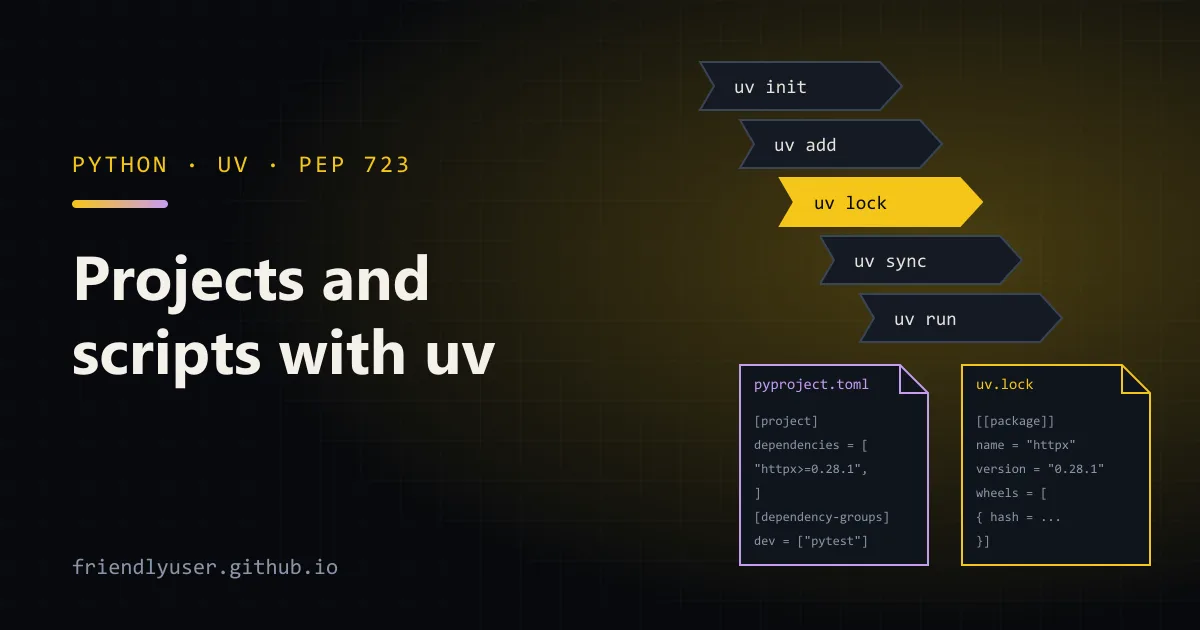
uv is a Python package and project manager from Astral, written as a single binary. It covers the jobs that used to need several tools: creating virtual environments (venv), installing packages (pip), pinning them (pip-tools), installing CLI tools (pipx) and installing Python itself (pyenv). It is also fast enough that you stop thinking about environment setup, which changes how you work with throwaway scripts.
This post walks through a small project from uv init to a locked, tested app, then covers tools, Python versions and single-file scripts with inline dependencies. Commands were run with uv 0.10.11.
Installing uv
Section titled “Installing uv”The official installers are a shell script on macOS and Linux and a PowerShell script on Windows:
curl -LsSf https://astral.sh/uv/install.sh | shpowershell -ExecutionPolicy ByPass -c "irm https://astral.sh/uv/install.ps1 | iex"It is also on PyPI (pipx install uv or pip install uv), Homebrew and WinGet. If you used the standalone installer, uv self update upgrades it.
A project from scratch
Section titled “A project from scratch”uv init weather-clicd weather-cliThat creates a pyproject.toml, a main.py, a README.md, a .python-version file and a .gitignore, and runs git init if you are not already inside a repository. The generated pyproject.toml is plain PEP 621 metadata, with nothing uv-specific in it:
[project]name = "weather-cli"version = "0.1.0"description = "Add your description here"readme = "README.md"requires-python = ">=3.14"dependencies = []requires-python and .python-version come from the interpreter uv picked. If you want a different floor, pass --python 3.12 to uv init, or edit both files.
uv init with no flags makes an application: code you run, not a package you publish. Use uv init --package for an installable package with a src/ layout and a build backend, or uv init --lib for a library.
Adding dependencies
Section titled “Adding dependencies”uv add httpxuv add --dev pytestCreating virtual environment at: .venvResolved 7 packages in 243msInstalled 6 packages in 88ms + anyio==4.12.1 + certifi==2026.2.25 + h11==0.16.0 + httpcore==1.0.9 + httpx==0.28.1 + idna==3.11uv add does three things in one step: it writes the requirement into pyproject.toml, updates uv.lock, and installs into .venv. Development tools go into a PEP 735 dependency group:
dependencies = [    "httpx>=0.28.1",]
[dependency-groups]dev = [    "pytest>=9.0.2",]
By default uv writes a lower bound at the version it just resolved. If you want an upper bound too, give it explicitly: uv add "httpx>=0.28,<1". uv remove httpx takes a dependency out again, and uv tree shows the resolved graph:
weather-cli v0.1.0├── httpx v0.28.1│ ├── anyio v4.12.1│ │ └── idna v3.11│ ├── certifi v2026.2.25│ ├── httpcore v1.0.9│ │ ├── certifi v2026.2.25│ │ └── h11 v0.16.0│ └── idna v3.11└── pytest v9.0.2 (group: dev) ├── colorama v0.4.6 ├── iniconfig v2.3.0 ├── packaging v26.0 ├── pluggy v1.6.0 └── pygments v2.19.2Writing and running the code
Section titled “Writing and running the code”Replace main.py with something that uses the dependency:
import sys
import httpx
API = "https://api.open-meteo.com/v1/forecast"

def current_temperature(client: httpx.Client, lat: float, lon: float) -> float:    resp = client.get(API, params={"latitude": lat, "longitude": lon, "current": "temperature_2m"})    resp.raise_for_status()    return resp.json()["current"]["temperature_2m"]

def main() -> None:    lat, lon = float(sys.argv[1]), float(sys.argv[2])    with httpx.Client(timeout=10) as client:        print(f"{current_temperature(client, lat, lon)} C")

if __name__ == "__main__":    main()
And a test that does not touch the network, using httpx’s mock transport, in tests/test_main.py:
import httpx
from main import current_temperature

def test_reads_current_temperature():    def handler(request: httpx.Request) -> httpx.Response:        assert request.url.params["latitude"] == "49.28"        return httpx.Response(200, json={"current": {"temperature_2m": 7.5}})
    client = httpx.Client(transport=httpx.MockTransport(handler))    assert current_temperature(client, 49.28, -123.12) == 7.5
Because main.py is not an installed package, tell pytest to put the project root on sys.path:
[tool.pytest.ini_options]pythonpath = ["."]Then run both through uv:
uv run pytest -quv run main.py 49.28 -123.12uv run is the command you use most. Before running anything it checks that uv.lock matches pyproject.toml and that .venv matches the lockfile, and fixes either if not. You never activate the virtual environment; if you prefer to, it is a normal venv at .venv and source .venv/bin/activate works.
The lockfile
Section titled “The lockfile”uv.lock is a TOML file listing every package in the resolution with its exact version, source, and the URL and hash of every artifact:
[[package]]name = "anyio"version = "4.12.1"source = { registry = "https://pypi.org/simple" }dependencies = [ { name = "idna" },]Commit it. It is a universal lockfile: one resolution that covers every platform and Python version allowed by requires-python, with environment markers where they differ. A Windows developer and a Linux CI runner install from the same file.
The commands around it:
| Command | What it does |
|---|---|
uv lock | Resolve and write uv.lock without installing |
uv lock --check | Exit non-zero if the lockfile is out of date |
uv lock --upgrade-package httpx | Move one package to the newest version allowed |
uv lock --upgrade | Re-resolve everything to the newest allowed versions |
uv sync | Make .venv match the lockfile exactly (removes extras too) |
uv sync --no-dev | Same, without the dev group (for production images) |
uv sync --locked | Fail instead of updating the lockfile if it is stale |
uv export --format requirements-txt | Write a requirements.txt for tools that need one |
In CI, use uv sync --locked (or uv run --locked ...). If someone edited pyproject.toml and forgot to commit the new lockfile, the build fails instead of quietly resolving something different. --frozen is the looser option: it uses the lockfile as-is without checking it against pyproject.toml.
Tools: uvx and uv tool install
Section titled “Tools: uvx and uv tool install”Command-line tools such as Ruff, Black or httpie should not live in your project’s environment. uvx (short for uv tool run) runs a tool in a temporary, cached environment:
uvx ruff check .uvx ruff@0.15.6 --versionuvx --from httpie http GET https://example.com--from is for packages whose command name differs from the package name. A version after @ pins it.
For tools you use every day, install them so they are on your PATH:
uv tool install ruffuv tool listuv tool upgrade --allEach installed tool gets its own isolated environment, exactly as with pipx. If the command is not found afterwards, uv tool update-shell adds the tools directory to your shell’s PATH.
Installing Python
Section titled “Installing Python”uv downloads standalone CPython builds on demand. If a project needs a version you don’t have, uv run and uv sync fetch it automatically. You can also do it explicitly:
uv python install 3.13 3.14uv python list --only-installeduv python pin 3.13uv python pin writes .python-version. It refuses a version that conflicts with requires-python, so you cannot pin a project to an interpreter it says it does not support. Free-threaded builds are available too, with a t suffix (uv python install 3.14t).
Single-file scripts with inline metadata
Section titled “Single-file scripts with inline metadata”This is the feature that changes habits. PEP 723 defines a comment block at the top of a .py file that declares the script’s Python version and dependencies. uv reads it, builds a cached environment, and runs the script, with no project, no requirements.txt and no manual venv.
Create a script and add a dependency to it:
uv init --script disk_report.py --python 3.12uv add --script disk_report.py richThen fill in the code:
#!/usr/bin/env -S uv run --script# /// script# requires-python = ">=3.12"# dependencies = [#     "rich>=14.3.3",# ]# ///"""Print the largest files under a directory as a table."""import sysfrom pathlib import Path
from rich.console import Consolefrom rich.table import Table

def main() -> None:    root = Path(sys.argv[1] if len(sys.argv) > 1 else ".")    files = [p for p in root.rglob("*") if p.is_file()]    files.sort(key=lambda p: p.stat().st_size, reverse=True)
    table = Table(title=f"Largest files in {root.resolve()}")    table.add_column("Size (KiB)", justify="right")    table.add_column("Path")    for p in files[:5]:        table.add_row(f"{p.stat().st_size / 1024:,.1f}", str(p.relative_to(root)))    Console().print(table)

if __name__ == "__main__": main()uv run disk_report.py ~/DownloadsThe first run installs rich into a cached environment; later runs start immediately. The #!/usr/bin/env -S uv run --script line lets you chmod +x disk_report.py and run it directly on macOS and Linux. --script tells uv to treat the file as a script even without a .py extension.
When you run a script that has a # /// script block inside a project directory, uv ignores the project’s dependencies and uses only the ones in the block. A script without the block, run with uv run inside a project, uses the project’s environment.
Scripts can be locked too. uv lock --script disk_report.py writes disk_report.py.lock next to it, and later uv run calls use the pinned versions. That is worth doing for scripts that run on a schedule.
For a quick one-off, you don’t even need the metadata block:
uv run --with rich --with httpx python -c "import rich; rich.print('[bold]hi[/bold]')"Replacing pip, venv and pipx
Section titled “Replacing pip, venv and pipx”| Before | With uv |
|---|---|
python -m venv .venv | uv venv |
pip install -r requirements.txt | uv pip install -r requirements.txt |
pip-compile requirements.in | uv pip compile requirements.in -o requirements.txt |
pipx install ruff / pipx run ruff | uv tool install ruff / uvx ruff |
pyenv install 3.13 | uv python install 3.13 |
poetry add / poetry lock | uv add / uv lock |
The uv pip interface is a lower-level, mostly pip-compatible layer. It is the easiest first step for an existing project: change pip to uv pip in your scripts and nothing else. To move fully to a uv project, uv add -r requirements.txt imports the requirements into pyproject.toml.
Gotchas
Section titled “Gotchas”uv syncremoves packages that are not in the lockfile. If youuv pip installsomething into the project’s.venvby hand, the nextuv synctakes it out again (uv runleaves extras alone unless you pass--exact). Add it withuv addinstead.uv pipdoes not touchpyproject.tomloruv.lock. Mixing the two interfaces in one project leads to confusion. Pick one.- Indexes and auth. For a private package index, configure it in
[[tool.uv.index]]inpyproject.tomland pass credentials through environment variables, not in the URL you commit. exclude-newerfor reproducible scripts. Settingexclude-newer = "2026-03-01T00:00:00Z"in[tool.uv], or in the script’s[tool.uv]table, makes resolution ignore anything uploaded after that date. It is a simple way to make an unlocked script resolve the same way later.
Further reading
Section titled “Further reading”© 2026 David Li · Home · Blog · RSS ·Classic site · Built with Astro, Starlight and three.js · Logos:Font Awesome Free (CC BY 4.0)